
KURABELL Workout Log
Non revendiquéeYour last weight, reps and RIR — right there on every set row, on iPhone and Apple Watch
Par Hajime Kitamura · Santé et formePourquoi nous l'attendons : Clear value from comparing each set with your last session on iPhone and Apple Watch, plus a generous free trial and a memorable name.





En bref
KURABELL Workout Log is a strength training app for iPhone and Apple Watch that shows your last weight, reps and RIR beside each set as you log it. It suits lifters who want to beat their previous session, with split-based daily plans, rest timers that notify you when the phone is locked, and an Apple Watch app that records workouts to Apple Health.
Résumé par Debuts, d'après la fiche de l'App Store.À propos
Your last weight, reps and RIR — right there on every set row, on iPhone and Apple Watch. Nothing to remember. Just beat last time.
The name KURABELL (koo-rah-bell) comes from kuraberu, Japanese for "to compare" — plus the bell in dumbbell and barbell. Compare with your last session, then beat it.
Your first 10 workouts are free, with every feature included. Like it? Unlock the full app with a single purchase. No subscription.
■ Beat your last session, set by set When you log your second set of bench, your last second set — "155×9 RIR1" — is sitting right next to it. Weight, reps and RIR (reps in reserve) side by side, so you know exactly where to push today. Every set shows its estimated 1RM, and it lights up green when you beat your best.
■ Log from your wrist with Apple Watch Start a workout on iPhone and KURABELL opens on your Apple Watch. Every set shows your last weight, reps and RIR. Set weight and reps with the −/+ buttons and RIR with a single tap. Logging a set starts a full-screen rest timer that also shows the next set. With Apple Health on, the watch records the workout with heart rate and active energy, so it counts toward your Activity rings. * The Apple Watch app requires the iPhone app.
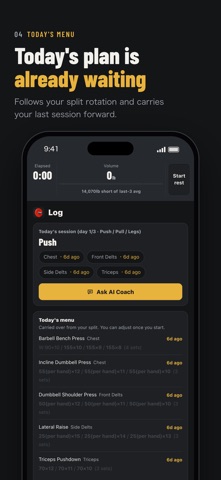
■ Today's plan is already waiting Pick a split — full body, upper/lower, push/pull/legs, 5-day or your own — and each day's menu is built from your last session of that day. One tap at the gym and you're logging. Stuck at the same weight three sessions running? You'll get a nudge. The next weight is still your call, not the app's.
■ Put the phone down. We'll keep time. The rest timer starts when you log a set and sends a notification at the times you choose (1, 2 and 3 minutes by default), even with the phone locked.
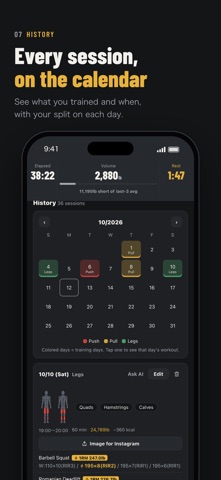
■ Watch your numbers climb ・Estimated 1RM and top weight per exercise ・Total volume over time — overall, weekly and by muscle ・Sets and volume per muscle for the last 7 days ・A calendar showing which split you trained on each day
■ Check your form in one tap Tap "Form" on any exercise to search YouTube for how-to videos on it. Trying an exercise for the first time? Watch first, then lift.
■ Works with Apple Health Turn it on in Settings to save your workouts to Apple Health and keep your body weight in sync. The weight from your smart scale goes straight into bodyweight lifts like pull-ups and dips. Workouts recorded on Apple Watch include heart rate and active energy.
■ Ask AI Coach for today's session Tap "Ask AI Coach" and your log is copied to the clipboard along with a request, then the AI chat you picked in Settings opens. Send it, paste the answer back, and the plan appears in the app — you decide whether to use it. The app never sends your log anywhere on its own.
■ And more ・About 95 built-in exercises, plus your own ・Dumbbell lifts logged per hand; bodyweight lifts include your bodyweight ・Warm-up and assisted sets kept apart ・kg or lb, English or Japanese ・JSON backup and restore, CSV export
Les notes des utilisateurs
Connecte-toi pour noter cette appli. Ce qui compte, c'est d'être honnête.
Pas encore de notes. Tu l'as essayée ? Sois le premier à la noter.
Plus d'apps Santé et forme
Les meilleures nouvelles apps Santé et forme de la semaine Orbit: Self-Care Habit TrackerYour healthy choices deserve more than a checkmark
 Wellbeing: Digital WellbeingBillions of people spend more time scrolling than they want to
 Vigia: meds & family healthVigia keeps your health and your family's in order: a child, a parent, a partner
 Pinfall: Bowling StatsPinfall is the bowling score tracker for league bowlers who want to get better, not just…
 Nuchronic: Energy & SymptomsTrack your energy and symptoms in seconds
 Drrreong - Sleep RecorderWhat did your night sound like?