
Logleaf
Non revendiquéeWhere do the tasks you did not finish yesterday go?
Par Natalie Hall · Productivité


En bref
Logleaf is an iPhone productivity app for daily planning and task journaling, built around one-line entries marked as tasks, events, or notes. Each morning, unfinished tasks from earlier days appear as cards to move to today, push to a later date, or drop, and the old day keeps a record of each decision.
Résumé par Debuts, d'après la fiche de l'App Store.À propos
Where do the tasks you did not finish yesterday go? In Logleaf they wait for you in the morning as cards, one at a time. Move each one to today, push it to a later month or date, or drop it. Yesterday keeps a trace of every decision, and today starts with a clean list.
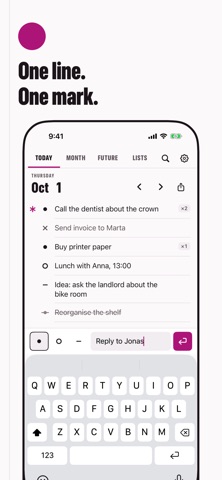
Logleaf is a typed daily planner and task journal for iPhone: one short line per entry, a mark in front of every line, and three logs to hold it all: Today, Month and Future. It is built around quick one-line entries, a style often called rapid logging. No handwriting, nothing to set up.
Write. Type a line, choose task, event or note, and press Return. The line is added and the keyboard stays open for the next one. You can write on any day, including days that have passed.
Mark. An open task is a filled disc; tap it and it turns into a cross. Events are rings, notes are dashes, and a star in the margin marks a priority. Every state has its own shape, not just its own color.
Sort. When earlier days still hold open tasks, a strip on Today shows how many. Tap Review and go through them card by card: Move to today, Later or Drop. A task that has already been moved twice gets a quiet question: keep it, push it later, or drop it? Changed your mind? Back undoes the last decision, and Move all carries the rest over after you confirm. The old day keeps a trace of what happened to each task.
Zoom out. Month shows a grid with a mark on every day that has entries, a list for the month itself, and its own review of what is left from earlier months. Future holds the next twelve months: put a line on a month or on a date, and it shows up when its time comes.
Keep lists. Groceries, gift ideas, a trip: flat lists for lines that do not belong to a day. Search finds a line by any word in it, and a day, a month or a list can be exported as plain text.
Stay private. Logleaf works offline. There is no account and no tracking, and everything stays on your iPhone. An evening reminder is there if you want it, and stays off until you switch it on.
The interface is available in English, German, French, Spanish, Brazilian Portuguese, Russian and Japanese, in light and dark.
Les notes des utilisateurs
Connecte-toi pour noter cette appli. Ce qui compte, c'est d'être honnête.
Pas encore de notes. Tu l'as essayée ? Sois le premier à la noter.
Plus d'apps Productivité
Les meilleures nouvelles apps Productivité de la semaine ChickMark: Habit TrackerChickMark is a simple habit tracker for routines, goals, and reminders
 Dayflint: One Thing a DayToo many priorities?
 Snappy Do ItSix connected modes. One traceable journey.
 Fristo CAFMFristo is the app for Fristo CAFM, the facility management software
 UhWhat? Voice NotesCatch the thought before it disappears
- BeginAnywayMorning alarm for hard tasks: set one task, prove you started, build a streak