
memomem: Voice Memo & Journal
Non revendiquée■ Capture an idea the moment it comes — just say it memomem is a memo app you can use by…
Par Mitsuo Watabe · Productivité


En bref
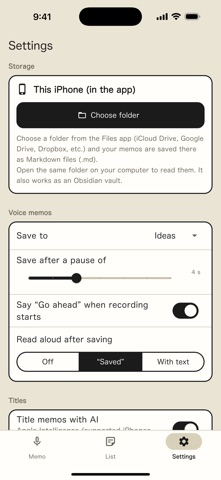
memomem: Voice Memo & Journal is a memo app for iPhone that records speech with hands-off, hold-to-record, or typing modes and saves each memo as a Markdown file in a folder of your choice. It is aimed at people who want to capture ideas by voice, including while driving or doing chores, and who want a daily journal or a place for AI prompts. It stands out for storing memos in your own Files folder, compatible with Obsidian, with no account needed.
Résumé par Debuts, d'après la fiche de l'App Store.À propos
■ Capture an idea the moment it comes — just say it
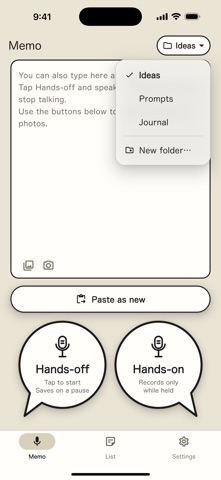
memomem is a memo app you can use by simply talking. Tap “Hands-off” once and speak. When you stop talking, the memo saves itself and the app says “Saved”, so you never have to look at the screen. Ideas that come while driving or doing chores don't slip away.
■ Three ways to capture
• Hands-off — tap to start; it saves when you stop talking • Hands-on — records only while you hold the button; release to save • Typing — write directly in the box and save
You can attach screenshots and photos too.
■ A daily journal that writes itself
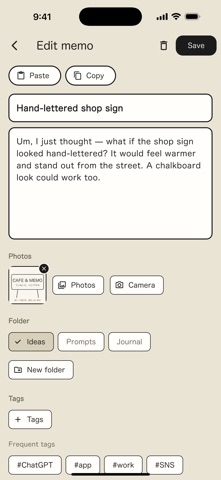
Choose the “Journal” folder and everything you save that day is added to one note, each entry with its time. Just speak whenever something comes to mind and you end up with one page per day.
■ A home for your prompts
Found a useful prompt on X or elsewhere? Copy it, tap “Paste as new”, and it's saved. When you need it, tap “Copy” in the list and paste it straight into your AI app. Paste a URL and memomem shows the link's thumbnail and title (a YouTube video's name, for example).
■ Easy to find later
• Every memo gets a title automatically • On iPhones with Apple Intelligence, on-device AI writes a title that fits the content • Organize with date headings, folders, tags and search • Deleted memos stay in Trash for 7 days, so you can bring them back
■ Your memos live in your own folder
Les notes des utilisateurs
Connecte-toi pour noter cette appli. Ce qui compte, c'est d'être honnête.
Pas encore de notes. Tu l'as essayée ? Sois le premier à la noter.
Plus d'apps Productivité
Les meilleures nouvelles apps Productivité de la semaine ChickMark: Habit TrackerChickMark is a simple habit tracker for routines, goals, and reminders
 Dayflint: One Thing a DayToo many priorities?
 Fristo CAFMFristo is the app for Fristo CAFM, the facility management software
- BeginAnywayMorning alarm for hard tasks: set one task, prove you started, build a streak
 DHUDEDHUDE Analityxs es la herramienta de gestión diaria para grupos de restauración y ocio…
 FTC BIOBUZZ Scorer & TrainerBIOBUZZ Scorer is a free, ad-free scorer for the 2026–2027 FTC season, built on…