
Money Board Plus
Non revendiquéeMoney Board Plus is a simple, private way to track your spending, stay on budget, and…
Par Denys Lebiediev · FinancePourquoi nous l'attendons : Clear value, a privacy-first design and a customizable widget board make this a compelling budgeting debut.




En bref
Money Board Plus is a finance app for tracking spending, budgets, and savings on a customizable board of widgets. Transactions are logged manually, with no account, bank connection, or ads, and data syncs through the user's private iCloud account. One standout feature is Budget Pace, which shows whether spending is on track to the end of the month.
Résumé par Debuts, d'après la fiche de l'App Store.À propos
Money Board Plus is a simple, private way to track your spending, stay on budget, and save for what matters. It all comes together on one board of widgets you arrange like your Home Screen, and adding a purchase takes just a few taps.
There’s no account to create, no bank to connect, and nothing is collected. You log each transaction yourself, so you always know exactly where your money goes.
Log it in seconds • Enter the amount on a keypad made for money, choose a category, and tap Add. • Your most recent categories always appear first. • Record expenses or income, change the date, and add a note when you need one.
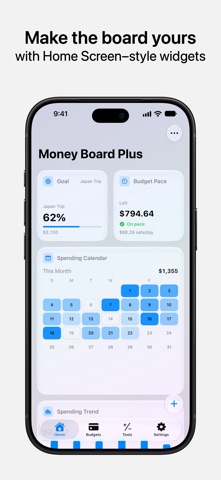
Make the board yours • See spending, cash flow, budgets, and recent transactions the moment you open the app. • Choose from 15 widgets in small, wide, and large sizes. • Touch and hold to rearrange, resize, or remove widgets, just like on your Home Screen. • Stack widgets and swipe through them. With Smart Rotate, the most relevant one rises to the top throughout the day. • Set a wallpaper behind your board.
Stay on budget • Set a monthly budget for any category and see what’s left at a glance. • Budget Pace shows whether you’re on track and where your spending is headed by the end of the month. • Get notified as you near a limit and when you go over. • Turn on a daily reminder to log what you spent.
See where your money goes • Break down spending by category, spot your largest expenses, and follow trends month over month. • Check the spending calendar, compare this week with last, and see which categories are up or down from a typical month. • Tap a category to see the transactions behind it, or search your entire history.
Plan ahead • Savings Goals: set a target, add money as you go, and see when you’ll reach it. • Savings Rate: see how much of your income you keep each month. • Compound Interest: see how your savings could grow over time.
Private by design • No account, no ads, no tracking. • Your data syncs through your private iCloud account, never a developer’s server. • Lock the app with Face ID, Touch ID, or your passcode. • Hide every balance on your board with a single tap. • Your finances stay hidden in the App Switcher. • Erase everything — on your iPhone and in iCloud — whenever you choose.
Designed for everyone • Works with currencies from around the world. • Supports Dynamic Type and VoiceOver.
Les notes des utilisateurs
Connecte-toi pour noter cette appli. Ce qui compte, c'est d'être honnête.
Pas encore de notes. Tu l'as essayée ? Sois le premier à la noter.
Plus d'apps Finance
Les meilleures nouvelles apps Finance de la semaine NjukiYour rent should do more than pay for where you live
 Qwiky AIQuiky AI helps you understand and organise your everyday finances in one clear place
 Inflation WatchInflation Watch turns official price data into plain English
 CashbellHear every sale
 uOwe: Split Bills & BudgetuOwe keeps shared costs fair and your own money clear
 Debtless: Debt-Free by WhenYou are about to know when you will be free