
Nidone - Mission Alarm Clock
Non revendiquéeYou don't remember turning it off, but you overslept anyway
Par Taichi Kimura · UtilitairesPourquoi nous l'attendons : A clear, witty pitch with a genuinely useful wake-up mechanic, plus a free tier and strong privacy promises.





En bref
Nidone - Mission Alarm Clock is an iPhone alarm that keeps ringing until you finish a task such as solving math problems, shaking the phone, or tapping tiles in order. It is aimed at people who oversleep, and it can be used free with one alarm. It stands out for having no ads or tracking, and for letting up to 20 friends see wake-up times.
Résumé par Debuts, d'après la fiche de l'App Store.À propos
You don't remember turning it off, but you overslept anyway. That's not weak willpower. It's an alarm you can switch off while you're still half asleep.
Nidone rings again 8 seconds after you stop it, for up to an hour. The X on the lock screen, the side button, the volume buttons: same result. It only stops when you finish a mission. By the time you've solved a few problems, you're awake.
One alarm is free, forever. No ads.
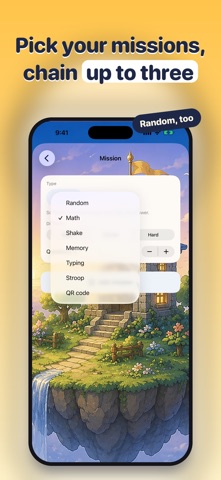
■ Five missions - Math: a few math problems, three difficulty levels - Shake: shake the phone, as many times as you choose - Memory: tap the tiles in the order they lit up - Stroop: the word says "red" in blue ink. Answer the color - QR code: print it and stick it by the sink. It won't stop until you walk over there Chain up to three. Pick Random and you won't know which one until it rings.
■ Rings on silent Nidone uses the iOS 26 alarm system. It rings with the silent switch on, during a Focus, and with the app closed.
■ You can always stop it Sixty seconds into a mission, an X appears. Confirm, and the alarm stops. Wrong answers are fine.
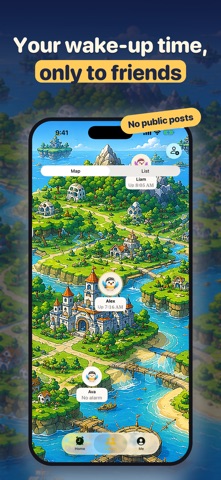
■ Wake up with friends Swap an invite code with up to 20 friends. They see only your nickname, your profile photo (if you set one), today's alarm time, and when you got up. No public posts. In the morning, open the island map to see who's up and who's still asleep.
■ Records Streaks and badges. The only person you're compared with is yesterday's you.
■ About Nidone Nidone is a bird that oversleeps with you. It's asleep too, so it never scolds you.
■ No ads, no tracking No ads, free or paid. No analytics, no advertising identifier.
■ Pricing Free: one alarm. Missions, friends and records are all included. No time limit. Nidone Pro (monthly): as many alarms as you want. For a different time on weekends, or one more for a nap. - The first 7 days are free. Cancel within them and you pay nothing - The price for your country is shown in the app before you buy - Renews automatically. Cancel in Settings > [your name] > Subscriptions on your iPhone - Deleting the app does not cancel it - When a canceled subscription ends, only your earliest alarm that's switched on stays. The others are deleted
■ What you need - An iPhone with iOS 26.1 or later - Alarm permission (asked on first launch; without it, nothing rings) - The camera is used only for the QR mission, and motion only for Shake - The Friends feature is anonymous. No name, email or phone number. Delete your server data in the app's settings anytime
Les notes des utilisateurs
Connecte-toi pour noter cette appli. Ce qui compte, c'est d'être honnête.
Pas encore de notes. Tu l'as essayée ? Sois le premier à la noter.
Plus d'apps Utilitaires
Les meilleures nouvelles apps Utilitaires de la semaine Drainly: Speaker CleanerMuffled speaker after a splash, rain, or a sweaty workout?
 Photo & PDF Resize: KBFile too large to upload?
 Arvectum Proxy LauncherArvectum Proxy Launcher is a network utility that routes your iPhone through a proxy you…
 Look Twice: Scam & AI CheckLook twice before you click
 Vodoalarm: vodostaji BiHVodoalarm javlja kad tvoja rijeka naglo raste, pa ne moraš stalno gledati vodostaje
 Sift: Photo CleanupYour camera roll is full of blurry shots, old screenshots and videos you'll never watch…