
Offline: Tap to Focus
Non revendiquéeOffline turns your phone's most distracting apps off with a tap — and back on only when…
Par Akhil Rudrawar · Productivité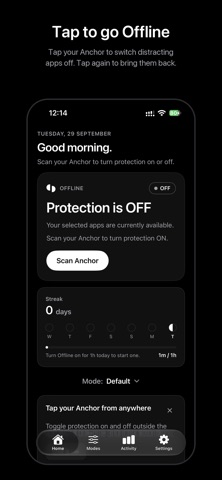


En bref
Offline: Tap to Focus is an iPhone app that blocks your chosen distracting apps and Safari sites with a tap on a physical Anchor placed somewhere you have to walk to. It suits people who want a deliberate pause before returning to their phone's distractions, and it offers modes for work, evenings, and study. It stands out for keeping data on the device with no account and no analytics.
Résumé par Debuts, d'après la fiche de l'App Store.À propos
Offline turns your phone's most distracting apps off with a tap — and back on only when you choose to get up and tap again.
HOW IT WORKS • Choose the apps that pull you in. Apple's Screen Time keeps your choices private — Offline never even learns their names. • Put your Offline Anchor somewhere you'll have to walk to: your desk, the kitchen, another room. • Tap your phone on the Anchor to turn protection on. Your chosen apps are blocked. • When you really need them, walk back and tap again.
The distance is the point. A physical switch creates the pause that willpower alone can't.
MODES Build different sets of apps and websites for different parts of your day — Work, Evenings, Study — and switch between them.
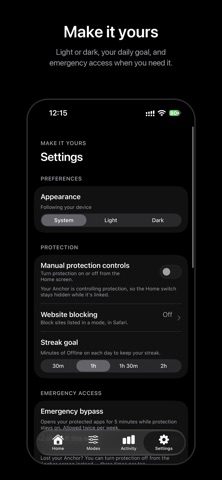
WEBSITE BLOCKING Block the sites you list in Safari while protection is on.
TAP FROM ANYWHERE Set up a one-time Shortcuts automation and your Anchor works from the Lock Screen or any app.
ACTIVITY AND STREAKS See your screen time, pickups and most-used apps, how often Offline stepped in, and build a daily streak of time offline.
EMERGENCY ACCESS Lost your Anchor or need an app urgently? Use a 5-minute emergency bypass, twice a week.
PRIVATE BY DESIGN No account. No analytics. Everything stays on your iPhone.
No Anchor yet? You can turn protection on and off from the Home screen instead. Get an Anchor at stayoffline.tech.
Les notes des utilisateurs
Connecte-toi pour noter cette appli. Ce qui compte, c'est d'être honnête.
Pas encore de notes. Tu l'as essayée ? Sois le premier à la noter.
Plus d'apps Productivité
Les meilleures nouvelles apps Productivité de la semaine ChickMark: Habit TrackerChickMark is a simple habit tracker for routines, goals, and reminders
 Dayflint: One Thing a DayToo many priorities?
 Fristo CAFMFristo is the app for Fristo CAFM, the facility management software
- BeginAnywayMorning alarm for hard tasks: set one task, prove you started, build a streak
 DHUDEDHUDE Analityxs es la herramienta de gestión diaria para grupos de restauración y ocio…
 Unlocky: Training App BlockerLock the apps that eat your day