
OpenAlarm: Alarms & AI Diary
Non revendiquéeWake up
Par Dowon Kim · Utilitaires



En bref
OpenAlarm: Alarms & AI Diary is a utilities app that combines alarms with departure planning. Users set wake-up, arrival, travel and preparation times, optionally add places and routes, and receive a briefing before departure with weather and air-quality advice. It also includes a calendar, todos, a diary, and alarm sharing with friends.
Résumé par Debuts, d'après la fiche de l'App Store.À propos
Wake up. Get ready. Leave on time. — OpenAlarm
• Start with times alone Set your wake-up and arrival times, travel time and preparation time. Places are optional. Repeat your work schedule on selected weekdays or prepare for an appointment on a specific date.
• Optional routes and location check-ins Add places and choose route calculations when useful. Automatic location check-ins require your consent and location permission. You can also confirm departure and arrival manually in the app.
• A briefing before departure Receive your schedule and preparation timing before your departure deadline. When valid weather and air-quality forecasts are available, briefings include advice such as bringing an umbrella and a mask. Weather in a scheduled notification is the forecast fetched when it was scheduled.
• Alarms for your routine Choose the days and sound. Stop ordinary and shared alarms on the lock screen or in the app. Wake-confirmation alarms require a separate confirmation in the app. On iOS, system alarm permission is required to schedule alarms on your device.
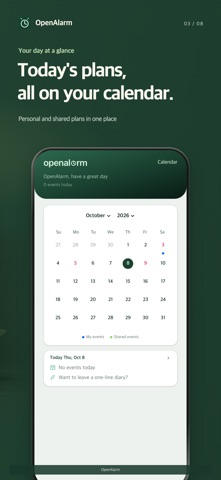
• Keep your day in view Use the calendar, todos, diary and footprints to plan and record your day. Preparation and travel timing suggestions become available as lateness-prevention records accumulate.
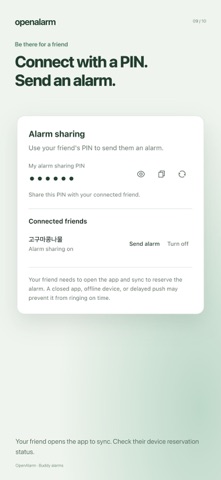
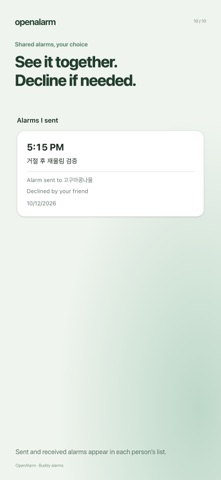
• Help a friend remember an alarm Connect through calendar sharing, then enable alarm sharing with a PIN. Both people can see shared alarms in their own lists. Recipients can decline an individual alarm. Your friend must open the app and sync to reserve it; the sender can check device reservation status.
Les notes des utilisateurs
Connecte-toi pour noter cette appli. Ce qui compte, c'est d'être honnête.
Pas encore de notes. Tu l'as essayée ? Sois le premier à la noter.
Plus d'apps Utilitaires
Les meilleures nouvelles apps Utilitaires de la semaine Vodoalarm: vodostaji BiHVodoalarm javlja kad tvoja rijeka naglo raste, pa ne moraš stalno gledati vodostaje
 NadhirNadhir is an independent app
 Rokey: Romanian KeyboardType Romanian without worrying about diacritics
 Vibe Island: AI Agent MonitorVibe Island is a command center for the AI coding agents running on your Mac
 Private AuthenticatorPrivate Authenticator keeps your two-factor authentication codes on your own Apple…
 Photo Clean: Photo CleanupA crowded camera roll?