
PauseFirst: App Blocker
Non revendiquéeA short moment between reaching for your phone and opening the app: PauseFirst gives you…
Par Tobias Reithmeier · Santé et formePourquoi nous l'attendons : A thoughtful pause-before-opening idea with clear value, varied tasks, and strong on-device privacy.



En bref
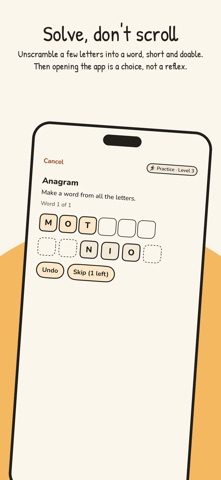
PauseFirst: App Blocker puts a short task in front of selected apps on iPhone, so opening them takes a moment of intent. Solving a task unlocks the app for 15 minutes, and repeat unlocks on the same day take longer. It suits people who want to break app habits and works without accounts, servers, or tracking.
Résumé par Debuts, d'après la fiche de l'App Store.À propos
A short moment between reaching for your phone and opening the app: PauseFirst gives you a small task before selected apps open. If you really need the app, you solve it in seconds. If you're just reaching out of habit, you notice, and often let it go.
HOW IT WORKS • Choose the apps or categories that should get a pause. • Open one of them and a block screen appears with "Start task". • PauseFirst opens with a short task. Solved? The app is free for 15 minutes, then it locks again. • Each further unlock on the same day takes a little longer. At midnight the day starts over with the first unlock. • Prefer to go direct? In PauseFirst, tap "Start task" next to the app. The Control Center control takes you to that list in one tap.
12 TASKS TO BREAK THE AUTOPILOT Math chain, Stroop, Digits backwards, Anagram, Letter Hunter, Typing, Tiles, Precision Tap, Slow swipe, Breath hold, Gyro Balance and Table lock. Some need your head, some a steady hand, some a long breath. In "Practice tasks" you can try every task at any level without anything counting. Tasks are available in English and German.
SCHEDULE AND STATISTICS • Block on a schedule, for example only during work or in the evening. • Statistics for today and the last 7 days: unlocks per day, by weekday and time of day.
FOR EMERGENCIES One emergency unlock a day frees an app for 5 minutes without a task. It doesn't count as an unlock, but it shows up in your statistics.
SOLVABLE FOR EVERYONE Anything you physically can't solve, for example because of motor skills or color vision, you exclude for free under Accessibility.
EVERYTHING STAYS ON YOUR IPHONE No account, no server, no ads, no tracking. Only iOS sees which apps you block. PauseFirst collects no data.
PAUSEFIRST PRO Everything above is free to use, with no time limit. Pro gives you more control over your pauses: • Choose the unlock length: 5, 10, 15 or 30 minutes • Multiple schedules, each with its own app selection • Turn off any task type (at least 3 stay active) • Two emergency unlocks a day instead of one • Set your own highest level (level 2 to 20) • Statistics history for all days, with trends and CSV export • Admin code for your settings: makes it harder for others who get hold of your iPhone to change your blocks
Pro is a one-time purchase, no subscription, with Family Sharing. PauseFirst is made by one person; Pro supports its further development.
TO BE HONEST PauseFirst isn't a safe, just a short pause. Removing PauseFirst's access in iOS Settings under Screen Time lifts all blocks. That's on purpose: you stay in control.
REQUIREMENTS iPhone with iOS 27 and Screen Time. PauseFirst is meant for self-control on your own iPhone. On devices in Family Sharing, a parent manages Screen Time.
Les notes des utilisateurs
Connecte-toi pour noter cette appli. Ce qui compte, c'est d'être honnête.
Pas encore de notes. Tu l'as essayée ? Sois le premier à la noter.
Plus d'apps Santé et forme
Les meilleures nouvelles apps Santé et forme de la semaine Orbit: Self-Care Habit TrackerYour healthy choices deserve more than a checkmark
 Wellbeing: Digital WellbeingBillions of people spend more time scrolling than they want to
 Drop LeagueLe vendredi soir, la question tombe toujours : « Tu dis quoi, toi, pour le choc de…
 Aphasia - Speech Therapy AdultFind your words again, a few minutes a day
 Gaia Baby TrackerGaia is a free shared baby log
 Radaa: Baby Feeding TrackerRadaa makes it easy to follow your baby's feeds in the first months — one-handed, and…