
PDFReady: PDF Upload Tools
Non revendiquéeGet your paperwork ready to upload, with one upfront purchase
Par Anthony Fasano · Productivité
En bref
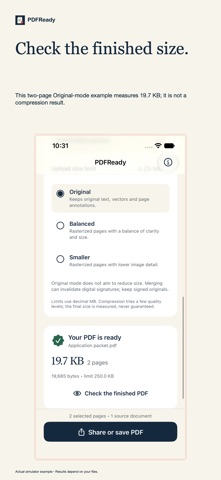
PDFReady: PDF Upload Tools combines pages from multiple PDFs, scanned paper, or photos into one new PDF. It lets users select, reorder, and remove pages, then check the file size against a preset or custom upload limit before saving or sharing. It stands out for keeping working copies on the device, with no account and no in-app purchases.
Résumé par Debuts, d'après la fiche de l'App Store.À propos
Get your paperwork ready to upload, with one upfront purchase.
PDFReady brings pages together into a new PDF. Import PDFs from Files, scan paper on a supported device, or add photos. Select the pages you need, arrange their order, and create a packet with a useful name.
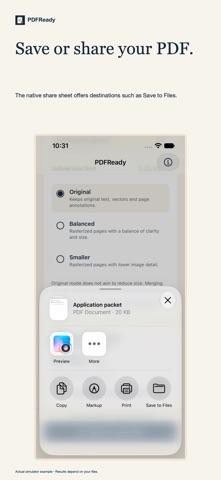
• Combine pages across documents. • Select a range such as 1–3, 5, 8–10. • Drag to arrange pages, or remove pages you do not need. • Choose a preset or custom upload size limit. • Check the measured size, preview the PDF, then save or share. • Resume your saved local workspace after closing the app.
Original mode preserves page text, vectors and annotations and does not aim to reduce size. Balanced and Smaller modes rasterize pages to try to reduce the file size; they flatten searchable text, links and forms. Compression can make a small vector PDF larger, so PDFReady compares the finished size with an original export of the same selected pages. A target may be unattainable. Review readability before uploading.
The app supports up to 200 pages per workspace and 100 MB per imported PDF. Locked PDFs require an unlocked copy. Keep signed originals: assembling a new PDF can invalidate digital signatures. PDFReady does not offer OCR or guarantee acceptance by every upload portal.
Your working copies stay on your device. PDFReady has no account, developer-hosted processing, ads, analytics, subscription or in-app purchases. Files and Photos may download items from your own cloud provider; sharing sends only the file you choose to the destination you select.
Les notes des utilisateurs
Connecte-toi pour noter cette appli. Ce qui compte, c'est d'être honnête.
Pas encore de notes. Tu l'as essayée ? Sois le premier à la noter.
Plus d'apps Productivité
Les meilleures nouvelles apps Productivité de la semaine ChickMark: Habit TrackerChickMark is a simple habit tracker for routines, goals, and reminders
 Dayflint: One Thing a DayToo many priorities?
 Fristo CAFMFristo is the app for Fristo CAFM, the facility management software
- BeginAnywayMorning alarm for hard tasks: set one task, prove you started, build a streak
 DHUDEDHUDE Analityxs es la herramienta de gestión diaria para grupos de restauración y ocio…
 Snappy Do ItSix connected modes. One traceable journey.