
PlaceClock: GPS Time Tracker
Non revendiquéeNo clock-in button
Par Carlos Rebato · UtilitairesPourquoi nous l'attendons : A clear, privacy-focused idea with a well-written description that makes its automatic time tracking value easy to grasp.


En bref
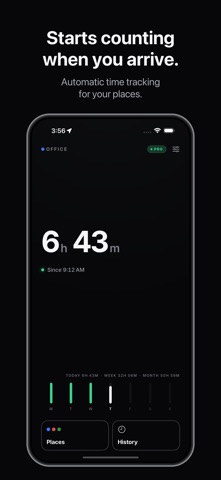
PlaceClock: GPS Time Tracker automatically logs time spent at saved places such as work, the gym or client sites, starting when you arrive and stopping when you leave. It is aimed at people who want an accurate record of hours without manually clocking in. Data stays on the iPhone, with no account and no server, and it uses iOS location events rather than continuous GPS.
Résumé par Debuts, d'après la fiche de l'App Store.À propos
No clock-in button. Nothing to remember. Nothing to forget.
PlaceClock automatically tracks the time you spend at work, at the gym and at your other regular places. Mark a place on the map once. Your clock starts when you arrive and stops when you leave.
WHAT IT’S FOR • Know how many hours you actually spend at the office • Keep track of time spent on site with clients • See whether you go to the gym as often as you think • Keep a clear record of your working day — without remembering to clock in
SET IT ONCE. LET IT COUNT. Choose a place and set its radius. PlaceClock uses iOS location events to detect arrivals and departures, without continuously running GPS.
SEE YOUR PROGRESS Set daily goals for individual weekdays, a weekly goal, a monthly goal, or all three. Follow each goal separately and see your progress throughout the day.
ALWAYS A GLANCE AWAY Check your running timer and when you will reach your daily goal, right on your Lock Screen. Choose from four Home Screen widgets and three Lock Screen widgets to keep your time in view.
EVERY VISIT. EVERY HOUR. Browse visits by day and place, with totals, progress bars and individual sessions. With Pro, export your full history as a CSV file for your own records or invoicing.
When an exact departure time is unavailable, PlaceClock marks the uncertainty and uses a conservative estimate rather than overstating your hours.
PRIVATE BY DESIGN No account. No sign-up. No server. Your places and hours are stored on your iPhone. We do not receive your location history. You choose whether to export it.
START FREE. GO PRO WHEN YOU NEED MORE. Start with one place and 100 logged hours, free.
PlaceClock Pro unlocks up to 20 places, unlimited logged hours and CSV export of your full history. Choose a one-time purchase or a yearly subscription.
Hitting the free limit never stops the clock and never drops a single minute. Go Pro and your whole history is there, from day one.
Les notes des utilisateurs
Connecte-toi pour noter cette appli. Ce qui compte, c'est d'être honnête.
Pas encore de notes. Tu l'as essayée ? Sois le premier à la noter.
Plus d'apps Utilitaires
Les meilleures nouvelles apps Utilitaires de la semaine Drainly: Speaker CleanerMuffled speaker after a splash, rain, or a sweaty workout?
 Photo & PDF Resize: KBFile too large to upload?
 Arvectum Proxy LauncherArvectum Proxy Launcher is a network utility that routes your iPhone through a proxy you…
 BillVoice : Lecteur de billetsPointez votre iPhone vers un billet, touchez l’écran n’importe où et entendez ce que…
 Look Twice: Scam & AI CheckLook twice before you click
 Vodoalarm: vodostaji BiHVodoalarm javlja kad tvoja rijeka naglo raste, pa ne moraš stalno gledati vodostaje