
Presence: Time Off Your Phone
Non revendiquéeCount the time you're present
Par Ezra Beletskiy · Productivité



En bref
Presence: Time Off Your Phone is a productivity app that tracks the time you spend away from your iPhone and shows it as a filling ring and a yearly total of full days. It lets users schedule phone-time windows, rest selected apps during focus sessions, and keep essentials like Messages and Maps available. Its standout feature is that it counts time gained rather than hours lost.
Résumé par Debuts, d'après la fiche de l'App Store.À propos
Count the time you're present.
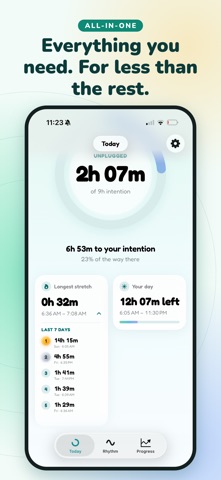
Most screen time apps count the hours you lose. Presence counts the hours you get back. Every minute your iPhone rests fills your ring, so the number you see is one you grow, not one to feel bad about. Every hour away is an hour gained.
COUNT THE TIME YOU'RE PRESENT - A live ring that fills with your time away from your phone - Choose the hours that count, so only your waking day is measured - Your longest stretches of the week, ranked
SEE THE DAYS YOU'LL GET BACK - "Every year, at this pace": the full days you'll gather this year - Your year as a grid, one square for every day - Your daily average, by week or by month
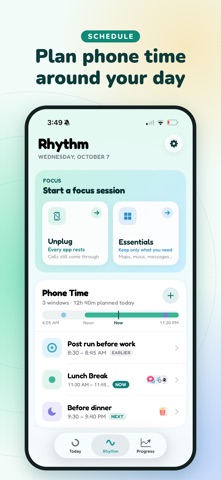
PLAN YOUR PHONE TIME. ENJOY THE REST. - Set Phone Time windows for when you'd like to scroll, catch up or wind down - Choose the apps for each window - Peace of mind that your phone time is coming, so you can be present until then
REST YOUR APPS. KEEP YOUR ESSENTIALS. - Unplug: every app rests until your timer ends - Essentials: keep only the apps you need, like Messages and Maps - Focus sessions from 10 minutes, a gentle app blocker that works at your pace - An optional Presence passcode someone you trust can keep
MILESTONES WORTH CELEBRATING - Eight badges to earn again and again - The 200 Days badge for a yearly pace of 200 full days back - Rest days that don't break your progress: keep a Sabbath or a day off, and Presence leaves it out
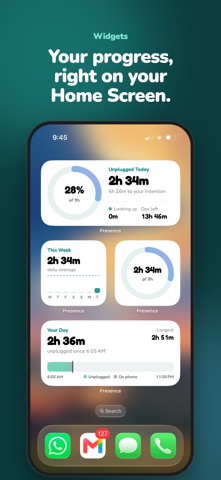
MADE FOR REAL LIFE - Home Screen and Lock Screen widgets - Two gentle notes, one as your day begins and one as it ends, never a nag - A fresh start every Monday and every new month
GENTLE BY DESIGN Presence never scolds. It shows you what you gained, lets you choose your pace and celebrates every milestone.
PRIVATE BY DESIGN Presence uses Apple's Screen Time framework. Your activity stays on your iPhone. There's no account, and we never see which apps you use.
PRESENCE PLUS Everything you need to be present, about 8¢ a day. The Today tab, the Ring widget and the Lock Screen widgets are free. Plus adds the planner, focus modes, your year, milestones and every Home Screen widget. - Yearly: $29.99, with your first 7 days free - Monthly: $3.99 - Lifetime: $49.99, one payment. Lifetime option. No pressure.
Subscriptions renew automatically unless cancelled at least 24 hours before the end of the current period. Your Apple Account is charged at confirmation of purchase and again at renewal. Manage or cancel anytime in your Apple Account settings.
Les notes des utilisateurs
Connecte-toi pour noter cette appli. Ce qui compte, c'est d'être honnête.
Pas encore de notes. Tu l'as essayée ? Sois le premier à la noter.
Plus d'apps Productivité
Les meilleures nouvelles apps Productivité de la semaine ChickMark: Habit TrackerChickMark is a simple habit tracker for routines, goals, and reminders
 Dayflint: One Thing a DayToo many priorities?
 Fristo CAFMFristo is the app for Fristo CAFM, the facility management software
- BeginAnywayMorning alarm for hard tasks: set one task, prove you started, build a streak
 DHUDEDHUDE Analityxs es la herramienta de gestión diaria para grupos de restauración y ocio…
 FTC BIOBUZZ Scorer & TrainerBIOBUZZ Scorer is a free, ad-free scorer for the 2026–2027 FTC season, built on…