
Pulse — System Monitor
Non revendiquéePulse keeps your Mac’s vital signs in the menu bar: CPU, memory, GPU, disk, network and…
Par Marcos Sanchez · UtilitairesPourquoi nous l'attendons : Pulse's clear, privacy-first description makes its menu bar monitoring value easy to grasp.



En bref
Pulse Mac system monitor lives in the menu bar and tracks CPU, memory, GPU, disk, network and battery, with up to 30 days of history for each metric. It suits Mac users who want live system readings without opening Activity Monitor. The app stands out for keeping no account and no analytics, with the speed test and public IP lookup running only on click.
Résumé par Debuts, d'après la fiche de l'App Store.À propos
Pulse keeps your Mac’s vital signs in the menu bar: CPU, memory, GPU, disk, network and battery, one click away.
30 DAYS OF HISTORY Chart any metric over 12 hours, a day, a week or a month, with its average and its peak.
IN YOUR MENU BAR, YOUR WAY Show an icon, a live value, a small graph or two stacked metrics. The icon can turn orange while your Mac is under strain.
ALERTS YOU CAN ACT ON Get notified when memory pressure rises or the battery runs low.
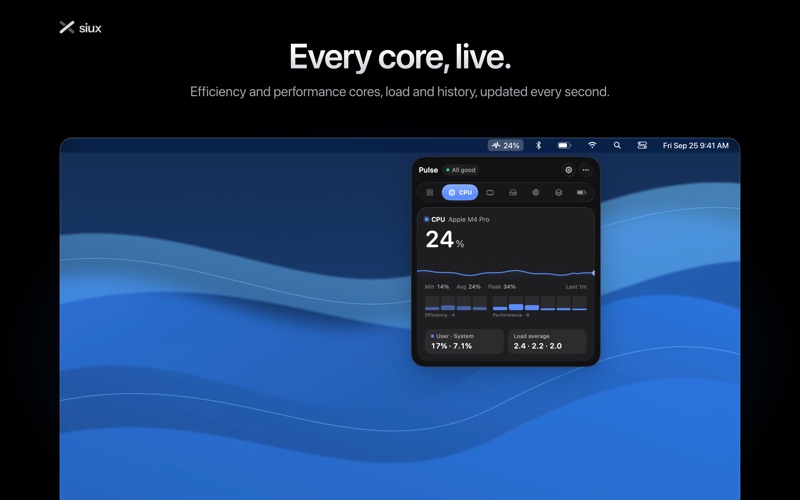
EVERY CORE, LIVE CPU usage per core, grouped into efficiency and performance cores, with user and system time and the load average.
MEMORY Memory pressure and what memory holds: apps, wired, compressed and cached.
NETWORK Download and upload speed, Wi-Fi signal, channel and standard, your local and public IP addresses, and a speed test that uses Apple’s own servers, only when you run it.
BATTERY Health, charge cycles, power draw and time remaining.
AND ALSO GPU usage and memory. Free disk space and live disk reads and writes. A global keyboard shortcut to open Pulse from anywhere.
PRIVATE BY DESIGN No account, no analytics, no calls home. The speed test and the public IP lookup run only when you click them.
Requires macOS 14 or later.
Les notes des utilisateurs
Connecte-toi pour noter cette appli. Ce qui compte, c'est d'être honnête.
Pas encore de notes. Tu l'as essayée ? Sois le premier à la noter.
Plus d'apps Utilitaires
Les meilleures nouvelles apps Utilitaires de la semaine Drainly: Speaker CleanerMuffled speaker after a splash, rain, or a sweaty workout?
 Photo & PDF Resize: KBFile too large to upload?
 Arvectum Proxy LauncherArvectum Proxy Launcher is a network utility that routes your iPhone through a proxy you…
 Vodoalarm: vodostaji BiHVodoalarm javlja kad tvoja rijeka naglo raste, pa ne moraš stalno gledati vodostaje
 Dusty: Photo Cleaner PetYour camera roll's new pet
 FairAuth: AuthenticatorFairAuth creates the codes for two-step verification on iPhone and iPad