
Qoorbell: QR Video Doorbell
Non revendiquéeQoorbell turns a printed QR code into a video doorbell
Par CIGUABIT S.R.L. · UtilitairesPourquoi nous l'attendons : Clever, clearly explained concept with thoughtful renter-friendly details, though it has no ratings yet and needs more proof of traction.



En bref
Qoorbell: QR Video Doorbell turns a printed QR code into a video doorbell that visitors reach by scanning it with their phone camera. It suits homeowners, renters, apartment buildings, offices and businesses, with no wiring, batteries or Wi-Fi needed at the door. A standout feature is that visitors never see the owner's name, phone number or email, only the doorbell's name.
Résumé par Debuts, d'après la fiche de l'App Store.À propos
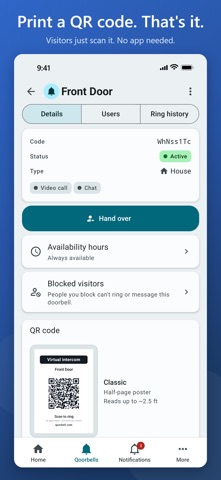
Qoorbell turns a printed QR code into a video doorbell. Put it on your front door, gate, desk or counter. Visitors scan it with their phone camera, tap to ring, and you answer by video call or chat from wherever you are. They don't need an app, and your door needs no wiring, batteries or Wi-Fi. Renting? Nothing gets drilled, so there are no holes to patch when you move out.
HOW IT WORKS 1. Create a doorbell in the app and name it, like Front Door or Apt 3B. 2. Print its QR poster and put it up where visitors will see it. 3. When someone rings, your iPhone lets you know right away. Answer by video or reply in the chat.
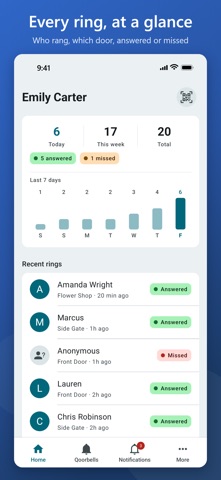
WHAT YOU GET • Rings arrive as time-sensitive alerts, with Answer and Decline right in the notification. • Video call or chat, your choice. If you can't pick up, visitors can leave you a message. • Ring history for each doorbell: who rang, when, and whether the ring was answered or missed. • A QR code and short link for every doorbell. Replace the code anytime and old posters stop working. • A poster studio with 7 designs, from small labels to full-page posters. Print at home, save a PDF or a 300 dpi PNG, or take an order sheet to a print shop. • Shared doorbells: invite family, roommates or staff by email, as owners or members. • Groups for apartment buildings, complexes and offices: one QR code in the lobby, and visitors pick who they came to see. • Hand it over: set up an apartment's doorbell, then give it to the resident. Once they accept, only they and the people they invite have access. • Report or block a visitor from the chat, the ring screen or your ring history. A blocked visitor can't ring that doorbell again. • A built-in scanner to ring other Qoorbell doorbells.
MORE THAN THE FRONT DOOR Pick a doorbell type, and its poster and visitor page are worded to match: house, apartment, office, business, rental, front desk, deliveries, vehicle, pet or item. Put a QR code on your windshield so people can reach you about your car without seeing your number. Add one to your pet's collar or your bag, so whoever finds them can get in touch. Give vacation rental guests a direct line for check-in and keys.
YOUR INFO STAYS PRIVATE Visitors only see the doorbell's name, never your name, phone number or email.
PLANS Every plan, including Free, comes with unlimited doorbells, groups, users per doorbell, rings and chat messages. The Free plan shows ads; Pro, Premium and Enterprise remove them. • Free: 2-minute video calls and 7 days of ring history. No credit card required. • Pro: 5-minute calls, 30 days of history, geofencing so a doorbell only rings when the visitor is near it, the option to require visitor sign-in, and availability hours. • Premium: everything in Pro, plus 10-minute calls, 90 days of history and call recording (150 minutes a month). • Enterprise: everything in Premium, with 15-minute calls, a full year of history and 600 recording minutes a month. Recordings are deleted 7 days after the call unless you save them to your phone.
Qoorbell works on iPhone and iPad, and in any browser at app.qoorbell.com. It's available in 60 languages.
SUBSCRIPTIONS Pro, Premium and Enterprise are auto-renewing monthly subscriptions purchased in the app. You'll see the price in your currency before you buy. Payment is charged to your Apple Account when you confirm the purchase. Your subscription renews automatically each month unless you cancel it at least 24 hours before the end of the current period, and the renewal is charged within the 24 hours before that period ends. You can manage or cancel your subscription anytime in your Apple Account settings.
Terms of Use: https://qoorbell.com/en/terms/ Privacy Policy: https://qoorbell.com/en/privacy/ Apple's Standard End User License Agreement (EULA): https://www.apple.com/legal/internet-services/itunes/dev/stdeula/
There's no hardware to buy. Your QR code is the doorbell.
Les notes des utilisateurs
Connecte-toi pour noter cette appli. Ce qui compte, c'est d'être honnête.
Pas encore de notes. Tu l'as essayée ? Sois le premier à la noter.
Plus d'apps Utilitaires
Les meilleures nouvelles apps Utilitaires de la semaine Drainly: Speaker CleanerMuffled speaker after a splash, rain, or a sweaty workout?
 Photo & PDF Resize: KBFile too large to upload?
 Arvectum Proxy LauncherArvectum Proxy Launcher is a network utility that routes your iPhone through a proxy you…
 Vodoalarm: vodostaji BiHVodoalarm javlja kad tvoja rijeka naglo raste, pa ne moraš stalno gledati vodostaje
 Dusty: Photo Cleaner PetYour camera roll's new pet
 FairAuth: AuthenticatorFairAuth creates the codes for two-step verification on iPhone and iPad