
Readride: Read in One Spot
Non revendiquéeReadride puts what you read in one spot, a few words at a time, so your eyes stay still…
Par Dohyun Kim · ÉducationPourquoi nous l'attendons : The detailed description, careful text cleanup, and clear one-spot reading focus make it a promising tool for readers.

En bref
Readride: Read in One Spot shows text a few words at a time in the middle of the screen, with pauses at commas and sentence ends, so the reader's eyes stay still. It works with novels, articles, PDFs, ePubs, and pasted text across 44 languages, and it removes headers, footers, and ads before reading. One standout detail is that a list of everything removed can be reviewed and restored.
Résumé par Debuts, d'après la fiche de l'App Store.À propos
Readride puts what you read in one spot, a few words at a time, so your eyes stay still and the text comes to you.
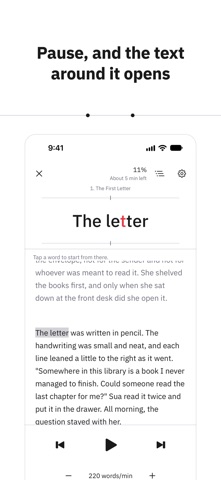
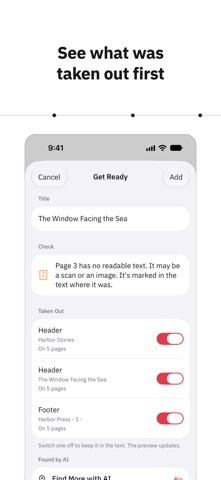
Add a novel, a news article, an essay, a PDF, or an ePub. Readride tidies it first and shows you what it took out. Then the words appear in the middle of the screen, with short pauses at commas and at the ends of sentences. How they are grouped, where the emphasis falls, and how fast they come are fitted to each of 44 languages. Pause, and the text around your place opens up.
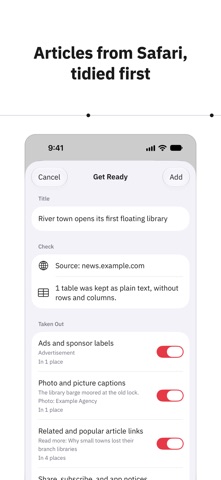
■ Tidied before you read • PDF headers, footers, and page numbers taken out • Lines broken mid-sentence joined back together • Ads and related-link lists around web articles taken out • A list of everything taken out on Get Ready, each one restorable • Pages with no text layer flagged and marked in the text • The reading language, chosen from the text and changeable on Get Ready
■ Reading in one spot • A few words at a time in the middle of the screen • Short phrases kept together when splitting them loses the meaning • Grouping, emphasis, and pause marks fitted to 44 languages • Japanese, Chinese, and Thai divided into words, though written without spaces • Arabic, Hebrew, and Urdu shown right to left • Pauses at commas, sentence ends, and paragraph ends • The text around your place whenever you pause • Any word you tap as the place to go on from • Back one sentence, or on to the next • A speed kept for each language, pauses in five steps • Your place kept to the character, even after changing text size • Your shelf and your place kept the same on devices signed in to the same iCloud account
■ What you can add • Articles shared from Safari • Text files (txt and md) • PDFs, including password-protected ones • ePubs without DRM • Pasted text
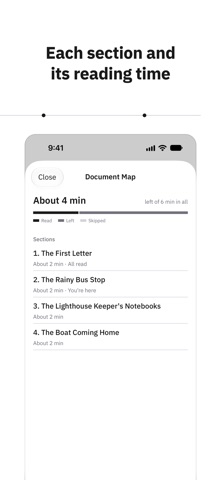
■ Readride Pro • More documents: 3 on your shelf to begin with, no limit with Pro • A ZIP of text files added as one document • Document Map: reading time for each section, what you have read and what is left • The name of the section you are in, shown above the words • Skip sections you turn off: appendices, references, or any section turned off in Document Map • Find More with AI: suggestions for headers and episode headings the rules missed, on iPhones and iPads that support Apple Intelligence
■ Privacy • No personal data collected • No account and no sign-in • No ads and no outside analytics
Les notes des utilisateurs
Connecte-toi pour noter cette appli. Ce qui compte, c'est d'être honnête.
Pas encore de notes. Tu l'as essayée ? Sois le premier à la noter.
Plus d'apps Éducation
Les meilleures nouvelles apps Éducation de la semaine FluencyToolShadow a native Japanese sentence, hear your own voice back, and get scored.
 YoMoo: Read & Shadow JapaneseYoMoo turns real Japanese writing into graded reading practice: news articles, Wikipedia…
 KeyswingLearn music notes, rhythm and piano through playful practice in a magical forest.
 Uncle Math Homeschool - 6 to 8No Math Fear, Uncle Math Is Here
 Malachi SpeaksMalachi Speaks gives a voice to people who don't use speech
 SelvarisWatch evolution unfold in real time – on an entire planet