
Seneschal: Smart Home Check
Non revendiquéeYour home's automations say they ran
Par Gregory M Koch · Style de viePourquoi nous l'attendons : A clear problem, careful verification features, and a well-explained value make this a genuinely useful companion for HomeKit households.
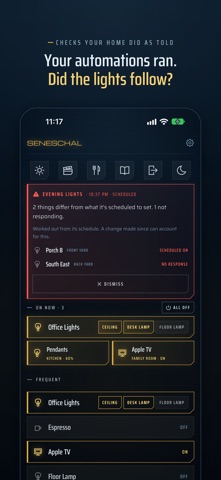


En bref
Seneschal: Smart Home Check is a lifestyle app that checks whether Home app scenes and automations actually reached their lights, outlets, switches and fans, and resends orders that did not. It is for people with an Apple home who run a Mac and want to confirm their automations worked. One standout feature is a Mac housekeeper that rechecks each scheduled run and retries up to three times.
Résumé par Debuts, d'après la fiche de l'App Store.À propos
Your home's automations say they ran. Seneschal checks that they worked.
When a scene or automation runs, the Home app counts it done as soon as the orders go out, even if a bulb never hears them. Seneschal compares what each one ordered with what's true now, and shows what didn't follow, in red, with Fix to send the order again.
A HOUSEKEEPER ON YOUR MAC Leave Seneschal open on a Mac and turn on the housekeeper. Half a minute after each scheduled automation, it checks the lights, outlets, switches and fans followed, and sends the order again for anything that didn't, up to three tries. If something still won't listen, it tells you. Each run gets one check, so a light you switch on afterwards stays on. Your iPhone shows a warning if the Mac goes quiet.
YOUR TAPS, CHECKED TOO A few seconds after you switch something, Seneschal reads it back, tries once more if nothing happened, and only then says so.
A SWITCHBOARD FOR EVERYTHING ELSE On Now shows what's on, open or unlocked, with All Off (it never unlocks or opens anything). Below it, the things you use most, your favorites, and every room as compact one-line rows. Groups from the Home app get a cell per light. Up to six scene buttons along the top. Long-press for brightness and colour.
MADE TO READ AT A GLANCE A dark panel by night or a light one by day, in the colour of your choosing, with an app icon to match.
Scenes, automations and accessories are set up in the Home app; Seneschal works with what's there. It needs an Apple home with a home hub, and a Mac for the housekeeper.
Les notes des utilisateurs
Connecte-toi pour noter cette appli. Ce qui compte, c'est d'être honnête.
Pas encore de notes. Tu l'as essayée ? Sois le premier à la noter.
Plus d'apps Style de vie
Les meilleures nouvelles apps Style de vie de la semaine askoraAI 회상 노트
 Familjekalender – familjens årFamiljekalender är en delad kalender för hela familjen, där varje dag kan bära ett foto…
 My Anime TrackerAnime watch order, no guesswork.
 WatchLux: Animated Watch FacesOver 750 animated watch faces for Apple Watch and Wear OS
 SCNT ControlSCNT conecta tu teléfono con tu difusor de aroma por Bluetooth y te da el control…
 Sakinah: Quran, Adhkar & DuaSakinah brings the Qur'an, the prayer and daily remembrance together in one calm app, in…