
Should You Sign It?
Non revendiquéeBefore you sign a lease, a job offer, a gym membership or a freelance contract, scan it
Par Djordje Janjic · ProductivitéPourquoi nous l'attendons : A genuinely useful privacy-first idea with clear value, verified quotes and on-device analysis, though it has no ratings yet.



En bref
Should You Sign It? is a productivity app that scans documents such as leases, job offers, gym memberships and freelance contracts. It explains the terms in plain language, flags clauses worth checking, and suggests questions to ask before signing. Its standout feature is that by default analysis runs on the device, with an optional Apple Private Cloud Compute mode for long contracts.
Résumé par Debuts, d'après la fiche de l'App Store.À propos
Before you sign a lease, a job offer, a gym membership or a freelance contract, scan it. Should You Sign It? reads the document and explains in plain language what you are agreeing to, which clauses deserve a second look, and what to ask before you sign.
WHAT YOU GET • A short summary of what the document does and what you commit to • The key points: dates, amounts, notice periods, renewals • Things to check: clauses such as automatic renewal, cancellation fees, arbitration, non-compete, indemnity or broad data sharing, each quoted word for word from your document with a note on why it matters • Questions to ask the other party, ready to copy • A clear caution level: looks routine, worth a question, or get advice first
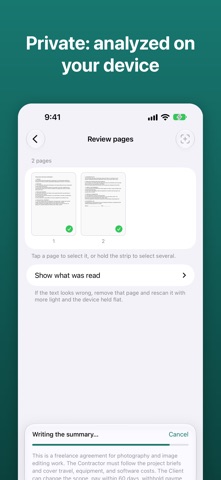
PRIVATE BY DEFAULT Documents are read with Apple's Vision framework and analyzed by Apple's on-device language model, so by default nothing leaves your device and it works in airplane mode. For long contracts you can choose Apple's Private Cloud Compute in Settings: the text is analyzed on Apple's servers, where Apple states it is not stored or accessible to anyone, and page images stay on your device. No account, no server of our own, no analytics, no ads.
BUILT TO BE TRUSTWORTHY • Every quoted clause is checked against the scanned text. Quotes that can't be found are dropped. • A keyword scan for known risky clause types backs up the model in eight languages. • If what you scanned isn't something you would sign, such as a recipe or an article, the app tells you instead of treating it as a contract.
HOW IT WORKS 1. Scan pages with the camera, or import a PDF or photos. 2. Remove the pages you don't need and extract the text. 3. Analyze, then read the report, share it, or keep it in your history.
LANGUAGES Reads documents in the languages Apple Intelligence supports, including English, German, French, Spanish, Italian, Portuguese, Chinese and Japanese. The app is available in English, German, French, Spanish, Italian and Chinese.
PRICING Your first two analyses are free. One purchase unlocks unlimited analyses. No subscription.
REQUIREMENTS Needs Apple Intelligence turned on: iPhone 15 Pro or later, or an iPad with an A17 Pro or M1 chip or later, on iOS 27 or later.
NOT LEGAL ADVICE Should You Sign It? helps you notice what to check and what to ask. It never tells you whether to sign and is not a substitute for a lawyer. For decisions that matter, have a qualified professional review the document.
Les notes des utilisateurs
Connecte-toi pour noter cette appli. Ce qui compte, c'est d'être honnête.
Pas encore de notes. Tu l'as essayée ? Sois le premier à la noter.
Plus d'apps Productivité
Les meilleures nouvelles apps Productivité de la semaine ChickMark: Habit TrackerChickMark is a simple habit tracker for routines, goals, and reminders
 Dayflint: One Thing a DayToo many priorities?
 Snappy Do ItTurn photos, text and voice into tasks, plans and more.
 Fristo CAFMFristo is the app for Fristo CAFM, the facility management software
 UhWhat? Voice NotesCatch the thought before it disappears
- BeginAnywayMorning alarm for hard tasks: set one task, prove you started, build a streak