
Slide Craft: Carousel Maker
Non revendiquéeTurn good ideas into great pages
Par Beijing Blue Ocean Xinfan Technology Co., Ltd · UtilitairesPourquoi nous l'attendons : The clear value, thoughtful layout details, and honest notes about limits make this carousel maker a strong, easy-to-try debut.



En bref
Slide Craft: Carousel Maker turns written text into a set of up to 30 styled image pages, with 20 templates and 3:4, 1:1 and 4:5 ratios. It suits people sharing knowledge, reading notes, travel recaps or product intros. Pages can be edited one by one, and sets export as 1080-pixel-wide PNGs with no account required.
Résumé par Debuts, d'après la fiche de l'App Store.À propos
Turn good ideas into great pages.
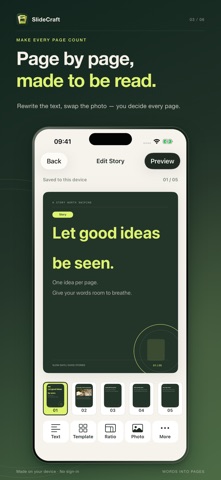
SlideCraft is a visual storytelling studio that turns your words into a beautifully laid-out image set. Write an opinion, build a checklist, or recap a weekend — from text to photos, finish a whole set of pages in one style, right on your phone.
[PASTE TEXT, AUTO-SPLIT INTO PAGES] Enter a title and body — pages are generated from your paragraphs and length, then fine-tuned page by page. Up to 30 pages per set, so long content unfolds with room to breathe.
[20 TEMPLATES, MORE THAN A NEW COLOR] From Minimal Paper and Dark Editorial to Magazine Masthead, Cream Note and Polaroid — every template brings its own layout language, keeping the whole set consistent.
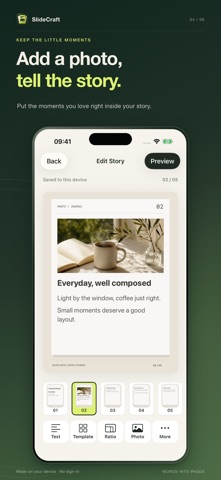
[EDIT PAGE BY PAGE, YOUR CALL] Rewrite titles and text, add your own photos, tune font size and byline, insert, delete or move pages. Put what matters where it lands best.
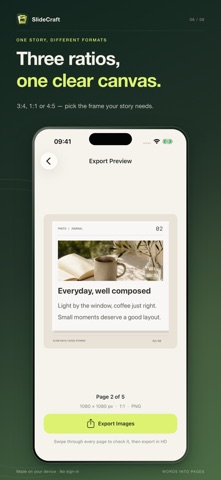
[THREE RATIOS FOR DIFFERENT STORIES] 3:4, 1:1 and 4:5 — vertical stories, square cards or feed-friendly notes; pick the frame your content deserves.
[PREVIEW THE SET, EXPORT IN HD] Swipe through every page, then export 1080-px-wide PNG images. Save to Photos or share through the system sheet to any app you choose.
[DRAFTS ON DEVICE, NO SIGN-IN] Core editing and exporting happen on your device. No account needed; drafts wait right where you left them.
Great for knowledge sharing, reading notes, travel recaps, lifestyle lists and product intros. Less layout work. More of what you mean.
Good to know: auto-pagination is not AI rewriting — please check text and layout before exporting. SlideCraft does not offer developer cloud sync; system backups depend on your device settings. Keep important material backed up before deleting the app or switching devices.
Les notes des utilisateurs
Connecte-toi pour noter cette appli. Ce qui compte, c'est d'être honnête.
Pas encore de notes. Tu l'as essayée ? Sois le premier à la noter.
Plus d'apps Utilitaires
Les meilleures nouvelles apps Utilitaires de la semaine Drainly: Speaker CleanerMuffled speaker after a splash, rain, or a sweaty workout?
 Photo & PDF Resize: KBFile too large to upload?
 Arvectum Proxy LauncherArvectum Proxy Launcher is a network utility that routes your iPhone through a proxy you…
 BillVoice : Lecteur de billetsPointez votre iPhone vers un billet, touchez l’écran n’importe où et entendez ce que…
 Look Twice: Scam & AI CheckLook twice before you click
 Vodoalarm: vodostaji BiHVodoalarm javlja kad tvoja rijeka naglo raste, pa ne moraš stalno gledati vodostaje