
SPAGETI: Focus Timer & Planner
Non revendiquéeSPAGETI is a minimal focus timer and planner
Par Alenlor, LLC · Productivité



En bref
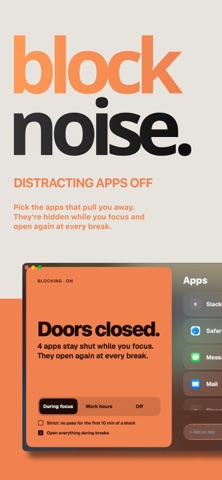
SPAGETI: Focus Timer & Planner is a minimal focus timer and planner that limits each day to three main tasks and runs timed work blocks with enforced breaks. It is aimed at people who get overwhelmed by long to-do lists. One feature that stands out is app blocking on the Mac, which keeps distracting apps closed during a focus session.
Résumé par Debuts, d'après la fiche de l'App Store.À propos
SPAGETI is a minimal focus timer and planner. Pick your 3 big things for the day, then work on one at a time with a timer that makes sure you take real breaks.
Long to-do lists freeze you. Every item competes for attention and nothing gets done. SPAGETI keeps the whole plan small enough to fit in your head: three big things, one timer, one thing at a time.
FOCUS ON ONE THING • A big, clear timer with nothing else in the way • Start a planned task, or just hit Start and focus • "Right now" for the urgent thing that can't wait. Your planned block pauses and picks up where you left off • End a session any time, the time you put in is kept
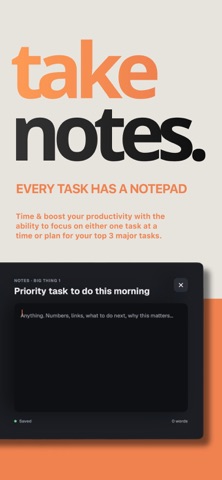
PLAN YOUR BIG 3 • Pick the three tasks that make today a win • Plan tomorrow the night before, so the morning starts decided • Keep smaller to-dos in "the rest" list, out of the way • A notepad for every task: numbers, links, next steps
REAL BREAKS • When a block ends, SPAGETI fills the screen and tells you to rest • The next block starts on its own after your break • A longer break after every few blocks • Soft sounds and a gentle alarm to start your day
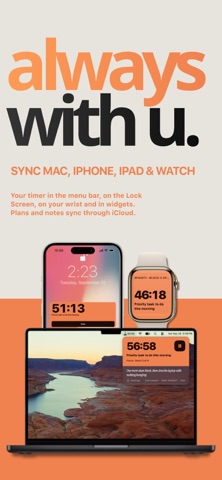
ALWAYS WITH YOU • Mac: menu bar timer, a small window that stays on top, and app blocking that keeps distracting apps shut while you focus • iPhone and iPad: Lock Screen timer, Dynamic Island and widgets • Apple Watch: see and control your timer from your wrist
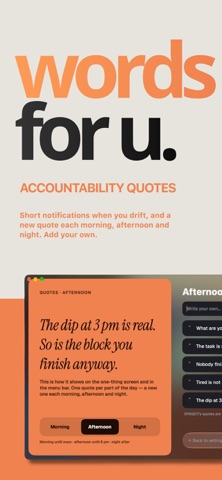
SEE YOUR PROGRESS • Your week at a glance: focus time, streaks and breaks taken • Tap any day to see what you finished and what you wrote • Short pointers when you drift, never a lecture • A new motivation quote each morning, afternoon and night
MAKE IT YOURS • 14 color themes • Bold or Serif numbers • Solid or Liquid Glass look
SPAGETI PRO SPAGETI is free to use for the timer, your daily 3 and breaks. SPAGETI Pro unlocks all 14 colors, Serif numbers, Liquid Glass, History and coach pointers, widgets, the Lock Screen timer, the Apple Watch app, iCloud sync across your devices, app blocking on the Mac and your own quotes.
• Monthly: $4.99 per month • Yearly: $19.99 per year, with a 3-day free trial • Lifetime: $39.99, one payment
One purchase unlocks Pro on your iPhone, iPad and Mac with the same Apple Account. Subscriptions renew automatically unless cancelled at least 24 hours before the end of the current period. Payment is charged to your Apple Account at confirmation of purchase. Manage or cancel any time in your Apple Account settings. Any unused part of a free trial ends when you buy a subscription.
Your data stays on your devices and in your own iCloud. SPAGETI doesn't collect anything.
Les notes des utilisateurs
Connecte-toi pour noter cette appli. Ce qui compte, c'est d'être honnête.
Pas encore de notes. Tu l'as essayée ? Sois le premier à la noter.
Plus d'apps Productivité
Les meilleures nouvelles apps Productivité de la semaine ChickMark: Habit TrackerChickMark is a simple habit tracker for routines, goals, and reminders
 Dayflint: One Thing a DayToo many priorities?
 Snappy Do ItSix connected modes. One traceable journey.
 Fristo CAFMFristo is the app for Fristo CAFM, the facility management software
 UhWhat? Voice NotesCatch the thought before it disappears
- BeginAnywayMorning alarm for hard tasks: set one task, prove you started, build a streak