
TempoMate: Run Cadence BPM
Non revendiquéeThis metronome is one I first built for my family
Par 丽婷 谭 · Santé et forme




En bref
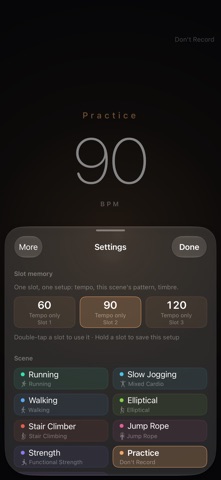
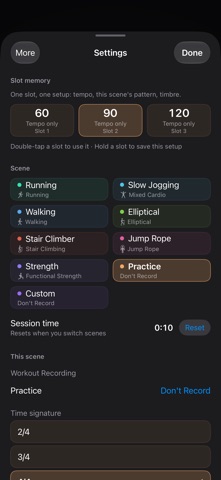
TempoMate: Run Cadence BPM is a metronome for runners and lifters, with a phone or watch remote and a wrist tap for the beat when the phone is away. It records sessions in Apple's Health app, including duration, heart rate, and active energy. It was first built by a developer for family use, and the app lets each scene count differently in Health.
Résumé par Debuts, d'après la fiche de l'App Store.À propos
This metronome is one I first built for my family.
After a while you notice that exercise has a rhythm. When your stride goes, your breathing goes with it, and the run falls apart; hold your stride at a steady rate and your body lasts longer. Lifting is the same — lower over three counts, pause at the top for one, and the movement comes out clean.
So I started using a metronome. And I found that none of them are made for someone who is actually moving. Most are built for musicians: rows of knobs, a vocabulary of their own, and you have to stop, stand still and stare at the screen to change anything. But when you're running you can't look at a screen, and when you're lifting your hands are full. Plug in headphones and the click fights your music. And a watch has a screen that is always right there, and nobody had put a metronome on it.
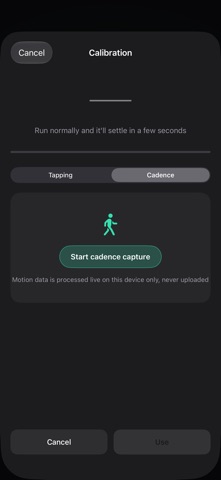
What I wanted was simple: I start running and it knows how fast I'm going; I move on to the next set and it knows the count has changed; and when the phone isn't on me, I don't have to look at anything — a tap on the wrist tells me the beat is still there.
There wasn't one, so I built it. My family uses it and so do I, and I keep changing it — every time something feels wrong on the track, I come back and fix it.
———
■ The easiest way to use it: a remote on your wrist
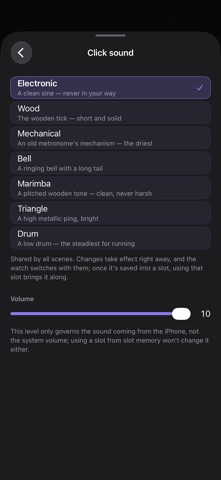
Set everything up on the phone first — tempo, scene, whether to record it in Health — and after that the phone can stay in your pocket.
· Put a complication on your watch face, or keep it in the Smart Stack: one tap and the app is up, no hunting for an icon · While the phone is playing, the watch is the remote: tap to start or stop, turn the crown for tempo, swipe to change scene — without taking the phone out · When the phone is out of reach, it plays the click itself and taps the beat on your wrist, so you keep time without looking · All three setups work: phone on its own / watch on its own / both together. Move from one to the other mid-run and the beat carries on — nothing to restart
■ You don't have to log it afterwards
From the moment you start, the session is being written into the Health app: duration, heart rate, active energy (and speed for the activities that have one). Want a heart-rate check mid-run? Raise your wrist.
No need to open Apple's Fitness app, and no switching between apps. You decide what each scene counts as: Run as running, Slow Jog as mixed cardio, Practice as nothing at all.
Les notes des utilisateurs
Connecte-toi pour noter cette appli. Ce qui compte, c'est d'être honnête.
Pas encore de notes. Tu l'as essayée ? Sois le premier à la noter.
Plus d'apps Santé et forme
Les meilleures nouvelles apps Santé et forme de la semaine Orbit: Self-Care Habit TrackerYour healthy choices deserve more than a checkmark
 Wellbeing: Digital WellbeingBillions of people spend more time scrolling than they want to
 Court OrderCourt Order sorts out who plays next, so nobody has to
 Finn: Baby TrackerFinn is the calm, quick way to track your baby's feeds, sleep, diapers and pumping — and…
 Padel Score Tracker: PacoKeep padel score on your Apple Watch without looking at it
 DeskFlow: Workday MovementYou don't need another workout app