
TurboShelf
Non revendiquéeTurboShelf is a small, fast shelf for the things you reuse: standard replies, prompts…
Par Kobar Sumarsono · Productivité

En bref
TurboShelf is a Mac app that keeps the text, links, images and files you reuse in one shelf, opened with Option-Space over any app. It ranks items by the apps you use them in, and search also reads text inside images and PDFs on your Mac. Your items stay local, with no account and no cloud upload.
Résumé par Debuts, d'après la fiche de l'App Store.À propos
TurboShelf is a small, fast shelf for the things you reuse: standard replies, prompts, links, colors, images, screenshots and documents.
Press Option-Space in any app. TurboShelf opens over your work and shows the items you use in that app first. Press Enter, and the item goes into the app you were using.
KEEP WHAT YOU REUSE • Save text, links, images, files and folders by drag and drop, from the Services menu, or with a shortcut. • Save Copy keeps an independent copy. Link points to the original file, so you always get the latest version. • Link a folder to keep its files one keystroke away.
THE RIGHT ITEM, ALREADY THERE • TurboShelf learns which items you reuse in which app. In Keynote, your brand colors and slide backgrounds come first. In Mail, your standard replies do. • Pin an item for one app or for every app. • Items you reuse or pin say why they are there, for example "Used 14 times in Keynote".
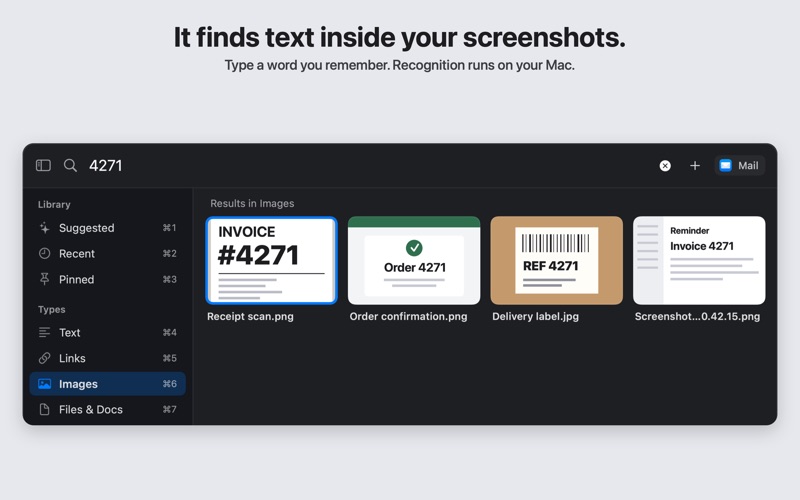
FIND ANYTHING WHEN YOU NEED TO • Search titles, text, file names and links as you type. • Search also finds text inside images and the text in PDF files. TurboShelf reads it on your Mac. Scanned PDF pages are not searched. • Seven views, each one Command-number away: Suggested, Recent, Pinned, Text, Links, Images, Files & Docs.
PRIVATE BY DESIGN • Your items stay on your Mac. There is no account and no cloud upload. • TurboShelf saves only what you choose to save. It does not record your clipboard history.
FREE AND PRO • Free: every feature, up to 25 saved items. • TurboShelf Pro: unlimited saved items. One purchase, no subscription.
Pasting into other apps needs the Accessibility permission (on macOS 27: Device Control and Data Access). The Save Copy and Link shortcuts need it too. TurboShelf uses it only to send Copy and Paste when you ask. To turn it on, click the TurboShelf menu bar icon and choose Set Up Save Copy…, then Continue. macOS asks for permission, and you turn on TurboShelf in System Settings. Without the permission, Command-Return copies an item, and you paste it yourself. Drag and drop and the Services menu work without it.
Les notes des utilisateurs
Connecte-toi pour noter cette appli. Ce qui compte, c'est d'être honnête.
Pas encore de notes. Tu l'as essayée ? Sois le premier à la noter.
Plus d'apps Productivité
Les meilleures nouvelles apps Productivité de la semaine ChickMark: Habit TrackerChickMark is a simple habit tracker for routines, goals, and reminders
 Dayflint: One Thing a DayToo many priorities?
 Fristo CAFMFristo is the app for Fristo CAFM, the facility management software
- BeginAnywayMorning alarm for hard tasks: set one task, prove you started, build a streak
 DHUDEDHUDE Analityxs es la herramienta de gestión diaria para grupos de restauración y ocio…
 Unlocky: Training App BlockerLock the apps that eat your day