
TV Size Calculator: AR Preview
Non revendiquéeWill 65 inches feel right, or should you go bigger?
Par Volodymyr Yahenskyi · UtilitairesPourquoi nous l'attendons : Clear value, honest estimates, and a practical AR preview make this a well-scoped TV sizing tool worth trying.




En bref
TV Size Calculator: AR Preview helps users pick a TV size from their viewing distance and place a virtual screen on their own wall through augmented reality on iPhone or iPad. It includes width checks, scale checks, and a one-time Pro purchase that adds a room library and model-specific dimensions. Its free tier covers size recommendations and basic AR previews.
Résumé par Debuts, d'après la fiche de l'App Store.À propos
Will 65 inches feel right, or should you go bigger?
TV Sizer helps you choose a size for your viewing distance and preview it on your own wall in AR. Try different sizes, check the available space, and make your next TV purchase with a clearer idea of how it will look at home.
FIND YOUR STARTING SIZE Enter the distance from your seat to the screen. Choose a relaxed, balanced, or immersive viewing preference and get a recommended size. Compare eight popular diagonals: 32, 43, 50, 55, 65, 75, 85, and 98 inches.
SEE IT ON YOUR WALL Place a virtual TV in your room with augmented reality. Switch sizes, reposition the TV, and lock its placement while you compare. See the difference before moving furniture or buying a screen.
CHECK YOUR SPACE View estimated screen dimensions and enter your available wall width to check fit and side clearance. Switch between metric and imperial units. Use a tape-measured reference to check AR scale.
CAPTURE AND SHARE Capture a preview and share it to get a second opinion. Size recommendations, basic AR previews, wall-width checks, scale checks, and sharing a single capture are free.
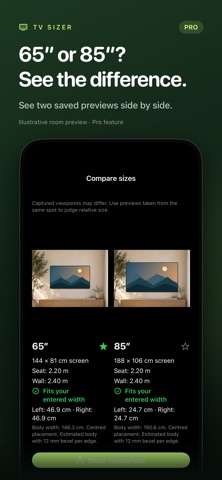
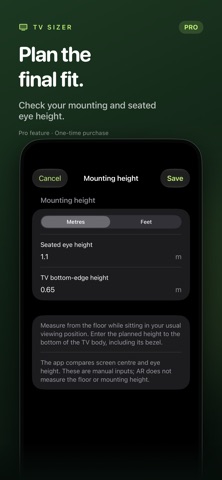
FINISH YOUR PLAN WITH PRO One purchase unlocks all Pro tools: - Save previews in a room library and mark your favorites. - Compare two saved previews side by side and share the comparison. - Enter a specific TV model's body width, height, and depth. - Plan mounting height using your seated eye and TV bottom-edge measurements. - Record your measurement and cable-space checks.
Pro is a one-time purchase. No subscription.
Room previews are stored locally, and you control what you share.
AR is a visual guide. Generic TV dimensions and fit recommendations are estimates. Confirm the final fit with the manufacturer's specifications and a tape measure. AR requires a compatible iPhone or iPad and camera access.
Terms: https://yahenskyi.dev/terms Privacy Policy: https://yahenskyi.dev/privacy
Les notes des utilisateurs
Connecte-toi pour noter cette appli. Ce qui compte, c'est d'être honnête.
Pas encore de notes. Tu l'as essayée ? Sois le premier à la noter.
Plus d'apps Utilitaires
Les meilleures nouvelles apps Utilitaires de la semaine Vodoalarm: vodostaji BiHVodoalarm javlja kad tvoja rijeka naglo raste, pa ne moraš stalno gledati vodostaje
 NadhirNadhir is an independent app
 Rokey: Romanian KeyboardType Romanian without worrying about diacritics
 Vibe Island: AI Agent MonitorVibe Island is a command center for the AI coding agents running on your Mac
 Private AuthenticatorPrivate Authenticator keeps your two-factor authentication codes on your own Apple…
 Photo Clean: Photo CleanupA crowded camera roll?