
Uniboard: Unicode Keyboard
Non revendiquéeFind the right symbol, special letter or complete emoji, then type it with a tap
Par Kitta Ltd · UtilitairesPourquoi nous l'attendons : A well-documented offline Unicode explorer and keyboard with clear value, bundled editions, and thorough emoji sequence support for curious typists.



En bref
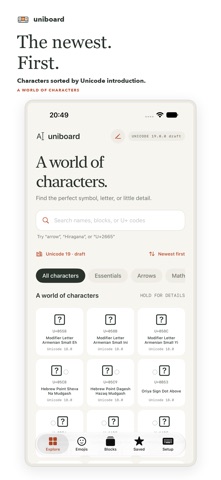
Uniboard: Unicode Keyboard is an offline Unicode character explorer and custom iPhone and iPad keyboard for finding symbols, special letters and complete emoji by name or code point. It suits people who need unusual characters while typing, and it runs without an account, ads, analytics or Full Access. It bundles Unicode 18 and the Unicode 19 draft, with the draft selected by default.
Résumé par Debuts, d'après la fiche de l'App Store.À propos
Find the right symbol, special letter or complete emoji, then type it with a tap. Uniboard is an offline Unicode character explorer and custom keyboard for iPhone and iPad.
FIND IT YOUR WAY - Search official character names, aliases, descriptive annotations or block names. Try "arrow", "heart" or "Greek". - Look up hex code points such as U+1F680, 0x1F680 or 1F680, or use decimal:128640. Paste a character into the app's search to identify it. - Browse the complete Unicode block list and scroll through assigned characters, from math symbols and punctuation to scripts and phonetic marks.
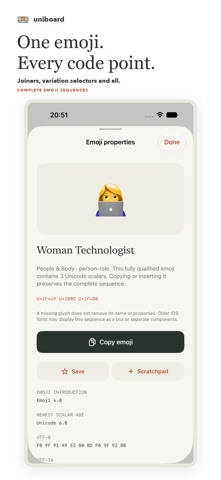
EXPLORE COMPLETE EMOJI - Search and browse the official fully qualified emoji set, including joined emoji, skin tones, flags and keycaps. - Copy or insert the complete sequence, preserving joiners and variation selectors. Inspect every component's name and code point. - Emoji order uses the version that introduced the emoji, shown separately from its components' Unicode ages.
CHOOSE YOUR UNICODE EDITION - Switch between Unicode 18, the latest release, and the Unicode 19 development draft. Both catalogs are bundled for offline use; the draft is selected by default. - Discover characters across the catalog with the newest Unicode age first. Choose oldest first or code point order whenever you prefer. - The app and keyboard remember their own edition and order choices.
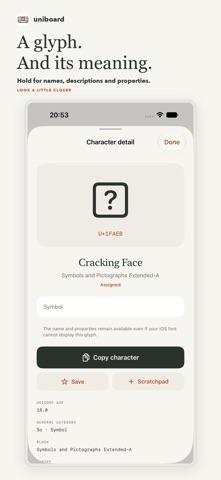
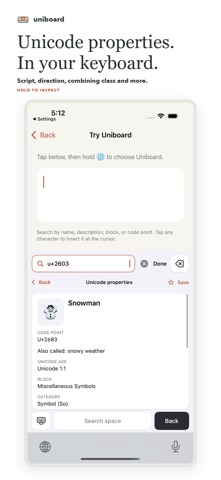
TYPE AND UNDERSTAND - Enable the Uniboard keyboard, search with its own keys, then tap a character or emoji to insert it at the cursor. The search query stays inside the keyboard. - Hold a key, or pause a pointer over it, to read its name, description, code points and properties without inserting it. Details include Unicode age, block, category, script, bidirectional class, combining class, decomposition and UTF-8 bytes where applicable. - Use the top-right backspace, including press-and-hold deletion, plus space, return and the globe menu. - Keep favorites and recent entries locally. The app and keyboard keep separate collections. Copy entries or combine text in the app's scratchpad.
PRIVATE AND OFFLINE No account, ads, analytics SDK or keyboard Full Access. Uniboard does not send your typing or searches to a server.
Enable the keyboard in Settings > General > Keyboard > Keyboards > Add New Keyboard > Uniboard. While typing, hold the globe key to switch to it.
Draft names and assignments may change. Character and emoji display depends on iOS fonts; some entries may appear as boxes or separate glyphs. Names, descriptions and properties remain readable. Preview markers for invisible characters and combining marks are not inserted.
The interface, Unicode names and descriptions are in English. iOS uses its own keyboard in password and phone-number fields, and some apps disable custom keyboards.
Requires iOS 17 or later.
Les notes des utilisateurs
Connecte-toi pour noter cette appli. Ce qui compte, c'est d'être honnête.
Pas encore de notes. Tu l'as essayée ? Sois le premier à la noter.
Plus d'apps Utilitaires
Les meilleures nouvelles apps Utilitaires de la semaine Vodoalarm: vodostaji BiHVodoalarm javlja kad tvoja rijeka naglo raste, pa ne moraš stalno gledati vodostaje
 Rokey: Romanian KeyboardType Romanian without worrying about diacritics
 Vibe Island: AI Agent MonitorVibe Island is a command center for the AI coding agents running on your Mac
 Private AuthenticatorPrivate Authenticator keeps your two-factor authentication codes on your own Apple…
 Photo Clean: Photo CleanupA crowded camera roll?
 Songbird AlarmWhat if the morning didn't have to start with a loud noise?