
Waylapse
Non revendiquéeWaylapse turns your running, cycling and walking records into flyover videos over…
Par Martin Tae · Santé et forme



En bref
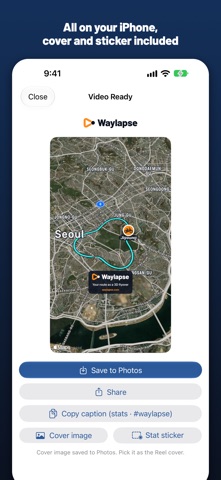
Waylapse turns workout records from Apple Watch, iPhone, or exports from apps like Garmin, Strava, and Wahoo into flyover videos over 3D satellite terrain. It is aimed at runners, cyclists, and walkers who want a shareable route video. Processing happens entirely on the device, and no account or server is needed.
Résumé par Debuts, d'après la fiche de l'App Store.À propos
Waylapse turns your running, cycling and walking records into flyover videos over satellite 3D terrain. No server, no account. Import a workout, pick a style, make the video.
■ Import • Workouts recorded on Apple Watch or iPhone (Health app) • GPX, TCX and FIT files — open exports from Garmin, Wahoo, COROS, Strava and others via the Files app or the share sheet • Garmin Connect account sync (optional)
■ 3D camera • Follow — a drone view that tracks your direction of travel • Orbit — slowly circles your current position • Overview — looks down on the whole route • Automatic intro and outro; satellite, satellite+labels, standard and dark 3D maps
■ Show yourself on the map • Dot, sport icon or heading arrow • Profile photo badge — pick from Photos or take one now, with a circular crop editor • Animated figure — your face runs, walks, pedals or treks, with a different motion for each sport
■ On-video stats • Title and date, distance, speed or pace, elevation, elapsed time, heart rate, elevation profile with progress • Three layout presets — the default top stack stays clear of Reels and Shorts UI • Toggle each item, choose the route color (including custom colors) • Background music — bundled tracks or your own files
■ Length and output • Compress the ride to any speed-up (60× by default) or set a fixed length • Portrait 9:16, landscape 16:9, square 1:1, feed 4:5; 720p/1080p; 24/30/60 fps • Save to Photos or send straight to the share sheet • Estimated render time from your device's measured speed, with a fast preset suggested when the phone gets warm
■ Your data stays on your device Everything is processed on your iPhone or iPad. Health data and routes never leave the device. The free version shows one optional, non-personalized rewarded ad when you choose to make a video in HD; for that ad, Google AdMob collects data such as a device identifier and approximate location (see App Privacy; no tracking). Pro has no ads. Maps and 3D terrain are provided by Apple Maps.
■ New in 1.9 • Simple editor: pick where you’ll post (Story, Reels, Shorts, YouTube) and a look, then Make Video • Music, photos, avatar and Hide home on one screen; every tool is still in Advanced • Free videos start right away in 720p; HD only when you want it
■ Editing and sharing • iPad support, map colors (Golden hour and Cool morning with Pro), a camera that keeps you in frame in canyons and by tall buildings, more accurate heart rate • Remastered music with 2 new tracks, smarter pacing through turns, the start and the finish, photo cards on the beat, and a route line above trees and buildings • Photos on the route (3 free, 30 with Pro), straight-to-Instagram Stories sharing and new workout alerts • Privacy zone — hide 200–500 m at the start and end • Trim, km/mi units, the workout's own time zone, automatic names • Heart-rate zone colors, cadence, highlight callouts • Multisport (triathlon, brick) and Crew (replay friends' records together, leader camera) • Reels, Shorts and YouTube presets, 4:5 feed • Caption copy, cover image and transparent stat sticker • Skip stops, dark 3D map and panel themes, slow-motion highlights, outro summary card with km splits
Available in 10 languages. The language in videos can be set separately.
Terms of Use (EULA): https://www.apple.com/legal/internet-services/itunes/dev/stdeula/ Privacy Policy: https://waylapse.com/privacy.html
Les notes des utilisateurs
Connecte-toi pour noter cette appli. Ce qui compte, c'est d'être honnête.
Pas encore de notes. Tu l'as essayée ? Sois le premier à la noter.
Plus d'apps Santé et forme
Les meilleures nouvelles apps Santé et forme de la semaine Orbit: Self-Care Habit TrackerYour healthy choices deserve more than a checkmark
 Wellbeing: Digital WellbeingBillions of people spend more time scrolling than they want to
 Court OrderCourt Order sorts out who plays next, so nobody has to
 Finn: Baby TrackerFinn is the calm, quick way to track your baby's feeds, sleep, diapers and pumping — and…
 Padel Score Tracker: PacoKeep padel score on your Apple Watch without looking at it
 DeskFlow: Workday MovementYou don't need another workout app