
Xsi: Day Planner & Journal
Non revendiquéeXsi turns your day into one timeline, and that timeline is your journal
Par 善康 梁 · Style de viePourquoi nous l'attendons : Xsi's clear timeline concept, on-device transcription, and well-documented features make its value easy to grasp quickly.




À propos
Xsi turns your day into one timeline, and that timeline is your journal.
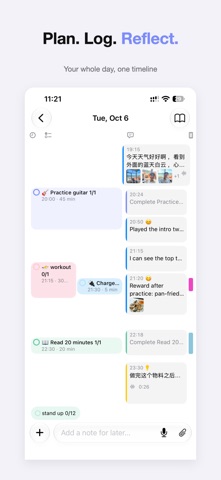
Most journal apps hand you a blank page and expect you to know what to write. Xsi doesn't ask you to write a journal. It asks you to live your day: schedule events, check off to-dos, tick habits, say a quick thought, snap a photo. Everything lands on one timeline in the order it happened, and that is already a journal. Want to say more? Add a written note.
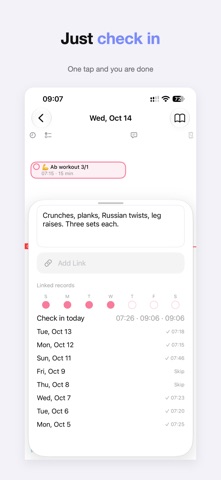
ONE DAY, ONE TIMELINE - Plans on the left (events, to-dos, habits), what actually happened on the right (notes, voice, photos, links) - Tap to check off, press and drag to reschedule. It works the way a calendar does - Tap anything to open a half-height panel and edit it in place, with the timeline still visible above
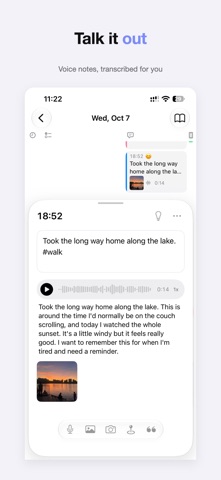
SAY IT, AND IT'S SAVED - Hold the mic and talk. Let go, and you have a voice note with a text transcript - Transcription runs on your phone. Nothing is uploaded - Ask Siri to add a note or an idea without opening the app - Start recording from the Action button, Control Center, or the Lock Screen - Share links, photos, or text from any app straight into your day
IDEAS DON'T GET LOST - Mark a quick note as an idea and it shows up in your Review tray - Unfinished to-dos wait there too: move to today, reschedule, or let go - Turn an idea into a to-do in one tap, or fold it into your journal
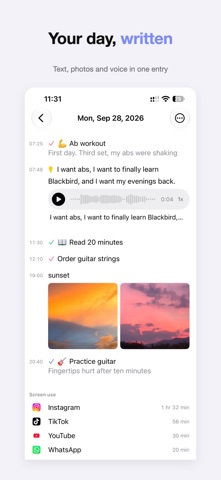
A JOURNAL YOU'LL ACTUALLY READ - Flip the day into reading mode: your timeline becomes a clean, chronological entry, plus anything you wrote - Browse by week, month, or #tag, search everything, export to Markdown - Notes support light Markdown and save as you type
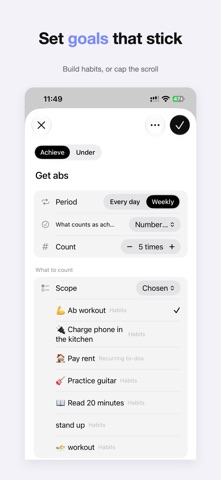
SEE WHERE YOUR TIME WENT - Choose the apps you want to track (set up with a Shortcuts automation), and see them next to the things you finished - Review any day, week, month, or year: how much time you spent, when, and on what - Set your own goals, like "workout 5 times a week" or "social apps under 1 hour a day," and compare only against yourself - No scores, no streaks, no rankings. Just the numbers - App usage comes from Shortcuts, so it's an approximation and won't match Apple's Screen Time exactly
LET AI DRAFT A PLAN (OPTIONAL) Describe a goal, copy the prompt into any AI app you like, paste the reply back, preview and tweak it, then import it as goals, habits, events, and to-dos. One tap to undo.
PRIVATE, AND FAIRLY PRICED - Your data stays on your device, with optional iCloud sync (Pro) - Voice transcription happens on-device - No account, no ads - Logging is free forever. You'll never lose access to your own entries - Xsi Pro is a one-time purchase, no subscription: iCloud sync, unlimited goals and tracked apps, weekly/monthly/yearly review, full-text search, and journal compilations - Export all your data any time (Markdown, photos, recordings)
For anyone who wants to plan without being buried by plans: studying for an exam, training, reading more, using the phone less, or just paying attention to your days.
Les notes des utilisateurs
Connecte-toi pour noter cette appli. Ce qui compte, c'est d'être honnête.
Pas encore de notes. Tu l'as essayée ? Sois le premier à la noter.
Plus d'apps Style de vie
Les meilleures nouvelles apps Style de vie de la semaine askoraAI 회상 노트
 Familjekalender – familjens årFamiljekalender är en delad kalender för hela familjen, där varje dag kan bära ett foto…
 My Anime TrackerAnime watch order, no guesswork.
 Sakinah: Quran, Adhkar & DuaSakinah brings the Qur'an, the prayer and daily remembrance together in one calm app, in…
 Mizwala: Prayer Times & QiblaMizwala is a calm, focused companion for the five daily prayers
 Primero DiosAbres el teléfono sin pensar y se te van veinte minutos