
AppFader - Per app volume
Non rivendicataYour Mac has one volume slider
Di Georgios Trigonakis · UtilitàPerché ce lo aspettiamo: AppFader solves a real problem with per-app volume, and its clear description and seven screenshots make the value easy to grasp.



In breve
AppFader - Per app volume starts with its name. It gives each app playing sound on a Mac its own volume slider, mute button and level meter from the menu bar. Its feature list ranges from per-app equalizers and output routing to recording any app to M4A, and the app runs entirely on the Mac with no accounts or tracking.
Riepilogo di Debuts, basato sulla scheda dell'App Store.Informazioni
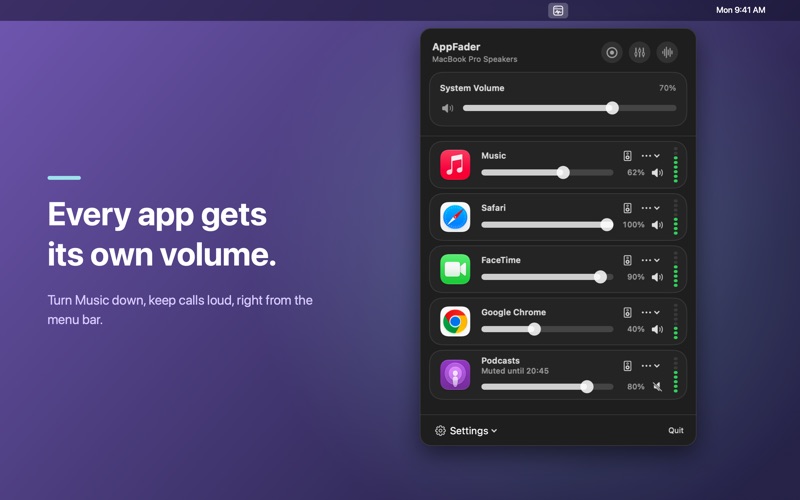
Your Mac has one volume slider. AppFader gives every app its own.
Turn Music down so you can hear a call. Keep a video quiet while a podcast plays. Record a lecture from Safari without recording anything else. AppFader lives in your menu bar and shows every app that is making sound, each with its own slider, mute button and live level meter.
AppFader Pro, a one-time purchase, unlocks everything listed under it below. If you bought AppFader before, Pro is already yours.
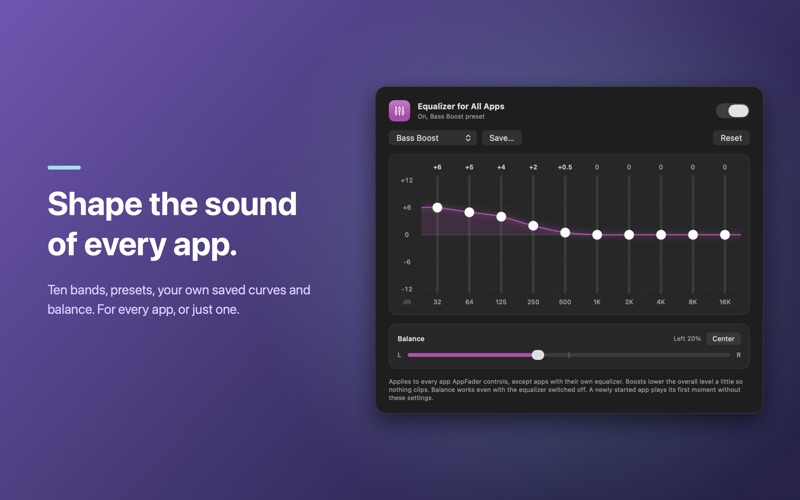
INCLUDED • A volume slider and mute button for every app playing audio, with live level meters • Browser audio grouped under the browser, so Safari and Chrome each get one slider • Mute All Others, and timed mute from 10 minutes to the end of the day. It comes back by itself • One mute rule, like muting Music while FaceTime is open • An equalizer for all apps, with presets and balance • Live visualizers in their own window, even full screen • An optional system volume slider
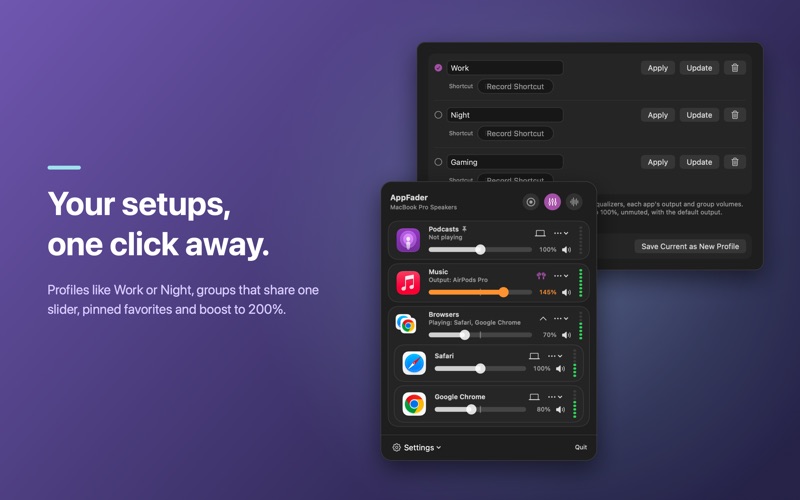
APPFADER PRO • Record any app, or everything you hear, to M4A: AAC up to 320 kbps or Apple Lossless. It stops by itself when the sound stops, and a library keeps your recordings • Quieter during calls: other apps dip while FaceTime, Zoom, Teams, Webex or a phone call plays • Output per app: send any app to different speakers or headphones • An equalizer for any single app, with your own saved presets • Profiles like Work or Night: every app's volume, mute, equalizer and output in one click • Groups that share one slider, and pinned favorites at the top • Volume boost up to 200%, with a limiter • Unlimited mute rules • Keyboard shortcuts to mute or record any app, Shortcuts app actions, and appfader:// links for Raycast and Stream Deck
STAYS OUT OF THE WAY • Lives in the menu bar, with an optional dot when an app is muted • Starts at login • Get a notification if a muted app starts playing again after a while • Works with built-in speakers, headphones, AirPods and USB audio, and follows you when you switch outputs
PRIVATE BY DESIGN AppFader needs macOS System Audio Recording permission to adjust each app's sound. Audio is mixed on your Mac in real time and is never sent anywhere. It is saved only when you press Record, to a folder you choose on your Mac. No accounts, no tracking.
Requires macOS 14.2 or later.
Le valutazioni delle persone
Accedi per valutare questa app. Conta essere sinceri.
Ancora nessuna valutazione. L'hai provata? Sii il primo a valutarla.
Altre app di Utilità
Le migliori nuove app di Utilità di questa settimana Vodoalarm: vodostaji BiHVodoalarm javlja kad tvoja rijeka naglo raste, pa ne moraš stalno gledati vodostaje
 NadhirNadhir is an independent app
 Rokey: Romanian KeyboardType Romanian without worrying about diacritics
 Vibe Island: AI Agent MonitorVibe Island is a command center for the AI coding agents running on your Mac
 Private AuthenticatorPrivate Authenticator keeps your two-factor authentication codes on your own Apple…
 Photo Clean: Photo CleanupA crowded camera roll?