
BoardView Reader
Non rivendicataBoardView Reader answers the two questions every motherboard repair tech asks: where do…
Di djamal guellati · UtilitàPerché ce lo aspettiamo: Its clear focus on board repair workflows, paired schematics, and included demo files makes the value obvious to technicians.



In breve
BoardView Reader is a utilities app for motherboard repair technicians that opens boardview and PDF schematic files. It can locate a power rail or component on the board, log diode-mode readings compared against a known-good board, and show the matching schematic page for a tapped part. One standout feature is that a board and its schematic with the same name are paired automatically on import.
Riepilogo di Debuts, basato sulla scheda dell'App Store.Informazioni
BoardView Reader answers the two questions every motherboard repair tech asks: where do I measure this power rail, and which part do I replace? Open the board's boardview and schematic, locate the rail in one tap, test it with your multimeter and find the reference and value of the component to change — on your phone, tablet and computer.
LOCATE A POWER RAIL • Search a rail (PPBUS_G3H, PP3V3_S5, VCC_MAIN…) or a component in a single field • Every point on the same net lights up on the board, top and bottom • Spot the most accessible capacitor or test point to place your probe • Flip the board, rotate 90°, show one side or both, just like on the bench
TEST FOR SHORTS • Measure the rail in diode mode and log the reading in one tap • Compared with a known-good board, it is judged at once: matches, slight difference, large difference, likely short, open line • Your reference values apply to every board with the same number; share them as CSV
FIND THE PART TO REPLACE • Tap a component: its reference, value, voltage, tolerance and package, read from the schematic • Side, pin count and the net of each pin in the inspector
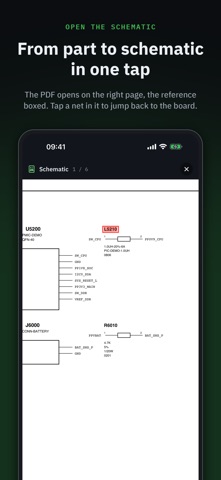
THE SCHEMATIC IN THE RIGHT PLACE • Import the board and its PDF schematic with the same name: they are paired automatically • Tap a component: the schematic opens on the right page, the reference boxed • Tap a net or a reference in the schematic: "Show on board" takes you back
AN ORGANISED SHOP • Sort boards into folders: in repair, donors, customers… • Each board keeps its schematic and its readings • On a computer: hover info with the mouse and customisable keyboard shortcuts
FORMATS: BRD (Test_Link, including encoded), BRD2, BDV, BVR and BVR3, CST.
A demo board and schematic are included so you can try everything right away.
FREE TO READ — Opening and reading boards is free. The linked schematic, diode-mode readings and the unlimited library are part of Pro: a one-time purchase, no subscription, with a full 7-day free trial.
No ads, no account, no ad tracking, works offline. Available in English, French, German, Italian, Spanish and Portuguese.
Le valutazioni delle persone
Accedi per valutare questa app. Conta essere sinceri.
Ancora nessuna valutazione. L'hai provata? Sii il primo a valutarla.
Altre app di Utilità
Le migliori nuove app di Utilità di questa settimana Drainly: Speaker CleanerMuffled speaker after a splash, rain, or a sweaty workout?
 Photo & PDF Resize: KBFile too large to upload?
 Arvectum Proxy LauncherArvectum Proxy Launcher is a network utility that routes your iPhone through a proxy you…
 Look Twice: Scam & AI CheckLook twice before you click
 Vodoalarm: vodostaji BiHVodoalarm javlja kad tvoja rijeka naglo raste, pa ne moraš stalno gledati vodostaje
 Sift: Photo CleanupYour camera roll is full of blurry shots, old screenshots and videos you'll never watch…