
CardTally - Loyalty Wallet
Non rivendicataEvery loyalty, membership and gift card in one place
Di SAI BABU DASARI · Stile di vita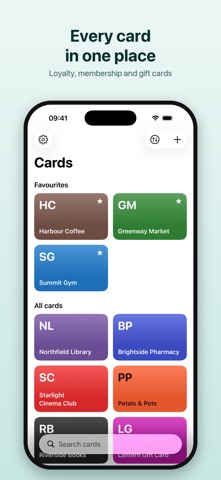

In breve
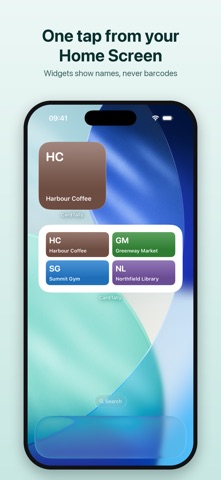
CardTally - Loyalty Wallet keeps loyalty, membership and gift cards in one place on your iPhone. Barcodes open full brightness at the till, and cards without barcodes, such as parking permits, are stored with their number shown large. One detail that stands out: widgets and Lock Screen buttons show card names only, never barcodes.
Riepilogo di Debuts, basato sulla scheda dell'App Store.Informazioni
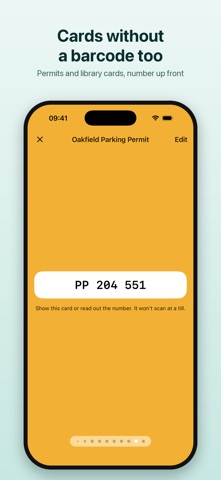
Every loyalty, membership and gift card in one place. Scan a card's barcode once and it's ready at the till at full brightness. Cards without a barcode — parking permits, library and membership cards — are kept too, with the number shown large.
AT THE TILL • Tap a card and its barcode fills the screen at full brightness; your own brightness comes back afterwards • Long barcodes turn sideways with a tap, so they're as big as they can be • Swipe between cards without going back • Each tile shows the shop's colour, or your card's own picture if you took one • Favourites first, then everything else — in your order, A–Z, or by what you used last
ADDING A CARD • Point the camera at the barcode and it's read in a moment • Pick the shop from the list or type any name, and the colour comes with it • Or type the number, or choose a picture of the barcode you already have • Add many cards at once from screenshots of your loyalty apps: every barcode is read on your iPhone, and the shop is guessed from the words on the screenshot • Or bring cards in from a file: a CardTally backup, a card someone sent you, or a list from another app • Every common barcode: EAN, UPC, Code 128, Code 39, Code 93, ITF, Codabar, QR, PDF417, Aztec and Data Matrix
CARDS WITHOUT A BARCODE • Parking permits, library and membership cards: keep pictures of the front and back, with the number shown large • CardTally reads the number off the picture for you to check • It says plainly which cards scan at a till and which you show or read out
ON YOUR HOME SCREEN AND LOCK SCREEN • Widgets open a card in one tap, and show names only — never a barcode • A large widget holds eight cards • Add a button to Control Centre or the Lock Screen that opens the card you choose (iOS 18 and later)
BACK UP AND SHARE • Save every card, pictures and all, to one file you keep where you like — on your iPhone or in iCloud Drive • Send a card to someone as a small file that opens in their CardTally
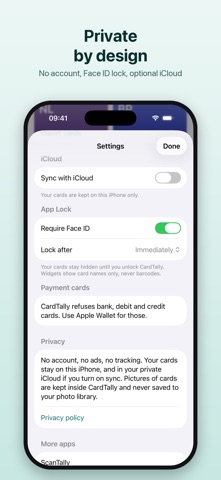
PRIVATE BY DESIGN • No account and no sign-up • Your cards stay on your iPhone — or in your own private iCloud, if you turn on sync • Optional App Lock with Face ID • Pictures of cards never go to your photo library, and leave CardTally only in a backup or a card you send • No ads, no tracking, no data collected
WHAT IT WON'T TAKE Bank, debit and credit cards are refused. Keep those in Apple Wallet.
SIMPLE PRICING Your first 5 cards are free. After that, a one-time unlock adds as many as you like. No subscription. Every card you've added stays yours to show, edit and delete, whatever you choose.
Le valutazioni delle persone
Accedi per valutare questa app. Conta essere sinceri.
Ancora nessuna valutazione. L'hai provata? Sii il primo a valutarla.
Altre app di Stile di vita
Le migliori nuove app di Stile di vita di questa settimana askoraAI 회상 노트
 Familjekalender – familjens årFamiljekalender är en delad kalender för hela familjen, där varje dag kan bära ett foto…
 My Anime TrackerAnime watch order, no guesswork.
 SCNT ControlSCNT conecta tu teléfono con tu difusor de aroma por Bluetooth y te da el control…
 Sakinah: Quran, Adhkar & DuaSakinah brings the Qur'an, the prayer and daily remembrance together in one calm app, in…
 Mizwala: Prayer Times & QiblaMizwala is a calm, focused companion for the five daily prayers