
MD Worktree
Non rivendicataMD Worktree is a Markdown workspace for people who read, edit and organise a lot of…
Di Code IT Ltd. · UtilitàPerché ce lo aspettiamo: A well-described Markdown workspace with clear value, a privacy focus and a generous free tier.




In breve
MD Worktree is a Markdown workspace for Mac that lets people read, edit and organise project folders, including the notes, plans and specs that AI tools produce. It offers a live preview, a hunk-by-hunk view of changes made on disk, and quick capture from the menu bar. What stands out is that everything stays on the device, with no account or analytics.
Riepilogo di Debuts, basato sulla scheda dell'App Store.Informazioni
MD Worktree is a Markdown workspace for people who read, edit and organise a lot of Markdown, especially the notes, plans, specs and instructions that AI tools leave behind.
Add each project folder once. Switch between projects with Control-digit shortcuts or the project switcher, and find any document with Quick Open or a search across the whole project.
WORK ACROSS PROJECTS • Every project is a folder you choose. MD Worktree only sees the folders you give it. • A Markdown-only file tree, plus Recent, Agents and Search views • Tabs, a split editor, Quick Open and a command palette • Git status badges, including for linked worktrees
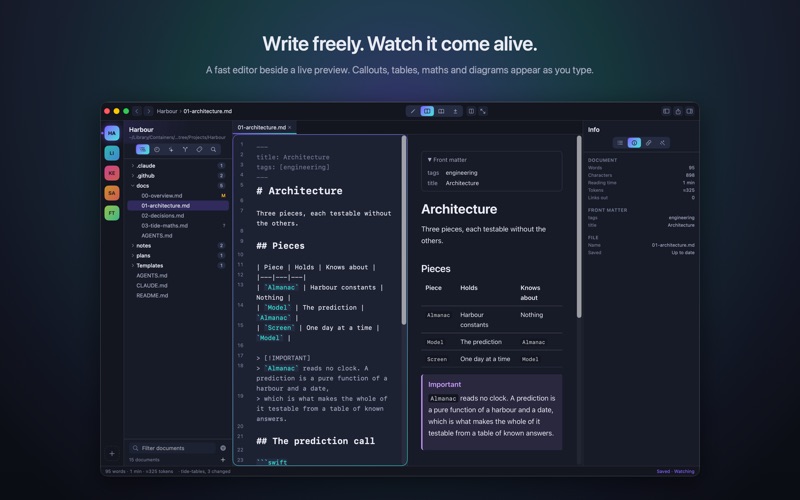
WRITE WITH A LIVE PREVIEW • A native editor with syntax highlighting, smart lists and table alignment • A preview beside it that renders callouts, wiki links, maths, diagrams and highlighted code • Six themes
WHEN A TOOL CHANGES YOUR FILES • A document that changes on disk is picked up, and you can see exactly what changed, hunk by hunk, before you keep your version or take theirs.
EXPORT AND SHARE • Export to PDF and standalone HTML, plus Markdown and plain text, free • Word, Rich Text and image export, and export of a whole folder or project, in Pro • Copy for AI puts a document or project on the clipboard with token counts (Pro) • A Quick Look extension previews Markdown in Finder
QUICK CAPTURE A menu bar note field adds a line to a Markdown file you choose.
PRIVATE BY DESIGN No account, no analytics, and nothing leaves your Mac. The AI actions run on your device with Apple Intelligence, on Apple silicon Macs where it is available.
FREE, WITH ONE OPTIONAL UPGRADE Use up to three projects for free, with everything not marked Pro. MD Worktree Pro is a one-time purchase, shared with your family, that unlocks unlimited projects, version history with restore, Word, Rich Text and image export, whole-project export, Copy for AI, on-device AI actions, custom reading styles and project-wide replace. Try every Pro feature free for 14 days.
Requires macOS 26 or later.
Le valutazioni delle persone
Accedi per valutare questa app. Conta essere sinceri.
Ancora nessuna valutazione. L'hai provata? Sii il primo a valutarla.
Altre app di Utilità
Le migliori nuove app di Utilità di questa settimana Drainly: Speaker CleanerMuffled speaker after a splash, rain, or a sweaty workout?
 Photo & PDF Resize: KBFile too large to upload?
 Arvectum Proxy LauncherArvectum Proxy Launcher is a network utility that routes your iPhone through a proxy you…
 Vodoalarm: vodostaji BiHVodoalarm javlja kad tvoja rijeka naglo raste, pa ne moraš stalno gledati vodostaje
 Dusty: Photo Cleaner PetYour camera roll's new pet
 FairAuth: AuthenticatorFairAuth creates the codes for two-step verification on iPhone and iPad