
Pastronaut: Clipboard History
Non rivendicataYour iPhone remembers only the last thing you copied
Di Berk Akbay · ProduttivitàPerché ce lo aspettiamo: Clear value, thoughtful one-tap saving, and strong privacy make this a compelling clipboard upgrade for iPhone users.





In breve
Pastronaut: Clipboard History keeps a running history of everything you save, and its keyboard pastes any saved clip into any app with one tap. It is aimed at iPhone users who want more than the single last copied item, with a Mac companion app that syncs through the user's own iCloud. One standout detail: the app is free, open source, and has no account, servers, or analytics.
Riepilogo di Debuts, basato sulla scheda dell'App Store.Informazioni
Your iPhone remembers only the last thing you copied. Pastronaut remembers what you save — and its keyboard pastes any of it, in any app, with one tap. Use it on its own, or with Pastronaut for Mac to have your Mac's clipboard on your iPhone too.
PASTE ANYTHING, IN ANY APP – The Pastronaut keyboard shows your clips in a tidy two-column grid, newest first – The latest copy from your Mac waits at the top – Tabs for recent, pinned, Mac, iPhone and each collection; search with letters and numbers
SAVE IN ONE TAP iOS lets only the app in front read the clipboard, so Pastronaut makes saving one tap: – Open the app ("Save Clipboard on Opening") – Tap Paste in the Pastronaut keyboard – Share text to Pastronaut from any app – Use the Control Center button, Back Tap or the Action button – Or type a new clip with +
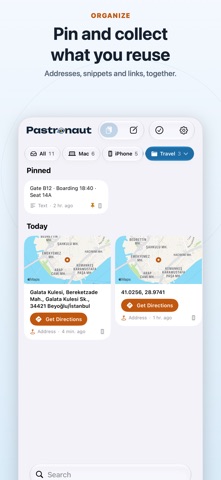
EVERY KIND, ITS OWN CARD – Addresses and map coordinates: a map and Get Directions – Links: a page preview (sign-in and reset links are never opened) – Code in color, colors as swatches, Call and Write Email buttons – Prefer it calm? Turn previews off for a compact list
PIN, COLLECT, FIND – Pin what you reuse; keep addresses, snippets or a project's links in collections – Search by text, or filter by kind and date
WIDGETS AND SHORTCUTS – Recent clips on the Home Screen (also from one collection), the latest on the Lock Screen – Shortcuts: Get Clip, Get Latest Clip, Copy Latest Clip, Get Recent Clips, Save to Pastronaut, Add to Collection
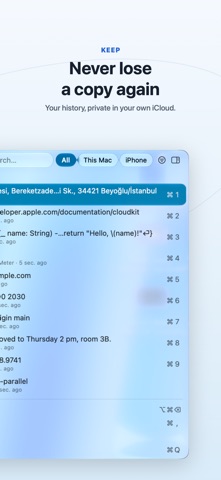
ON YOUR MAC TOO Pastronaut for Mac keeps your whole history in the menu bar — press Space to preview, paste a list in order, filter as you type — and syncs it with your iPhone through your own iCloud.
PRIVATE BY DESIGN – No account, no servers, no analytics, no ads – Your clips stay on your devices and in your private iCloud database; text is encrypted on your device before upload, and end-to-end with Advanced Data Protection – Optional Face ID lock; one-time codes, card numbers and IBANs are never saved automatically
FREE AND OPEN SOURCE No subscription and no in-app purchases. The source code is public.
Le valutazioni delle persone
Accedi per valutare questa app. Conta essere sinceri.
Ancora nessuna valutazione. L'hai provata? Sii il primo a valutarla.
Altre app di Produttività
Le migliori nuove app di Produttività di questa settimana ChickMark: Habit TrackerChickMark is a simple habit tracker for routines, goals, and reminders
 Dayflint: One Thing a DayToo many priorities?
 Snappy Do ItSix connected modes. One traceable journey.
 Fristo CAFMFristo is the app for Fristo CAFM, the facility management software
 UhWhat? Voice NotesCatch the thought before it disappears
- BeginAnywayMorning alarm for hard tasks: set one task, prove you started, build a streak