
PayView: Bill Tracker
Non rivendicataKnow what's due, when, and from which account, without handing your bank login to anyone
Di Naji Rizig · Finanza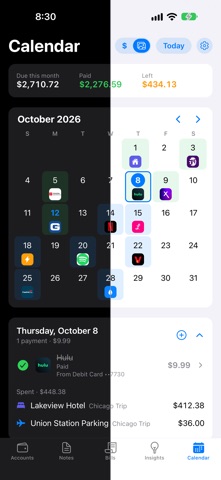



In breve
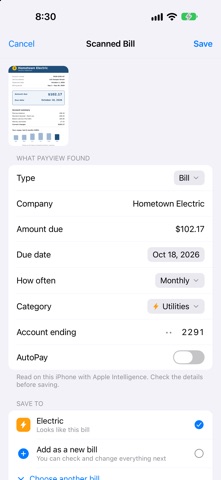
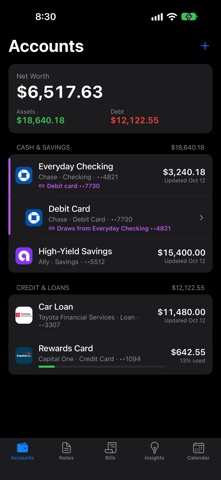
PayView: Bill Tracker is a finance app that keeps bills, subscriptions, expenses and accounts in one place on the iPhone, with no sign-up and no bank connection. It is aimed at people who want to see upcoming due dates, safe-to-spend amounts and debt payoff estimates while keeping data private. One notable feature is that bills can be added by scanning a photo, PDF or receipt, and the app fills in the details.
Riepilogo di Debuts, basato sulla scheda dell'App Store.Informazioni
Know what's due, when, and from which account, without handing your bank login to anyone.
PayView keeps your bills, subscriptions, expenses and accounts in one clean, private place. No sign-up, no bank connection, no ads.
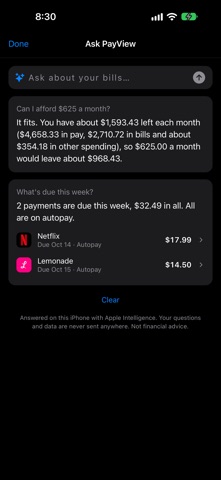
ASK PAYVIEW - Ask questions like "What's due this week?", "Can I afford $625 a month?" or "When will I be debt-free?" - Answers are worked out on your iPhone from your own bills, so the numbers always match the app - Uses Apple Intelligence on supported iPhones, and works on every iPhone
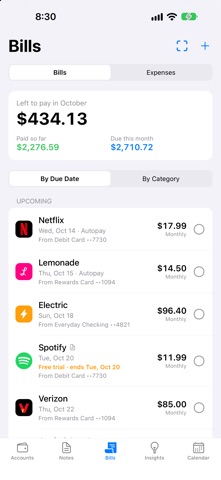
BILLS AND SUBSCRIPTIONS - Weekly, every two weeks, twice a month, monthly, quarterly, every six months or yearly - Autopay bills mark themselves paid on their due date - Free-trial tracking with a reminder the day before the trial ends - Link each bill to the account it's paid from - Scan a bill or receipt from a photo, PDF or your camera, and PayView fills in the details - Quick Start: tap the bills you have and see what they cost each month and year
EXPENSES - Track one-time spending like gas, meals and hotels next to your bills - Use the built-in categories or create your own - Tag a trip or project, mark what's reimbursable, and export a PDF or spreadsheet report
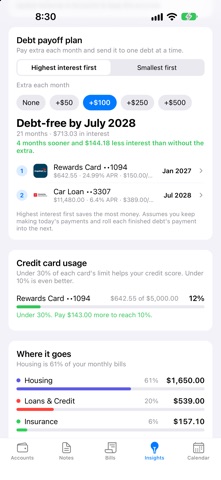
INSIGHTS - Safe to spend: what's left after the bills due before each paycheck - Debt payoff plan: highest interest first or smallest first, with extra payments - Credit card usage, what changed this month, and when your money goes out - Drag sections into the order you like and hide the rest
CALENDAR - See every due date, expense and the month's total at a glance - Tap a day to see what's due and check payments off
LOANS AND CREDIT - Watch balances go down as you mark payments paid, with interest counted - Estimated payoff date that updates as you pay, including extra payments
REMINDERS - Pick how many days before and what time - Each reminder names the bill, amount, due date and paying account, or reminds you to have the money ready - Low-balance warnings, a check-in when something's unpaid, and a Sunday summary
PRIVATE BY DESIGN - Face ID lock - Your bills and balances stay on your iPhone, with an automatic backup to your own iCloud Drive that you can turn off
Also: notes linked to bills with a built-in calculator, and light and dark mode.
PayView is a tracking tool, not financial advice. Payoff dates and Ask PayView answers are estimates based on what you enter.
Le valutazioni delle persone
Accedi per valutare questa app. Conta essere sinceri.
Ancora nessuna valutazione. L'hai provata? Sii il primo a valutarla.
Altre app di Finanza
Le migliori nuove app di Finanza di questa settimana NjukiYour rent should do more than pay for where you live
 Qwiky AIQuiky AI helps you understand and organise your everyday finances in one clear place
 Inflation WatchInflation Watch turns official price data into plain English
 uOwe: Split Bills & BudgetuOwe keeps shared costs fair and your own money clear
 Debtless: Debt-Free by WhenYou are about to know when you will be free
 Pace: Daily Budget & SpendPace turns your monthly budget into one calm number: what you can spend today