
PDF Builder Pro: All in One
Non rivendicataPDF Builder Pro: All-in-One is a complete PDF toolkit for your iPhone and iPad
Di Viraj Malani · UtilitàPerché ce lo aspettiamo: A clear, well-organized PDF toolkit with broad everyday appeal and strong value for students and professionals.


In breve
PDF Builder Pro: All-in-One is a utilities app for iPhone and iPad that converts images to PDF and PDF pages to images, merges and splits files, signs documents, and extracts text with OCR. It is aimed at students, professionals and small business owners who handle paperwork on the go. One notable feature is the option to draw a signature with a finger or Apple Pencil and place it anywhere on a page.
Riepilogo di Debuts, basato sulla scheda dell'App Store.Informazioni
PDF Builder Pro: All-in-One is a complete PDF toolkit for your iPhone and iPad. Convert images to PDF, turn PDF pages into images, merge and split files, sign documents, extract text with OCR and edit pages, all in one simple app.
Whether you are a student submitting an assignment, a professional sending a signed contract, or someone organizing everyday paperwork, PDF Builder Pro helps you get it done in a few taps.
IMAGE TO PDF - Convert photos from your library or camera into PDF - Combine multiple images into a single document - Reorder images before creating your file - Perfect for notes, receipts, forms, ID copies and certificates
PDF TO IMAGE - Turn PDF pages into high-quality JPG or PNG images - Export a single page or the entire document - Share images instantly with any app
MERGE PDF - Combine two or more PDF files into one - Arrange the order of your files before merging - Ideal for reports, applications and study material
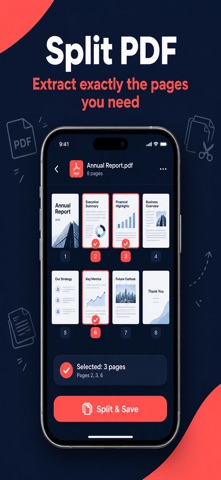
SPLIT PDF - Break a large PDF into smaller files - Extract only the pages you need - Make documents easier to share
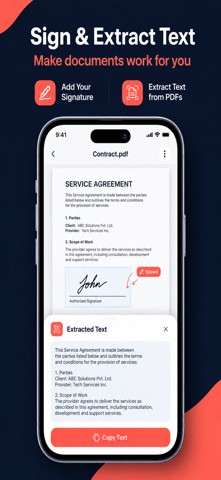
SIGN PDF - Add your signature to any PDF - Draw your signature with your finger or Apple Pencil - Move, resize and place it exactly where you want - Sign contracts and forms without printing a single page
OCR: EXTRACT TEXT - Recognize text from photos and scanned documents - Copy the text or save it for later use - Turn scanned pages into text you can search and reuse
PAGE EDITOR - Rotate, delete and reorder pages - Rearrange pages with simple drag and drop - Tidy up a document before sending it
WHY PEOPLE CHOOSE PDF BUILDER PRO - All the tools you need in one app - Clean, simple design that is easy to use - Fast processing, even for larger files - Share your finished PDF through Mail, Messages, AirDrop, WhatsApp or the Files app
PERFECT FOR - Students: merge notes and turn photos of handwritten pages into PDF - Professionals: sign contracts and combine reports for clients - Small business owners: organize invoices, receipts and forms - Everyone: manage documents on the go
HOW IT WORKS 1. Open the app and pick a tool 2. Select your images or PDF files 3. Merge, split, sign, edit or extract text 4. Save and share your finished file
Le valutazioni delle persone
Accedi per valutare questa app. Conta essere sinceri.
Ancora nessuna valutazione. L'hai provata? Sii il primo a valutarla.
Altre app di Utilità
Le migliori nuove app di Utilità di questa settimana Drainly: Speaker CleanerMuffled speaker after a splash, rain, or a sweaty workout?
 Photo & PDF Resize: KBFile too large to upload?
 Arvectum Proxy LauncherArvectum Proxy Launcher is a network utility that routes your iPhone through a proxy you…
 Look Twice: Scam & AI CheckLook twice before you click
 Vodoalarm: vodostaji BiHVodoalarm javlja kad tvoja rijeka naglo raste, pa ne moraš stalno gledati vodostaje
 Ham Radio IQHam Radio IQ answers one question: which band is open right now, from where you are, and…