
PhoneBlackBox - Dash Cam
Non rivendicataA dash cam that starts with the phone you already have
Di SEUNG JUN KIM · UtilitàPerché ce lo aspettiamo: A clear, feature-rich dash cam that turns an old phone into a useful driving recorder.



In breve
PhoneBlackBox - Dash Cam turns a phone into a dash cam for cars, bikes, and motorcycles, using the rear camera. It loops recordings automatically, keeps impact-triggered clips separate, and stores GPS routes that can be viewed on a map or exported as GPX. The store text notes that recording only runs while the app is on screen and that videos stay on the phone.
Riepilogo di Debuts, basato sulla scheda dell'App Store.Informazioni
A dash cam that starts with the phone you already have. Mount it in a car, on a bike or a motorcycle — the rear camera records your ride.
■ Features
• 3-minute loop recording Clips are split at the interval you choose (1–10 min). When the stored duration (up to 24 h) or the storage limit (up to 64 GB) is reached, the oldest normal clips are deleted automatically, so you never have to clean up manually.
• Impact (event) recording When an impact is detected while driving, that clip is kept separately and is never loop-deleted. If the impact happens within 10 seconds of a clip boundary, the previous and next clips are kept too. Sensitivity has three levels (3.0g / 2.0g / 1.3g), and you can also mark an event by hand.
• Live preview with speed and time While recording you see the current speed (km/h or mph), date and time, GPS status and impact level. Turn on the speed warning to be alerted on screen and by vibration above a speed you set.
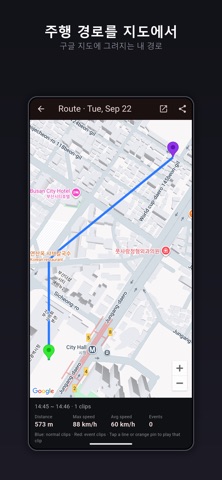
• GPS route and maps Every clip stores its route and speed. During playback a mini map in the corner follows your position; tap it to open the full map. You can view a whole day's route on one map, open it in Google Maps, or export the track as a GPX file.
• Browse your recordings Thumbnails like a gallery, with filters by date and time of day. A 24-hour bar shows at a glance which hours were recorded and when events happened. Playback supports fullscreen, pinch and double-tap zoom, playback speed and auto-play of the next clip.
• And more Photo capture while recording / auto-start recording on launch / screen-off power saving mode / orientation lock / share clips / export to Photos / Korean and English / low-storage warning
■ Good for
- Driving a rental or borrowed car with no dash cam - Recording bike, motorcycle or scooter rides - A second recorder alongside an existing dash cam
■ Before you start
- Recording uses a lot of battery. Keep the phone plugged in. - Videos stay on the phone (app storage) and are never uploaded. - Recording runs while the app is on screen (no background recording). - Do not operate the phone while driving. Mount it and start recording before you set off.
Le valutazioni delle persone
Accedi per valutare questa app. Conta essere sinceri.
Ancora nessuna valutazione. L'hai provata? Sii il primo a valutarla.
Altre app di Utilità
Le migliori nuove app di Utilità di questa settimana Drainly: Speaker CleanerMuffled speaker after a splash, rain, or a sweaty workout?
 Photo & PDF Resize: KBFile too large to upload?
 Arvectum Proxy LauncherArvectum Proxy Launcher is a network utility that routes your iPhone through a proxy you…
 Look Twice: Scam & AI CheckLook twice before you click
 Vodoalarm: vodostaji BiHVodoalarm javlja kad tvoja rijeka naglo raste, pa ne moraš stalno gledati vodostaje
 Sift: Photo CleanupYour camera roll is full of blurry shots, old screenshots and videos you'll never watch…