
Post Friendly
Non rivendicataPost Friendly takes a Markdown file and turns it into a published WordPress post, then…
Di James Nerlinger · ProduttivitàPerché ce lo aspettiamo: Careful, well-explained workflow that turns Markdown into native WordPress posts and hands off social sharing cleanly.


In breve
Post Friendly is a Mac productivity app that turns a Markdown file into a published or scheduled WordPress post, with images uploaded to the media library and native Gutenberg blocks. It is aimed at bloggers who want to skip the block editor for the final publishing step. One notable point: after publishing, it copies LinkedIn and Facebook text to the clipboard and opens each network's editor, since those networks do not allow the app to post directly.
Riepilogo di Debuts, basato sulla scheda dell'App Store.Informazioni
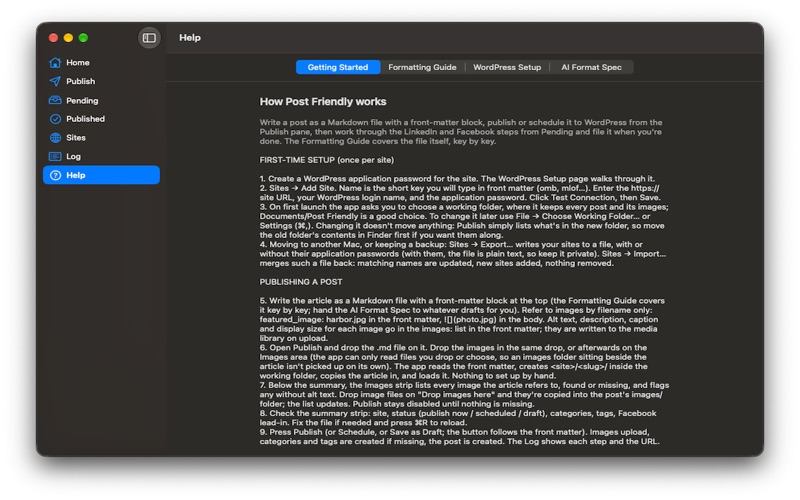
Post Friendly takes a Markdown file and turns it into a published WordPress post, then walks it out to your social networks. It exists because the last step of writing, getting a finished piece onto your blog and in front of readers, should not mean an evening in the block editor.
Write your article in Markdown with a short front-matter block at the top: title, site, categories, tags, a publish time, the images you'll use, and the lead-in you want on Facebook. Drop the file on Post Friendly along with its images. The app uploads the images to your media library with alt text, captions and descriptions, creates any categories or tags the site doesn't have yet, and publishes or schedules the post as native Gutenberg blocks, so it opens in the block editor ready to edit if you ever need to. Sections, quotations, separators, tables, code, right-to-left text such as Hebrew, and image sizing all come through as you wrote them.
Post Friendly is built to work alongside an AI. It ships with a format specification you paste into any AI prompt so that whatever drafts with you produces a file the app accepts as is, and a Formatting Guide that explains every key and construct for when you write by hand.
Once a post is on WordPress, Pending shows it with the steps that remain. Write LinkedIn Article copies the body as rich text and opens LinkedIn's article editor; paste, add the cover, publish or schedule. Share on LinkedIn copies your blurb for the share post. Share on Facebook copies your lead-in and opens Facebook's share dialog on the live post. File it when you're done. The app does everything the networks allow and hands you the rest on the clipboard, because Facebook does not permit apps to post to personal profiles and LinkedIn has no interface for articles.
Post Friendly works with any WordPress site on version 5.6 or later over HTTPS, self-hosted or on a managed host, using an application password tied to your account. Nothing leaves your Mac except the posts you send to your own sites; there is no account, no cloud service and no tracking. Sites can be exported and imported to move between Macs.
Post Friendly is made by Deep Dark Abyss Productions.
Le valutazioni delle persone
Accedi per valutare questa app. Conta essere sinceri.
Ancora nessuna valutazione. L'hai provata? Sii il primo a valutarla.
Altre app di Produttività
Le migliori nuove app di Produttività di questa settimana ChickMark: Habit TrackerChickMark is a simple habit tracker for routines, goals, and reminders
 Dayflint: One Thing a DayToo many priorities?
 Snappy Do ItTurn photos, text and voice into tasks, plans and more.
 Fristo CAFMFristo is the app for Fristo CAFM, the facility management software
 UhWhat? Voice NotesCatch the thought before it disappears
- BeginAnywayMorning alarm for hard tasks: set one task, prove you started, build a streak