
Privvy: Screen Privacy Remote
Non rivendicataPrivvy is a screen privacy remote for your Mac and Windows PC
Di Grimado Global Group LLC · UtilitàPerché ce lo aspettiamo: A clear, well-explained idea with a timely audience of developers and shared-workspace users.


In breve
Privvy: Screen Privacy Remote covers the screens of a Mac or Windows PC so nearby people cannot read them, while AI agents and automations keep running underneath. It is aimed at developers leaving agents running, shared offices, sensitive-screen teams, and parents or teachers. The iPhone works as a remote that can see, lock and control each computer, with Face ID required before anything is uncovered.
Riepilogo di Debuts, basato sulla scheda dell'App Store.Informazioni
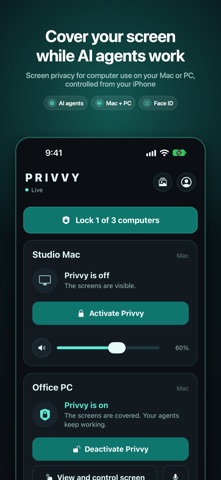
Privvy is a screen privacy remote for your Mac and Windows PC. It covers the computer's screens so no one nearby can see what is on them, while your AI agents, computer-use automations and apps keep working underneath. Your iPhone is the remote: see, lock, watch and control every computer from afar.
Privvy needs the free Privvy app on your Mac or Windows PC. Get it at privvyapp.ai, sign in to the same account here, and your computers appear in the app.
MADE FOR - Developers who leave AI coding agents running on a Mac or PC - Anyone whose computer sits in a shared office, home or classroom - Teams with sensitive screens: finance, legal, health, support - Parents and teachers who want a screen blacked out on demand
WITH THE FREE APP - See whether each computer is covered, from anywhere - Cover or uncover your first computer with one tap - Get an alert on your phone and Apple Watch when someone tries to get past the cover - Face ID before anything is uncovered
WITH PRIVVY PRO - Live view of the covered screen - Remote control: tap, type and scroll on your computer from your phone - Talk and listen through the computer - Camera captures of whoever tries to get in, sent to your phone - Lock every computer at once, up to 5 computers - An alert when macOS shows one of its own prompts above the cover
YOUR PRIVACY - Settings are encrypted on your computers before they reach Privvy Cloud - No ads, no tracking, no data sold - Optional app passcode on top of Face ID
Apple Watch: see your computers, get alerts and lock or unlock from your wrist.
Privvy Pro is available in the app as an auto-renewing subscription (monthly or yearly) or a one-time Lifetime purchase. Payment is charged to your Apple ID. Subscriptions renew automatically unless cancelled at least 24 hours before the end of the period; manage or cancel them in Settings > Apple ID > Subscriptions.
Terms: https://privvyapp.ai/terms Privacy: https://privvyapp.ai/privacy Support: support@privvyapp.ai
Le valutazioni delle persone
Accedi per valutare questa app. Conta essere sinceri.
Ancora nessuna valutazione. L'hai provata? Sii il primo a valutarla.
Altre app di Utilità
Le migliori nuove app di Utilità di questa settimana Vodoalarm: vodostaji BiHVodoalarm javlja kad tvoja rijeka naglo raste, pa ne moraš stalno gledati vodostaje
 Letter Explainer: PostklarGot an official letter and only understand half of it?
 NadhirNadhir is an independent app
 Rokey: Romanian KeyboardType Romanian without worrying about diacritics
 Vibe Island: AI Agent MonitorVibe Island is a command center for the AI coding agents running on your Mac
 Private AuthenticatorPrivate Authenticator keeps your two-factor authentication codes on your own Apple…