
Sill – Mac Streaming
Non rivendicataSill shows a window from your Mac, or its whole desktop, on your iPhone or iPad, and…
Di NOAH WILLIAM SAFFER · UtilitàPerché ce lo aspettiamo: Clear value, a thorough and well-organized description, and a privacy-minded design make this a strong debut for Mac streaming fans.



Informazioni
Sill shows a window from your Mac, or its whole desktop, on your iPhone or iPad, and lets you use it with touch, a keyboard, a touchscreen trackpad or Apple Pencil. It streams straight from your Mac to your device over your own network, so there is no account to create and no server in between. You pair each device once, and every connection is encrypted. Both parts are free: the Sill app for iPhone and iPad, and Sill for Mac.
Streaming:
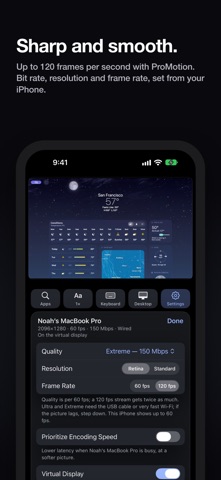
* Any single Mac window, or the whole Desktop, on your iPhone or iPad * Hardware HEVC video, up to 120 fps on ProMotion screens (60 elsewhere); the rate follows each device * Seven bitrate quality presets, from Low (4 Mbps) to Extreme (150 Mbps), plus Resolution, a frame-rate limit and Prioritize Encoding Speed * Text size (Aa): resizes your Mac window to fit your screen, so text is the size you want * Optional virtual display: a window streams from its own HiDPI display, sized to your device, and keeps updating even when covered on your Mac; full-screen video works too
Controls:
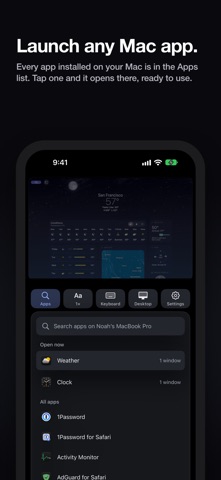
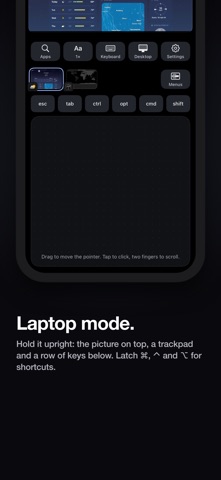
* Touch: tap to click, drag to scroll with momentum, touch and hold to right-click * Apple Pencil as the mouse, with hover * Software and hardware keyboards, with ⌘, ⌃ and ⌥ shortcuts, plus a key row with latching modifiers and a Spotlight key * Laptop layout when you hold the device upright: the picture on top, a key row and a trackpad (two-finger scroll, two-finger tap, hold then drag, three-finger gestures for Mission Control, App Exposé, switching Spaces, Apps and Show Desktop) * Dedicated iPhone and iPad layouts * Each Mac app's menus (File, Edit, View, etc) on your device, behind a Menus button * Window thumbnails: switch with a tap; hold one for close, minimize and full screen; drag to reorder * An Apps drawer: open windows and all installed apps, with search, and it launches apps
Connecting:
* Finds your Mac automatically; each Mac has 4 modes: Wired, Wi-Fi, Direct or Remote * USB cable (Wired) support, and a live session moves between the cable and Wi-Fi without dropping * Direct Wireless Connection (Direct, optional), for when you and your Mac don't share a network * Remote Access from anywhere through your own VPN, such as Tailscale, or a port forward * Pairing: every connection encrypted with TLS 1.3; pair each device once by QR code or a 12-digit code, and a USB cable pairs by itself; Require pairing is on by default * Your Mac keeps its keys in the protected part of its keychain that only Sill can read
Sill for Mac:
* A ~6 MB menu bar app with a live status card: each device, its frame rate and latency * Settings: General, Devices, Streaming, Virtual Display, Remote Access and Permissions * Launch at Login, a log window, and an update check that tells you when a new version is out * A notarized disk image download from getsill.app
Sill for iPhone and iPad:
* A Settings panel that changes your Mac's stream settings, and shows the connection and latency * A first-run tour, and Take the Tour to replay it * Tells you when your Mac or the device needs an update
Free and open source (Apache 2.0)
Le valutazioni delle persone
Accedi per valutare questa app. Conta essere sinceri.
Ancora nessuna valutazione. L'hai provata? Sii il primo a valutarla.
Altre app di Utilità
Le migliori nuove app di Utilità di questa settimana Photo & PDF Resize: KBFile too large to upload?
 Vodoalarm: vodostaji BiHVodoalarm javlja kad tvoja rijeka naglo raste, pa ne moraš stalno gledati vodostaje
 FairAuth: AuthenticatorFairAuth creates the codes for two-step verification on iPhone and iPad
 Polarglow: Aurora AlertsKnow tonight's chance of seeing the aurora where you are, and never miss a storm night
 Letter Explainer: PostklarGot an official letter and only understand half of it?
 NadhirNadhir is an independent app