
SlimScan: Scan or Shrink PDF
Non rivendicataTired of "Attachment too large"?
Di TAHA ABBAS · UtilitàPerché ce lo aspettiamo: Clear, practical value and a detailed description make this useful for anyone fighting oversized PDFs.



Informazioni
Tired of "Attachment too large"?
The scanner built into your iPhone makes beautiful PDFs, but they are huge. A few pages can be too big to email, and a folder of scans can quietly eat through your iCloud storage. SlimScan fixes that – for new scans and for the PDFs you already have.
SHRINK THE PDFs YOU ALREADY HAVE • Share any PDF to SlimScan from Mail, Files, WhatsApp or Safari – or open it from inside the app. • SlimScan rebuilds it as a small, sharp PDF and shows you exactly how much you saved (for example: was 14 MB, now 1.3 MB). • Drop pages you don't need before you send. • Works with anything you can print or export as a PDF – reports, slide decks, spreadsheets, web pages – not just scans.
SMALL. REALLY SMALL. • A 20-page document in 1.5 MB or less. That's about 75 KB a page – often 1/10th the size of a default phone scan. • Less iCloud storage used, faster to email, and quicker to upload anywhere. • The exact file size is shown before you send, with a clear "EMAIL SAFE" check against the limit. • Text pages become razor-sharp black & white. Colour pages stay in colour. • SlimScan fine-tunes quality across the whole document so every page fits. Busy pages borrow space from simple ones.
SCAN LIKE A PRO • Uses Apple's own document camera: automatic edge detection, perspective correction and multi-page capture. • Import photos from your library. • Rotate, reorder or delete pages. • Your pages stay put until you delete them – a failed send, a phone call, or closing the app never means starting over.
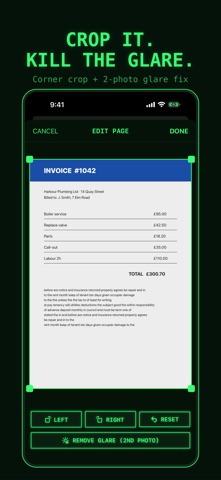
FIX IT IN SECONDS • Crop dead space off any page: drag the corners, done. • Glossy paper? Remove Glare combines two photos of the page and keeps the glare-free parts. • Shadows and uneven light are evened out automatically.
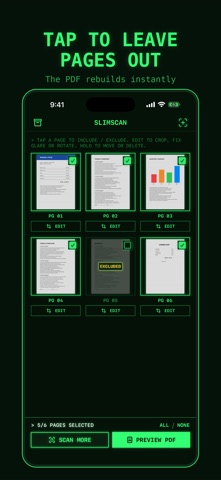
PRINT PREVIEW THAT LETS YOU CHOOSE • See the real PDF before you send it. • Tap any page to leave it out. The file rebuilds instantly and the size updates as you go. • Choose the size you need: TINY, EMAIL or HI-Q. Pick A4 or Letter.
SEND IT ANYWHERE • Email straight from the app, or share to Outlook, Gmail, WhatsApp, Messages, AirDrop and more. • Print with AirPrint. • Save to your in-app archive, which you can also see in the Files app.
ZERO MARKETING. ZERO DATA. KEEP YOUR PRIVACY. • No ads. No tracking. No analytics. No account. No sign-up. • SlimScan collects no data. Your documents never leave your iPhone unless you send them. • Everything is processed on the device, so it also works in flight mode. • Made in Switzerland – where privacy isn't an afterthought, it's the standard.
ONE SIMPLE PRICE • Try it free: your first 3 PDFs are on us (trial PDFs carry a small SlimScan watermark). • Then unlock SlimScan forever with a single payment. No watermark, unlimited PDFs. • No subscription. No renewals. No upsells. Pay once, it's yours.
Two looks: a retro green-screen terminal with a turnable mode dial, or a clean classic iOS style. Switch any time.
Le valutazioni delle persone
Accedi per valutare questa app. Conta essere sinceri.
Ancora nessuna valutazione. L'hai provata? Sii il primo a valutarla.
Altre app di Utilità
Le migliori nuove app di Utilità di questa settimana Drainly: Speaker CleanerMuffled speaker after a splash, rain, or a sweaty workout?
 Photo & PDF Resize: KBFile too large to upload?
 Arvectum Proxy LauncherArvectum Proxy Launcher is a network utility that routes your iPhone through a proxy you…
 Vodoalarm: vodostaji BiHVodoalarm javlja kad tvoja rijeka naglo raste, pa ne moraš stalno gledati vodostaje
 Dusty: Photo Cleaner PetYour camera roll's new pet
 FairAuth: AuthenticatorFairAuth creates the codes for two-step verification on iPhone and iPad