
TabForge: Code Keyboard
Non rivendicataTabForge is an open-source programming keyboard for iPhone and iPad
Di Jeremy Collins · Utilità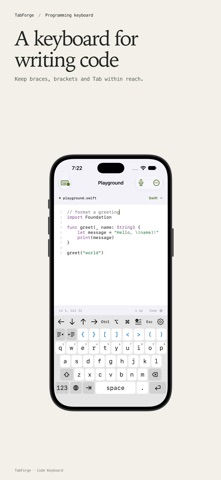



In breve
TabForge: Code Keyboard is an open-source iPhone and iPad keyboard that places punctuation, indentation and editing controls beside the letter keys for writing code, scripts and terminal commands. It suits developers who type in terminals or remote sessions and want saved snippets and language suggestions for Swift, Python, JavaScript, TypeScript, Shell and JSON. One notable detail is that English autocorrect is optional and off by default, and it skips code-like input.
Riepilogo di Debuts, basato sulla scheda dell'App Store.Informazioni
TabForge is an open-source programming keyboard for iPhone and iPad. Write code, scripts and terminal commands with punctuation and editing controls beside the letter keys.
Indent a line, move the cursor or insert a saved snippet. The keyboard's gear menu gives you access to settings and code tools in the app you're typing in.
Programming keys - Type braces, square brackets, angle brackets, parentheses and full ASCII punctuation. - Choose Tab, two spaces or four spaces, with indent, outdent and automatic newline indentation. - Use arrows, Escape and Control, Option and Command keys. Their behavior depends on the input profile and host app. - Save snippets for commands, operators and repeated text. - Get language suggestions for Swift, Python, JavaScript, TypeScript, Shell and JSON.
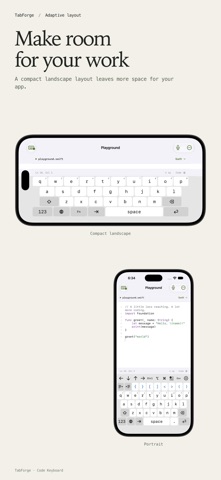
Layouts for your screen Phone layouts keep familiar letter keys with coding controls close by. Compact landscape layouts leave more room for the app above the keyboard. Larger iPad and supported Duo layouts show more controls. Choose your key size and keyboard height, follow iOS light and dark appearance, or select a code palette.
Editing and input profiles Use Code editor for pairing and indentation, Terminal · ANSI for supported control text, or Remote desktop for literal input. Terminal and remote behavior depends on the client: a keyboard extension inserts text and cannot send arbitrary hardware-key events. Line edits need enough context from the host app to verify the change.
Optional English prose autocorrect uses Apple's on-device spelling service in eligible text fields. It is off by default, skips code-like input and stays inactive in Terminal, Remote desktop and the code playground. Space applies a correction; immediate Delete restores your spelling.
The companion playground Edit text with syntax highlighting, line numbers, undo and a share action. The playground does not run code. Its keyboard and layout previews use temporary settings, separate from the installed keyboard.
Voice to code lets you dictate, review spoken punctuation and insert the result. It requires microphone and Speech permission plus available on-device English recognition. Voice input runs in the companion app; iOS controls system Dictation availability.
Optional swipe typing uses a bundled English dictionary and programming words, with alternatives in the gear menu. It works offline, is off by default and remains experimental. Tap typing works better for some identifiers.
Open source and privacy TabForge is MIT licensed, with source and privacy details linked in the companion app. The keyboard does not log or transmit keystrokes. There are no ads, analytics or accounts.
Keyboard preferences and custom snippets are saved in the keyboard's own container. Configure them from its gear menu; they are not shared with the companion app. Full Access is not requested. The companion playground saves its draft separately. Apps you type into, Apple system services, device backups and destinations you choose when sharing have their own data practices.
Requires iOS or iPadOS 27.0 or later. Duo-specific layouts require 27.1. iOS uses its system keyboard in secure and phone fields, and some apps decline third-party keyboards.
Le valutazioni delle persone
Accedi per valutare questa app. Conta essere sinceri.
Ancora nessuna valutazione. L'hai provata? Sii il primo a valutarla.
Altre app di Utilità
Le migliori nuove app di Utilità di questa settimana Drainly: Speaker CleanerMuffled speaker after a splash, rain, or a sweaty workout?
 Photo & PDF Resize: KBFile too large to upload?
 Arvectum Proxy LauncherArvectum Proxy Launcher is a network utility that routes your iPhone through a proxy you…
 Vodoalarm: vodostaji BiHVodoalarm javlja kad tvoja rijeka naglo raste, pa ne moraš stalno gledati vodostaje
 TidyShots: Screenshot CleanerScreenshots pile up fast: receipts, memes, codes you needed once, directions you already…
 Screenshot Tidy: Sort & FindYou saved it