
Task Control Tower
Non rivendicataLine up today's work as strips, focus on the one you're working on, and slide it right…
Di Yuichi Ono · ProduttivitàPerché ce lo aspettiamo: A clear, well-described concept with a distinctive flight strip metaphor and thoughtful privacy features that stands out.




In breve
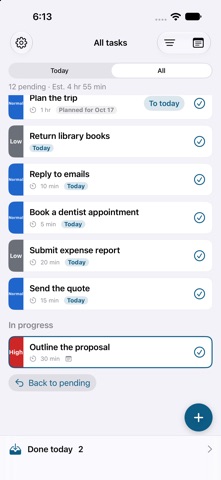
Task Control Tower is a to-do app that shows today's tasks as flight strips, like those used by air traffic controllers. It is aimed at people who want to work on one task at a time and keep handwritten notes alongside their list. Only one task can be in progress at once, and finished strips slide into a tray with undo available right away.
Riepilogo di Debuts, basato sulla scheda dell'App Store.Informazioni
Line up today's work as strips, focus on the one you're working on, and slide it right into the tray when it's done. Task Control Tower borrows the flight strips air traffic controllers use to handle planes one at a time, and pairs them with handwritten notes.
■ Focus on today • Put today's tasks in the pending queue and reorder them with a long press • Only one task is in progress at a time, so you can stay on it • Slide a strip right to finish it and drop it into the tray. Undo right away if it was a mistake • What you didn't finish stays as "carried over" the next day • Priorities (high, normal, low) shown in color and words, plus due dates and time estimates • Switch between the Today and All views
■ Handwritten notes • Keep notes in books of A4 sheets, by hand with Apple Pencil or your finger, or as text • Link notes to tasks and open them while you work • Export as PDF or images to share or print • On iPad, keep your tasks and notes side by side
■ Calendar events • Today's events from your iPhone's calendar appear in the same column as your tasks • Slide finished events to mark them done and leave a note on the event • Create new events from the app
■ Private and dependable • No account needed. Your data stays on your device and works offline • Sync between devices is encrypted on your device before it's sent, so not even we can read it • Move your data to another device with a backup file • Works with VoiceOver, larger text and Reduce Motion
■ Pricing The basic features are free, with ads. • Free plan: up to 10 pending strips shown, 5 active note books, and 7 days of history • Remove Ads (one-time purchase): no more ads • Premium (auto-renewing monthly subscription): no limit on pending strips or books, full history, sync between devices, and backup export. No ads while subscribed, and ads stay off even after you cancel
Premium renews automatically unless you cancel at least 24 hours before the end of the current period. You can cancel in your App Store account settings under Subscriptions.
Terms of Use: https://todo.otsi.jp/en/terms/ Privacy Policy: https://todo.otsi.jp/en/privacy/ Contact: https://todo.otsi.jp/en/contact/
Le valutazioni delle persone
Accedi per valutare questa app. Conta essere sinceri.
Ancora nessuna valutazione. L'hai provata? Sii il primo a valutarla.
Altre app di Produttività
Le migliori nuove app di Produttività di questa settimana ChickMark: Habit TrackerChickMark is a simple habit tracker for routines, goals, and reminders
 Dayflint: One Thing a DayToo many priorities?
 Snappy Do ItSix connected modes. One traceable journey.
 Fristo CAFMFristo is the app for Fristo CAFM, the facility management software
 UhWhat? Voice NotesCatch the thought before it disappears
- BeginAnywayMorning alarm for hard tasks: set one task, prove you started, build a streak