
Timetable: Ad-Free Schedule
Non rivendicataWhere is my next class?
Di 强 李 · IstruzionePerché ce lo aspettiamo: A focused, ad-free schedule app with clear value and a careful description that students will likely appreciate.



In breve
Timetable: Ad-Free Schedule is a class timetable for college and university students that opens straight to the current week. It has no ads, no social features and no sign-up, and data stays on the user's iPhone. It stands out for its Home Screen widget showing the next class with room and start time, plus reminders that can be set per course.
Riepilogo di Debuts, basato sulla scheda dell'App Store.Informazioni
Where is my next class? Open the app and you're looking at your week. Nothing else.
Timetable is a class schedule for college and university students with no ads, no social features and no sign-up. No splash ads, no feeds, no red badges piling up, and no student-portal password. It just does one job well: what class, where, and when.
WHAT IT FIXES • Waiting several seconds for a full-screen ad just to see your schedule → there are no ads here • Schedule apps stuffed with communities, chats and feeds → this one is only a schedule • Forced sign-up, phone numbers and student-portal logins → no account at all; your data stays on your iPhone • An odd-week class showing up in even weeks, and a wasted trip → weeks are exact, so odd/even can't be misread • Sleeping through an 8 a.m. or forgetting which building it's in → a reminder with the course name, room and time • Pulling out your phone between classes → a Home Screen widget shows what's next • Monthly fees you forget to cancel → no subscription, just a one-time unlock
WHEN YOU'LL USE IT • Start of semester: copy your schedule from the registration page or a printout. Tap an empty cell and fill it in. About 10 minutes for a full week • Before the first lecture: get a reminder 5, 10, 15 or 30 minutes ahead • Between classes: glance at the widget to see the next class, room and start time • Mid-semester changes: move a class to another day or period and the grid, reminders and widget update
OPENS TO YOUR WEEK • Launches straight into this week, with no onboarding wall or pop-ups • Week view for the whole week, day view for a time-ordered list • "Next class" card: course, room and time until it starts (or ends, if you're in class) • Monday to Friday by default; weekends appear automatically if you have classes • Swipe between weeks and jump back to this week in one tap
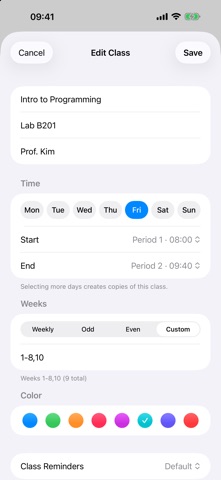
FAST TO ENTER, HARD TO GET WRONG • A class that meets several days a week? Pick multiple days and save once • Duplicate a similar class and just change the name • Week patterns: every week, odd, even, or custom (for example 1-16 or 1-8,10,12) • Two classes in the same slot? You're warned before saving, with both course names • Set your semester start date, number of weeks and each period's start and end time to match your school
REMINDERS • Choose a default lead time, or change or turn it off per course • Notification shows course name · room · start time • Change period times or reschedule a class and reminders update automatically • Uses local notifications only, no internet needed
WIDGETS • Small: next class name, start time and room • Medium: the rest of today's classes • Supports iOS 26 Liquid Glass plus tinted and clear Home Screen styles • Tap a widget to open today's schedule
YOUR DATA STAYS YOURS • No account and no server. Your timetable is stored only on your device • No tracking and no data collection • Never asks for your student-portal login • Note: deleting the app deletes your timetable. Your iPhone's iCloud device backup can protect it
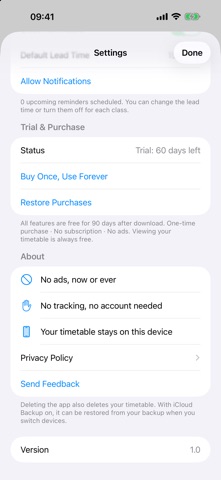
TRY IT FIRST: 90 DAYS FREE • Every feature is free for 90 days after you install. Nothing to buy up front • After 90 days you can still view your week, day and next class for free, and your data is kept • Editing classes, reminders and widgets need a one-time in-app purchase • Buy once, no subscription, no auto-renewal • New phone or reinstall? Go to Settings > Trial & Purchase > Restore Purchase
WHY A ONE-TIME PURCHASE Free schedule apps usually live on ads and attention, so they get noisier over time. Timetable takes another route: you pay once for a quiet tool that only does your schedule, and it can keep being updated without ads.
No social. No noise. Just your schedule.
Le valutazioni delle persone
Accedi per valutare questa app. Conta essere sinceri.
Ancora nessuna valutazione. L'hai provata? Sii il primo a valutarla.
Altre app di Istruzione
Le migliori nuove app di Istruzione di questa settimana FluencyToolShadow a native Japanese sentence, hear your own voice back, and get scored.
 YoMoo: Read & Shadow JapaneseYoMoo turns real Japanese writing into graded reading practice: news articles, Wikipedia…
 KeyswingLearn music notes, rhythm and piano through playful practice in a magical forest.
 Uncle Math Homeschool - 6 to 8No Math Fear, Uncle Math Is Here
 Malachi SpeaksMalachi Speaks gives a voice to people who don't use speech
 SelvarisWatch evolution unfold in real time – on an entire planet