Timezone Menu Bar
Non rivendicataFind a better time for everyone, straight from your Mac's menu bar
Di Opus Accountancy Limited · Utilità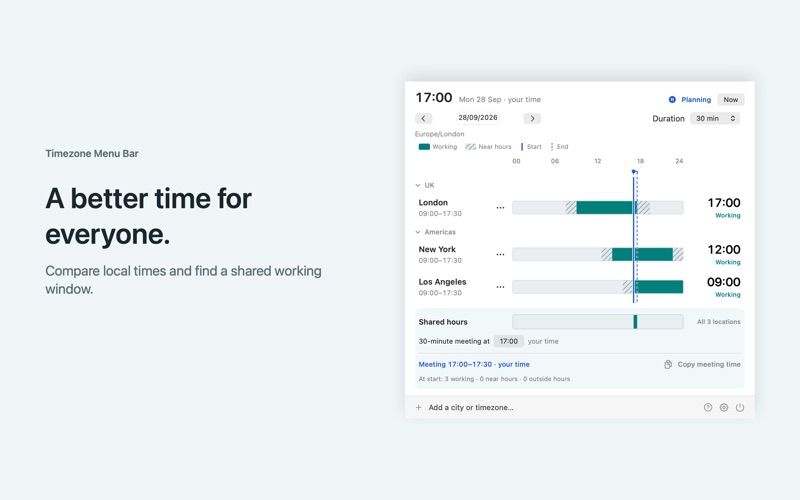


In breve
Timezone Menu Bar is a Mac app that shows clocks for up to eight cities in the menu bar and compares them on a timeline with each location's working hours. It suits people arranging calls or meetings across time zones. It can also read chosen Mac calendars to suggest meeting starts that avoid busy events.
Riepilogo di Debuts, basato sulla scheda dell'App Store.Informazioni
Find a better time for everyone, straight from your Mac's menu bar.
I spend a lot of time on calls across different time zones. I kept looking for a quick way to see everyone's local time and work out who would be starting early or staying late. I wanted to choose the least inconvenient time for the whole group. So I created Timezone Menu Bar.
Add the cities you work with and see their clocks side by side. A clear timeline shows working hours, time near working hours and time outside them, with plain-language labels to make the trade-offs easy to understand.
Optionally connect calendars available on your Mac to see existing events alongside your locations. As you change the proposed meeting time or duration, the preview highlights clashes and suggested starts avoid busy events in your selected calendars.
• Keep the local times you need in your menu bar, with room for up to eight location clocks. • Drag the timeline or type a time in any location to update every clock together. • Set working hours for each location, including different schedules in the same time zone. • Choose a date and a meeting duration from 15 minutes to two hours, then see suggested starts that fit everyone's working hours. • Preview selected calendars on the same timeline and see clashes update as you move the meeting. • Find suggestions that avoid busy events for the full meeting duration. Events marked Free do not block suggestions. • Create a meeting in a writable calendar with a summary of each location's local time in its notes. Add invitees afterwards in your calendar app. • See shared working hours at a glance, with clear guidance when no full meeting fits. • Copy a dated meeting summary with local start and end times for each location. • Organise locations into groups, reorder them by dragging, and customise your menu-bar labels and colours. • Plan across daylight-saving changes with timelines that follow the actual length of the day. • Use light or dark appearance, with patterns and labels alongside colour. • Add a desktop widget in three sizes to see your clocks and shared working hours. Widgets use configured working hours, not calendar events.
Whether you are arranging a client call, checking in with colleagues abroad or catching up with family, Timezone Menu Bar helps you plan with everyone's day in view.
No account is required. Clocks, city search and working-hours planning work offline. Calendar access is optional and requires your permission. You choose which calendars to include; other people's events are only available through calendars you can access. Event previews stay on your Mac and are not sent to Opus. Created meetings are saved to your selected calendar and may sync through its provider. Your locations, preferences and calendar selections are stored locally.
Le valutazioni delle persone
Accedi per valutare questa app. Conta essere sinceri.
Ancora nessuna valutazione. L'hai provata? Sii il primo a valutarla.
Altre app di Utilità
Le migliori nuove app di Utilità di questa settimana Drainly: Speaker CleanerMuffled speaker after a splash, rain, or a sweaty workout?
 Photo & PDF Resize: KBFile too large to upload?
 Arvectum Proxy LauncherArvectum Proxy Launcher is a network utility that routes your iPhone through a proxy you…
 Vodoalarm: vodostaji BiHVodoalarm javlja kad tvoja rijeka naglo raste, pa ne moraš stalno gledati vodostaje
 Dusty: Photo Cleaner PetYour camera roll's new pet
 FairAuth: AuthenticatorFairAuth creates the codes for two-step verification on iPhone and iPad