
Windover
Non rivendicataWindover keeps what matters in sight
Di Jose Daniel Araujo · ProduttivitàPerché ce lo aspettiamo: Windover solves a clear everyday problem with a focused, well-explained menu bar workflow, and its privacy-first design is a genuine strength.



In breve
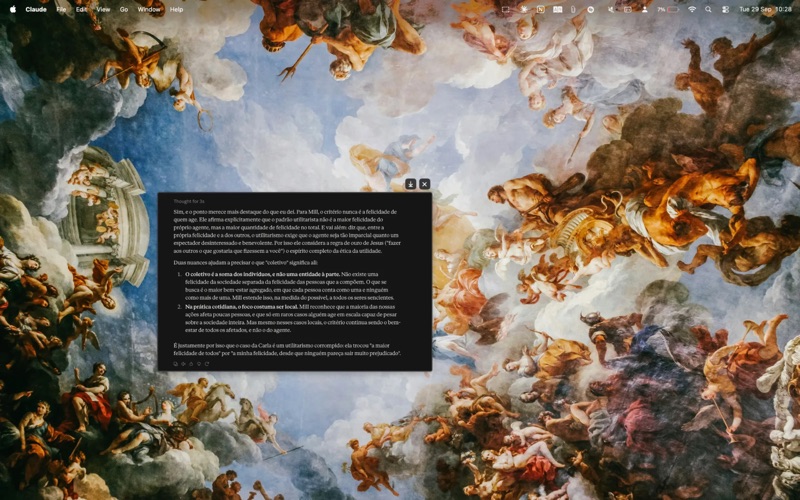
Windover is a macOS productivity app that lets you select any region of your screen and pin it as a floating window that stays above other apps, including full-screen ones. It suits anyone who needs reference material such as notes, diagrams, or instructions visible while they work. One notable point is that it collects no data and never connects to the internet.
Riepilogo di Debuts, basato sulla scheda dell'App Store.Informazioni
Windover keeps what matters in sight.
Click the Windover icon in the menu bar, drag to select any part of your screen, and it lifts off as a floating window that stays on top of everything else. Keep a diagram next to your notes, a paragraph beside your draft, a design reference over your editor, or instructions in view while you follow them — no more switching back and forth between windows.
SELECT LIKE A SCREENSHOT • One click in the menu bar, then drag to select — just like the macOS screenshot tool • The pinned window appears exactly where you selected it • Captured at full Retina resolution • Press Esc to cancel
ALWAYS ON TOP • Pinned windows float above your other apps • They follow you across Spaces and over full-screen apps • Pin as many regions as you need
MOVE, RESIZE, ADJUST • Drag to move a pin anywhere • Pinch, Option-scroll, or ⌘+ / ⌘− to resize; ⌘0 returns to actual size • Set opacity from 100% down to 20% to see what's underneath • Toggle the window shadow
SAVE OR CLOSE IN ONE CLICK • Move the pointer near a pin's top-right corner and Save and Close buttons slide into view • Save as PNG (⌘S) or copy to the clipboard (⌘C) • Close with Esc, ⌘W, or a double-click — or close all pins at once from the menu bar
PRIVATE BY DESIGN Windover doesn't collect any data. It has no accounts, analytics, or tracking, and it never connects to the internet. Captures stay in memory on your Mac, and are only written to disk when you choose Save.
Windover needs the Screen Recording permission to capture the region you select. It captures only when you start a capture yourself, and only the area you select.
Requires macOS 14 or later.
Le valutazioni delle persone
Accedi per valutare questa app. Conta essere sinceri.
Ancora nessuna valutazione. L'hai provata? Sii il primo a valutarla.
Altre app di Produttività
Le migliori nuove app di Produttività di questa settimana ChickMark: Habit TrackerChickMark is a simple habit tracker for routines, goals, and reminders
 Dayflint: One Thing a DayToo many priorities?
- BeginAnywayMorning alarm for hard tasks: set one task, prove you started, build a streak
 DHUDEDHUDE Analityxs es la herramienta de gestión diaria para grupos de restauración y ocio…
 FTC BIOBUZZ Scorer & TrainerBIOBUZZ Scorer is a free, ad-free scorer for the 2026–2027 FTC season, built on…
 Intent - Scroll by ChoiceTake back control of your screen time