
BasenCloud
Ikke hentetBasenCloud is the app for BasenGreen home batteries
Av Shenzhen Basen Technology Co.,Ltd · VerktøyHvorfor vi forventer det: A thorough, well-explained companion app with clear value for BasenGreen battery owners.


Kort fortalt
BasenCloud is a monitoring app for BasenGreen home batteries, showing live state of charge, cell voltages, temperatures, alarms and BMS history over Wi-Fi, with no Bluetooth needed. It is aimed at owners of these home batteries who want to check on one or up to 20 units from anywhere. It cannot control charging or protection settings, and it notes that notifications can be delayed and should not be relied on for safety.
Sammendrag fra Debuts, basert på oppføringen i App Store.Om appen
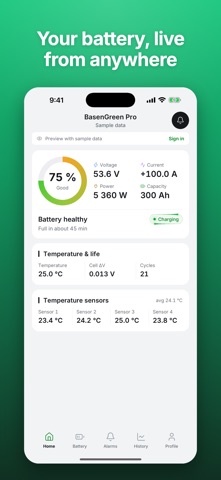
BasenCloud is the app for BasenGreen home batteries. The battery's touch display connects to Wi-Fi and reports to BasenCloud, and the app shows you what your battery is doing, wherever you are. No Bluetooth is needed: the app works wherever your phone is online.
Live status • State of charge, voltage, current and power • Charging, discharging or standby, and whether a protection is active • Whether the display and each pack are online
Cells and temperatures • Every cell voltage, with the lowest, the highest and the difference • Cell balancing, as the battery management system (BMS) reports it • Parallel packs side by side, and every temperature sensor
Alarms and notifications • Protection events and warnings from the BMS • Notifications for protection events always, and you choose which of the others you get: warnings, low and full charge, a pack that goes offline and firmware updates installed by BasenGreen • Acknowledge an alarm to clear your badge
History and BMS log • See the battery's history at any time: state of charge over time, cycles, energy throughput, deepest discharge and the largest cell difference • Read the BMS log: how many times each protection of the battery's management system has been triggered
Several batteries • Link up to 20 batteries to one account, name them and switch between them • Read-only protection parameters and installed firmware versions • The inverter protocol of the battery's CAN and RS485 ports, which you can change as on the display
Getting started 1. Sign in with Apple or Google, or create an account with your email address. 2. On the battery's display, open Settings > Network > Link to Mobile. 3. In the app, tap Add battery and scan the QR code on the display.
Want to look around first? Guest mode shows the app with a sample battery and simulated data, no account needed.
Good to know • BasenCloud is for monitoring. It cannot switch, charge or discharge your battery or change its protection settings; the battery's own BMS protects it at all times. • Notifications are for information and can be delayed. Never rely on the app for safety. • A battery belongs to one account at a time. Before you hand it over, unlink it in the app or at the display. • No ads and no tracking. You can delete your account in the app at any time. • In English, Simplified Chinese, Arabic and Kurdish (Sorani).
BasenCloud is provided by Shenzhen Basen Technology Co., Ltd. Terms of Use: https://basencloud.com/terms Privacy Policy: https://basencloud.com/privacy Support: support@basengreen.com
Slik vurderer folk den
Logg inn for å vurdere denne appen. Det ærlige svaret teller.
Ingen vurderinger ennå. Har du prøvd den? Vær den første til å vurdere.
Flere Verktøy-apper
Ukens beste nye Verktøy-apper Drainly: Speaker CleanerMuffled speaker after a splash, rain, or a sweaty workout?
 Photo & PDF Resize: KBFile too large to upload?
 Arvectum Proxy LauncherArvectum Proxy Launcher is a network utility that routes your iPhone through a proxy you…
 Look Twice: Scam & AI CheckLook twice before you click
 Vodoalarm: vodostaji BiHVodoalarm javlja kad tvoja rijeka naglo raste, pa ne moraš stalno gledati vodostaje
 Sift: Photo CleanupYour camera roll is full of blurry shots, old screenshots and videos you'll never watch…