
BoardView Reader
Ikke hentetBoardView Reader answers the two questions every motherboard repair tech asks: where do…
Av djamal guellati · VerktøyHvorfor vi forventer det: Its clear focus on board repair workflows, paired schematics, and included demo files makes the value obvious to technicians.



Kort fortalt
BoardView Reader is a utilities app for motherboard repair technicians that opens boardview and PDF schematic files. It can locate a power rail or component on the board, log diode-mode readings compared against a known-good board, and show the matching schematic page for a tapped part. One standout feature is that a board and its schematic with the same name are paired automatically on import.
Sammendrag fra Debuts, basert på oppføringen i App Store.Om appen
BoardView Reader answers the two questions every motherboard repair tech asks: where do I measure this power rail, and which part do I replace? Open the board's boardview and schematic, locate the rail in one tap, test it with your multimeter and find the reference and value of the component to change — on your phone, tablet and computer.
LOCATE A POWER RAIL • Search a rail (PPBUS_G3H, PP3V3_S5, VCC_MAIN…) or a component in a single field • Every point on the same net lights up on the board, top and bottom • Spot the most accessible capacitor or test point to place your probe • Flip the board, rotate 90°, show one side or both, just like on the bench
TEST FOR SHORTS • Measure the rail in diode mode and log the reading in one tap • Compared with a known-good board, it is judged at once: matches, slight difference, large difference, likely short, open line • Your reference values apply to every board with the same number; share them as CSV
FIND THE PART TO REPLACE • Tap a component: its reference, value, voltage, tolerance and package, read from the schematic • Side, pin count and the net of each pin in the inspector
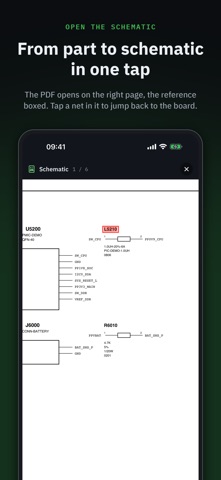
THE SCHEMATIC IN THE RIGHT PLACE • Import the board and its PDF schematic with the same name: they are paired automatically • Tap a component: the schematic opens on the right page, the reference boxed • Tap a net or a reference in the schematic: "Show on board" takes you back
AN ORGANISED SHOP • Sort boards into folders: in repair, donors, customers… • Each board keeps its schematic and its readings • On a computer: hover info with the mouse and customisable keyboard shortcuts
FORMATS: BRD (Test_Link, including encoded), BRD2, BDV, BVR and BVR3, CST.
A demo board and schematic are included so you can try everything right away.
FREE TO READ — Opening and reading boards is free. The linked schematic, diode-mode readings and the unlimited library are part of Pro: a one-time purchase, no subscription, with a full 7-day free trial.
No ads, no account, no ad tracking, works offline. Available in English, French, German, Italian, Spanish and Portuguese.
Slik vurderer folk den
Logg inn for å vurdere denne appen. Det ærlige svaret teller.
Ingen vurderinger ennå. Har du prøvd den? Vær den første til å vurdere.
Flere Verktøy-apper
Ukens beste nye Verktøy-apper Drainly: Speaker CleanerMuffled speaker after a splash, rain, or a sweaty workout?
 Photo & PDF Resize: KBFile too large to upload?
 Arvectum Proxy LauncherArvectum Proxy Launcher is a network utility that routes your iPhone through a proxy you…
 Look Twice: Scam & AI CheckLook twice before you click
 Vodoalarm: vodostaji BiHVodoalarm javlja kad tvoja rijeka naglo raste, pa ne moraš stalno gledati vodostaje
 Sift: Photo CleanupYour camera roll is full of blurry shots, old screenshots and videos you'll never watch…