
CloseoutCam: Job Photo Reports
Ikke hentetCloseoutCam turns your before-and-after job photos into a professional PDF report in…
Av RYAN JOSEPH BRAZIL · ProduktivitetHvorfor vi forventer det: A focused, well-described tool that solves a real contractor pain point with offline use, paired before-and-after layouts, and no account required.


Kort fortalt
CloseoutCam: Job Photo Reports turns before-and-after job photos into a branded PDF report on an iPhone, working fully offline with no account required. It is aimed at contractors and tradespeople who want to send customers organized, side-by-side photo documentation. One notable point is that all job data stays on the device, with nothing uploaded to any server.
Sammendrag fra Debuts, basert på oppføringen i App Store.Om appen
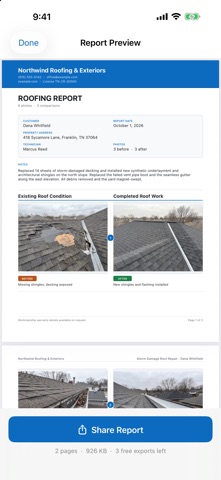
CloseoutCam turns your before-and-after job photos into a professional PDF report in about two minutes — on site, with no signal, and without creating an account.
Built for contractors who are tired of texting customers a jumble of photos and hoping it looks professional.
HOW IT WORKS
1. Create a job. Enter the customer, address, date and technician once. 2. Add photos from your camera or library, and tag each one Before or After. 3. Add a short caption. Reorder or remove anything you don't want. 4. Tap Create Report. CloseoutCam lays out a clean, page-numbered PDF. 5. Share it straight to text, email or your CRM from the normal iOS share sheet.
The job stays saved on your iPhone, so you can edit it and send an updated report later.
BEFORE AND AFTER, SIDE BY SIDE
The report pairs each before photo with its after photo on the same page, so your customer sees the comparison without flipping back and forth. That is the whole point of documenting a job, and it is what makes the work you did obvious.
WHAT'S IN THE REPORT
• A branded header with your logo, company name, phone, email, website and license number • Customer, property address, report date and technician • Paired before/after comparisons with clear photo captions • Your general notes • Page numbering and a footer you control • Optional customer and technician signature lines
TEMPLATES FOR YOUR TRADE
General contracting, roofing, HVAC, plumbing, electrical, landscaping, cleaning and property inspection. Each one preloads sensible report wording and caption suggestions — and every word stays editable.
MARK UP YOUR PHOTOS
Slik vurderer folk den
Logg inn for å vurdere denne appen. Det ærlige svaret teller.
Ingen vurderinger ennå. Har du prøvd den? Vær den første til å vurdere.
Flere Produktivitet-apper
Ukens beste nye Produktivitet-apper ChickMark: Habit TrackerChickMark is a simple habit tracker for routines, goals, and reminders
 Dayflint: One Thing a DayToo many priorities?
 Snappy Do ItSix connected modes. One traceable journey.
 Fristo CAFMFristo is the app for Fristo CAFM, the facility management software
 UhWhat? Voice NotesCatch the thought before it disappears
- BeginAnywayMorning alarm for hard tasks: set one task, prove you started, build a streak