
ConferLingo
Ikke hentetConferLingo is a professional live meeting translator for Mac and iPhone
Av Kirill Rogov · ProduktivitetHvorfor vi forventer det: Clear value, a careful description, and a focused professional niche make this a promising live translation tool.



Kort fortalt
ConferLingo is a live meeting translator for Mac and iPhone that uses your own OpenAI API key and billed API usage. On Mac it can listen to microphone and system audio from apps like Zoom or Teams, while iPhone works from the microphone only. It is aimed at business conversations in fields such as oil and gas, EPC, and finance, with custom glossaries and local history storage.
Sammendrag fra Debuts, basert på oppføringen i App Store.Om appen
ConferLingo is a professional live meeting translator for Mac and iPhone.
Requires your own OpenAI API key and separately billed API usage. Internet connection required.
On Mac, it can listen to your microphone and system audio from Zoom, Teams, a browser, a player, or another meeting app. On iPhone, Live mode translates speech captured by the microphone, and Dialogue mode supports a face-to-face bilingual conversation. iPhone does not capture audio directly from other apps or calls.
NO SPECIAL HARDWARE Use AirPods or another ordinary compatible Bluetooth headset. ConferLingo follows standard Apple audio routing; no proprietary interpreter receiver is required.
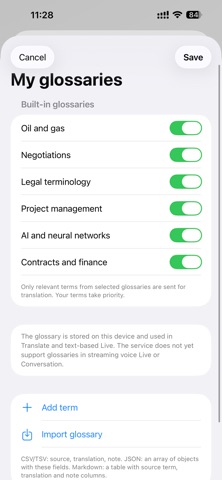
BUILT FOR BUSINESS CONVERSATIONS • Translation instructions prioritize numbers, amounts, dates, conditions, questions, uncertainty, and negations • Meaning-preserving adaptation aims to remove speech clutter while retaining the complete message • Built-in terminology for oil & gas, EPC, refining, projects, and finance • Add your own company, project, equipment, and approved translation terms
EVERY MODE IN ONE HISTORY Review Block, Live, and Dialogue sessions. Copy any original or translation, or export the complete history as Markdown for notes and further processing.
FOLLOW THE CONVERSATION Switch language direction in Live mode and review key points alongside the translation. Key points are a separate summary; they do not replace the translated conversation.
DESIGNED NOT TO CUT OFF THE END When you stop, ConferLingo finishes captured speech and queued translation audio instead of silently dropping the last phrase.
PRIVACY AND COST CONTROL ConferLingo has no translation server or user account. Your API key is stored in Apple Keychain. By default, audio and text needed for translation go directly from your device to OpenAI. Advanced users can configure their own compatible HTTPS API provider; requests then go to that provider. History and custom glossaries are stored locally; relevant glossary terms can be included in translation requests.
Live spoken output on iPhone requires connected headphones; translated text remains available without them. Explore the built-in prerecorded demonstration without an API key or network requests.
Requires an OpenAI API key. OpenAI API usage is billed separately by OpenAI and is not included in the App Store purchase. Internet connection required. Machine translation can contain errors; verify high-impact information with a qualified human interpreter.
Slik vurderer folk den
Logg inn for å vurdere denne appen. Det ærlige svaret teller.
Ingen vurderinger ennå. Har du prøvd den? Vær den første til å vurdere.
Flere Produktivitet-apper
Ukens beste nye Produktivitet-apper ChickMark: Habit TrackerChickMark is a simple habit tracker for routines, goals, and reminders
 Dayflint: One Thing a DayToo many priorities?
 Snappy Do ItSix connected modes. One traceable journey.
 Fristo CAFMFristo is the app for Fristo CAFM, the facility management software
 UhWhat? Voice NotesCatch the thought before it disappears
- BeginAnywayMorning alarm for hard tasks: set one task, prove you started, build a streak