
Course Management System
Ikke hentetAptaOps is the instructor app for training providers that run on AptaOps
Av Selion Technologies Limited · Utdanning




Kort fortalt
Course Management System is an instructor app for training providers that use AptaOps. It puts an instructor's course diary, candidate lists, attendance register, walk-in additions and qualifications on a phone, syncing attendance back to the provider's system. It is for instructors whose provider gave them an account and organisation key, and it cannot be used without one.
Sammendrag fra Debuts, basert på oppføringen i App Store.Om appen
AptaOps is the instructor app for training providers that run on AptaOps. If your training provider books you through it, this puts your diary, your candidate lists and the attendance register on your phone.
Sign in with the account your training provider gave you, and here's what you get.
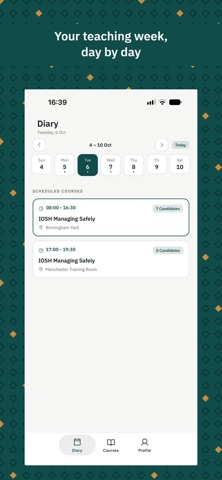
YOUR DIARY Every course you're booked to deliver, day by day. Today is marked, so you always know where you are. Tap any date to see what's on.
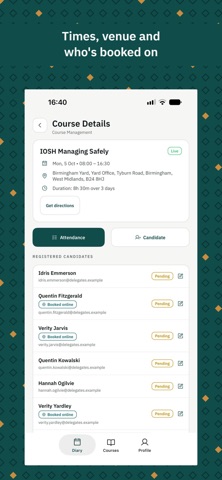
COURSE DETAILS Start and end times, the venue with directions in Maps, the course type and the other instructors on the session. The course documents are there too, and you can add new ones from your phone.
CANDIDATE LISTS Everyone booked onto the course, with their status at a glance and a badge for anyone who booked online. If a name was typed wrong at booking, you can fix it.
ATTENDANCE Mark candidates present or absent as the session runs. Mark everyone present in one tap and change the odd one. It saves straight back to your training provider's system, so nobody has to retype a register afterwards.
WALK-INS Someone turns up who isn't on the list? Add them there and then, on their own or as a group, with their company, purchase order and training type. Adding candidates and fixing names depend on your role and the course status, so you might not see every option.
YOUR QUALIFICATIONS See the qualifications on your profile and when each one expires. To add a new one, enter the certificate details and take a photo of the certificate or attach a file. You can see what's still waiting on approval, and withdraw a request nobody has answered yet.
MORE THAN ONE TRAINING PROVIDER Work for several training providers? Add each one and switch between them without signing out. Each keeps its own sign-in.
QUICK SIGN-IN Remember your sign-in and unlock it with Face ID or Touch ID next time, instead of typing your password.
WHAT YOU NEED An instructor account from a training provider that uses AptaOps, plus the organisation key they give you. You can't sign up in the app, and it won't show you anything without an account. If you're not sure whether you have one, ask whoever books your courses.
YOUR PRIVACY Everything goes over a secure connection to your training provider's system. The app only uses the camera or your photos when you choose to attach a certificate, and it only sees the files you pick to upload. It doesn't read your location or your contacts.
Slik vurderer folk den
Logg inn for å vurdere denne appen. Det ærlige svaret teller.
Ingen vurderinger ennå. Har du prøvd den? Vær den første til å vurdere.
Flere Utdanning-apper
Ukens beste nye Utdanning-apper FluencyToolShadow a native Japanese sentence, hear your own voice back, and get scored.
 YoMoo: Read & Shadow JapaneseYoMoo turns real Japanese writing into graded reading practice: news articles, Wikipedia…
 KeyswingLearn music notes, rhythm and piano through playful practice in a magical forest.
 Uncle Math Homeschool - 6 to 8No Math Fear, Uncle Math Is Here
 Malachi SpeaksMalachi Speaks gives a voice to people who don't use speech
 SelvarisWatch evolution unfold in real time – on an entire planet