
Data Usage Monitor & Widget
Ikke hentetKnow how much cellular data you have left, and how long it will last
Av Abdelkarime Achtaou · VerktøyHvorfor vi forventer det: Its honest limits, clear per SIM tracking, and free widgets make it a useful and trustworthy debut.

Kort fortalt
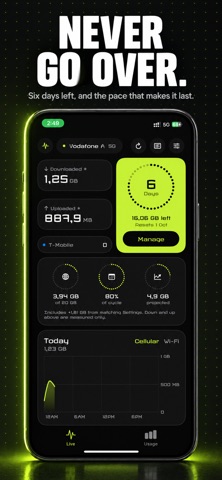
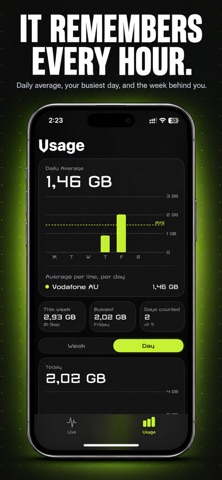
Data Usage Monitor & Widget tracks cellular data on an iPhone, grouped by billing period, and estimates when an allowance will run out at the current pace. It separates usage across two SIM lines automatically, supports monthly, fixed-length, annual, and prepaid plans, and offers free Home Screen, Lock Screen, and Control Center widgets. Nothing leaves the device, and the app does not report per-app usage.
Sammendrag fra Debuts, basert på oppføringen i App Store.Om appen
Know how much cellular data you have left, and how long it will last.
Data Usage counts what your phone actually sends and receives, groups it by billing period, and tells you the day your allowance runs dry at the pace you are going.
KNOWS WHICH SIM SPENT IT Two lines, two plans, counted separately and attributed automatically. iOS tells the app the moment the data line switches, so you never pick a SIM by hand and never see one line's usage folded into the other. Physical SIM, eSIM, either, both.
YOUR PLAN, NOT A TEMPLATE Monthly on a fixed date. A 30 day pack. Four weeks. A 365 day annual plan. Or a prepaid top up that does not renew at all and stays finished until you buy another. Set the size, set the date, done.
TELLS YOU BEFORE IT IS TOO LATE Warnings at half, at eighty percent, and at the limit. A projected total for the period, and a daily rate that would make the pack last. No overage surprise on the bill.
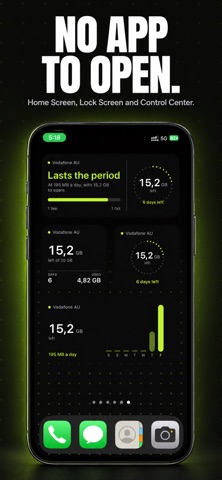
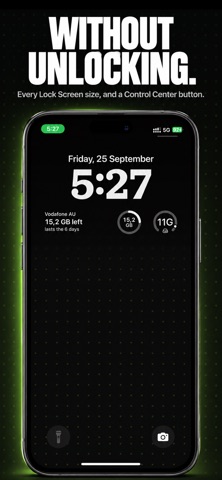
WIDGETS EVERYWHERE, FREE A Home Screen widget, all three Lock Screen sizes, and a Control Center button, so the number is there without opening anything. Free, all of them.
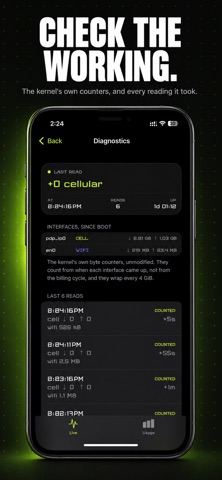
EXACT, AND IT SHOWS ITS WORKING A diagnostics screen with the kernel's own byte counters, every reading the app took, the gap before each one, and a flag on any figure it had to estimate after a reboot or a counter reset. If you want to check the number, you can. Nobody else lets you.
ABOUT PER APP USAGE iOS does not report which app used which bytes, and no App Store app can do it without rerouting your traffic through a proxy, or on a device your employer manages. If you have seen that promised in a screenshot somewhere, it was not on iPhone. We would rather say so here than have you find out after downloading.
NO ACCOUNT. NO SERVER. NO TRACKING. Nothing leaves your phone. There is no login, no server and no analytics, and nothing reroutes, proxies or inspects your traffic in order to measure it. The counting happens on the device, from numbers iOS already keeps.
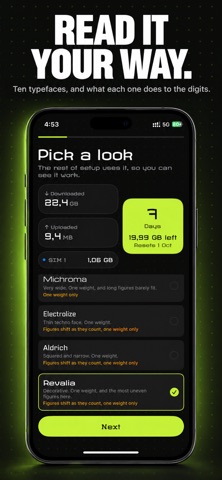
ONE PAYMENT The counting is free forever, on every line. One optional payment unlocks the forecast, CSV export, the larger widgets and seven more typefaces. No subscription, no renewal, no second paywall behind the first.
Ten typefaces, including a proper mono, because a number you check every day should be a number you like reading.
Terms of Use (EULA): https://www.apple.com/legal/internet-services/itunes/dev/stdeula/
Slik vurderer folk den
Logg inn for å vurdere denne appen. Det ærlige svaret teller.
Ingen vurderinger ennå. Har du prøvd den? Vær den første til å vurdere.
Flere Verktøy-apper
Ukens beste nye Verktøy-apper Drainly: Speaker CleanerMuffled speaker after a splash, rain, or a sweaty workout?
 Photo & PDF Resize: KBFile too large to upload?
 Arvectum Proxy LauncherArvectum Proxy Launcher is a network utility that routes your iPhone through a proxy you…
 Vodoalarm: vodostaji BiHVodoalarm javlja kad tvoja rijeka naglo raste, pa ne moraš stalno gledati vodostaje
 Dusty: Photo Cleaner PetYour camera roll's new pet
 FairAuth: AuthenticatorFairAuth creates the codes for two-step verification on iPhone and iPad