
HomeTimeline
Ikke hentetApple Home shows you your automations, but not what will actually happen, or when
Av Steven Muir · VerktøyHvorfor vi forventer det: Clear value and thoughtful privacy make this a promising companion for anyone with a well-used Apple Home setup.


Kort fortalt
HomeTimeline is a utilities app that lists every Apple Home change scheduled in the next 48 hours, in order and by accessory, with live status on each row. It is for people who already run lights, plugs and scenes through the Home app and want to see what happens next. It stands out for keeping all data on the device, with no account or analytics.
Sammendrag fra Debuts, basert på oppføringen i App Store.Om appen
Apple Home shows you your automations, but not what will actually happen, or when.
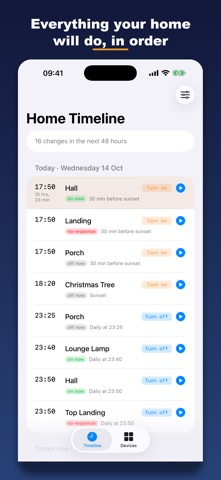
Home Timeline lists every change coming up in the next 48 hours, in order, accessory by accessory. Things drop off the list as they run.
REQUIRES accessories already set up in the Apple Home app (lights, plugs, scenes etc). Home Timeline reads your Home; it doesn't replace the Home app.
SEE WHAT'S NEXT • Sunsets, times of day and weekdays worked out for you • Live status on every row: on now, off now, or no response • Automations Home can't place on a timeline (a button, a person arriving) are listed separately
RUN IT NOW • Going to bed? Switch the lights off early with one tap • Run any of your scenes • Press a button from your phone: Home Timeline runs what a press would do • Clear, friendly messages when a plug is switched off or out of range
EVERY DEVICE IN ONE LIST • Lights, plugs, buttons, scenes and sensors, with search • A Problems filter shows everything that isn't responding • Warns you when two automations on the same button ask for opposite things
WIDGETS • Home Screen widgets in three sizes and Lock Screen widgets • Executed changes drop off the widget on time
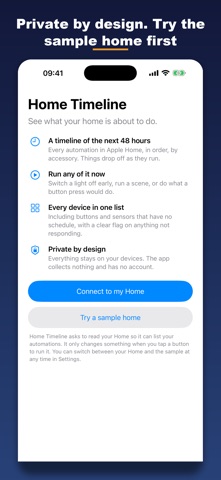
PRIVATE BY DESIGN • No account, no analytics, no adverts, nothing collected • Your Home is read on your own device and never leaves it
FLOOR PLANS
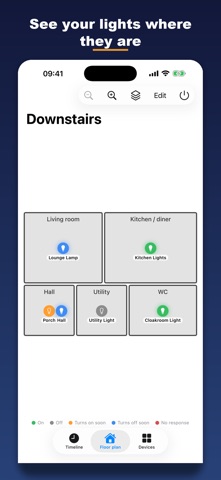
Add a plan of your home (a sample house or flat, a photo, or a PDF) and see your lights where they are. Colour-coded markers show what is on, what turns on or off soon, and what isn't responding. Tap one to see its schedule or switch it. Plans and marker positions sync between your devices through iCloud.
Also new: • Multi-outlet plug strips now show each socket on its own • Brightness sliders for dimmable lights • Thermostat target temperature • Door locks, with a confirmation before unlocking • An Automations screen to switch automations on or off, with sorting
• Plans and marker positions sync between your devices through iCloud
Slik vurderer folk den
Logg inn for å vurdere denne appen. Det ærlige svaret teller.
Ingen vurderinger ennå. Har du prøvd den? Vær den første til å vurdere.
Flere Verktøy-apper
Ukens beste nye Verktøy-apper Drainly: Speaker CleanerMuffled speaker after a splash, rain, or a sweaty workout?
 Photo & PDF Resize: KBFile too large to upload?
 Arvectum Proxy LauncherArvectum Proxy Launcher is a network utility that routes your iPhone through a proxy you…
 Vodoalarm: vodostaji BiHVodoalarm javlja kad tvoja rijeka naglo raste, pa ne moraš stalno gledati vodostaje
 FairAuth: AuthenticatorFairAuth creates the codes for two-step verification on iPhone and iPad
 Polarglow: Aurora AlertsKnow tonight's chance of seeing the aurora where you are, and never miss a storm night