
Interval: Meetings & Notes
Ikke hentetYour meetings
Av Cory Harrison Parry · Produktivitet



Om appen
Your meetings. One glance away.
Keep time, calls and notes at the edge of your Mac. Interval brings your meeting day into a quiet, compact companion, so you can stay with the conversation and keep the important details close.
KNOW WHAT’S NEXT See upcoming meetings from the calendars you choose, with a countdown that gives you time to get ready. Start your meeting when you’re ready and open its call link when one is available. Interval reads your calendar without changing your events or invitations.
KEEP TIME. KEEP YOUR FOCUS. Follow a clear meeting timer without filling your desktop. Fold it into a compact countdown when you want more room to work, then bring the meeting panel back when you need it. Optional preparation and end-of-meeting notifications help you keep your day moving.
CAPTURE THE THOUGHT Write notes beside your meeting timer. Use bullets and checklists to capture ideas, decisions and next steps while the conversation is fresh.
RECORD WHEN YOU CHOOSE Mac 1.1 adds optional microphone and Mac audio recording inside Notes. Start and stop it yourself, then review an on-device transcript and draft before adding it to your existing notes. Local speech processing requires a supported Mac and language; generated summaries require Apple Intelligence to be available and enabled. Microphone and Screen & System Audio Recording permissions are requested before capture. Recording never starts automatically.
FINISH WELL. OR TAKE FIVE. Wrap up with your notes close by, or give the conversation five more minutes. Save the details you’ll want to return to, then move on to what’s next.
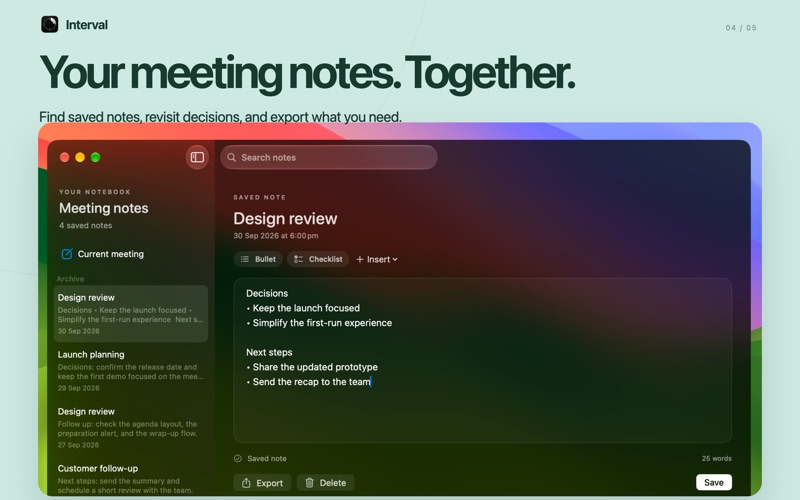
KEEP THE DECISIONS Find saved meeting notes in one dedicated notebook. Search previous notes, revisit a decision and export a copy when you need it. Keep notes on your Mac or choose optional iCloud sync.
MAKE IT YOURS Choose your calendars, working hours and preparation time. Connect your own Apple Shortcut to turn on a Focus when a meeting starts. Calendar access is needed to display your meetings; notifications, iCloud and Focus setup are optional.
TRY INTERVAL PRO Interval is free to download and requires an Interval Pro subscription to use. Choose a monthly or annual plan. Eligible new subscribers receive a seven-day free trial when they start a subscription through Apple. After the trial, your chosen plan renews automatically at the price shown before purchase unless cancelled. Cancel at least 24 hours before the trial ends to avoid being charged.
Payment is charged to your Apple Account when you confirm a purchase, or after the free trial when applicable. Subscriptions renew automatically unless cancelled at least 24 hours before the current period ends. Manage or cancel your subscription in your Apple Account settings. Trial eligibility, prices and renewal terms are shown before purchase.
Made for Mac. Requires macOS 26 or later.
Slik vurderer folk den
Logg inn for å vurdere denne appen. Det ærlige svaret teller.
Ingen vurderinger ennå. Har du prøvd den? Vær den første til å vurdere.
Flere Produktivitet-apper
Ukens beste nye Produktivitet-apper ChickMark: Habit TrackerChickMark is a simple habit tracker for routines, goals, and reminders
 Dayflint: One Thing a DayToo many priorities?
 Snappy Do ItSix connected modes. One traceable journey.
 Fristo CAFMFristo is the app for Fristo CAFM, the facility management software
 UhWhat? Voice NotesCatch the thought before it disappears
- BeginAnywayMorning alarm for hard tasks: set one task, prove you started, build a streak