
Nebula Note: Markdown Editor
Ikke hentetNebula Note is a clean, focused Markdown editor for the Mac with a live preview that…
Av Byoungho Kim · ProduktivitetHvorfor vi forventer det: A focused Mac Markdown editor with built-in diagrams, offline privacy, and thorough feature details makes its value clear to people who love trying new apps.

Kort fortalt
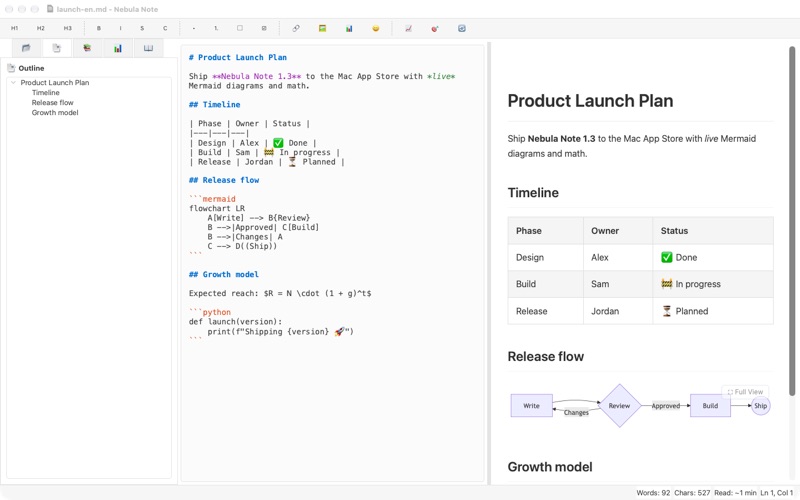
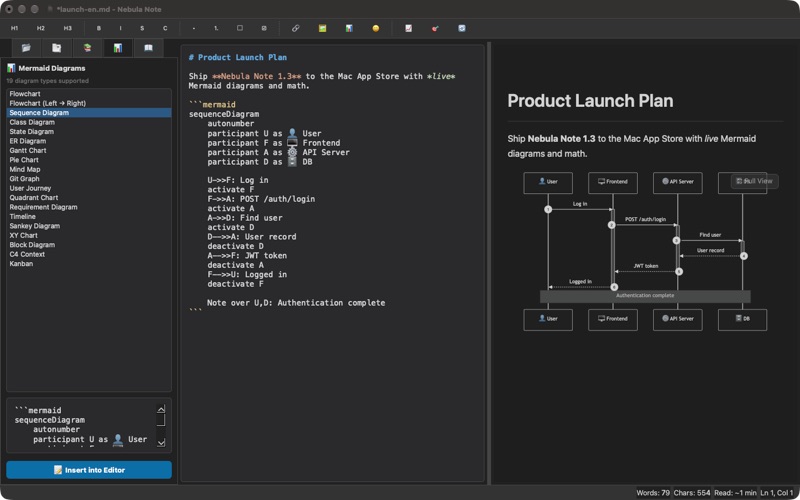
Nebula Note is a Markdown editor for the Mac with a live preview that renders LaTeX math and Mermaid diagrams as you type. It suits people who write technical or structured documents and want diagrams, exports to HTML or PDF, and a focus mode. It works offline, and the store text says documents stay on the Mac with no accounts or tracking.
Sammendrag fra Debuts, basert på oppføringen i App Store.Om appen
Nebula Note is a clean, focused Markdown editor for the Mac with a live preview that renders diagrams and math as you type.
WRITE AND PREVIEW SIDE BY SIDE • Live preview with syntax-highlighted code blocks and one-click Copy buttons • Tables, task lists, table of contents, footnote-style links and images • LaTeX math rendered with MathJax ($E = mc^2$)
MERMAID DIAGRAMS, BUILT IN • 19 diagram types: flowchart, sequence, class, state, ER, Gantt, pie, mind map, Git graph, user journey, timeline, quadrant, sankey, XY chart, block, C4, kanban and more • A dedicated diagram viewer with zoom, fit-to-window and full screen • Export any diagram as SVG, PNG or high-resolution PNG @2x
STAY IN THE FLOW • Focus mode hides everything but your words • Document outline for jumping between headings • Snippets that expand with Tab, plus autocomplete for common Markdown • Word goals, reading time and detailed document statistics • Find & replace with regular expressions • One-click table formatting, line sorting and empty-line cleanup
MADE FOR YOUR MAC • Dark mode and custom CSS for the preview • Export to standalone HTML or PDF • Works fully offline — Mermaid and MathJax are bundled in the app • Available in English, Korean, Japanese and Simplified Chinese
Your documents never leave your Mac. No accounts, no tracking.
Slik vurderer folk den
Logg inn for å vurdere denne appen. Det ærlige svaret teller.
Ingen vurderinger ennå. Har du prøvd den? Vær den første til å vurdere.
Flere Produktivitet-apper
Ukens beste nye Produktivitet-apper ChickMark: Habit TrackerChickMark is a simple habit tracker for routines, goals, and reminders
 Dayflint: One Thing a DayToo many priorities?
 Fristo CAFMFristo is the app for Fristo CAFM, the facility management software
- BeginAnywayMorning alarm for hard tasks: set one task, prove you started, build a streak
 DHUDEDHUDE Analityxs es la herramienta de gestión diaria para grupos de restauración y ocio…
 ScrollTime: Limit & ChallengesTikTok, Instagram, Facebook… ScrollTime helps you take back control of the time you…